Courses / JavaScript Foundations
Lesson 12 of 12
JavaScript Event Loop Explained: How Async Code Really Works
Understand how the JavaScript event loop handles async operations including the call stack, microtasks, macrotasks, and execution order with practical examples.
What you'll learn
- ✓How the call stack, task queues, and event loop coordinate
- ✓The difference between microtasks and macrotasks
- ✓Why Promise callbacks run before setTimeout callbacks
- ✓How to predict async execution order in any scenario
Prerequisites
- •Basic JavaScript and Promises
JavaScript runs on a single thread. One call stack, one piece of code executing at a time. Yet somehow your apps handle user clicks, network requests, timers, and animations without freezing. The mechanism behind this apparent magic is the event loop, and understanding it transforms how you reason about asynchronous code.
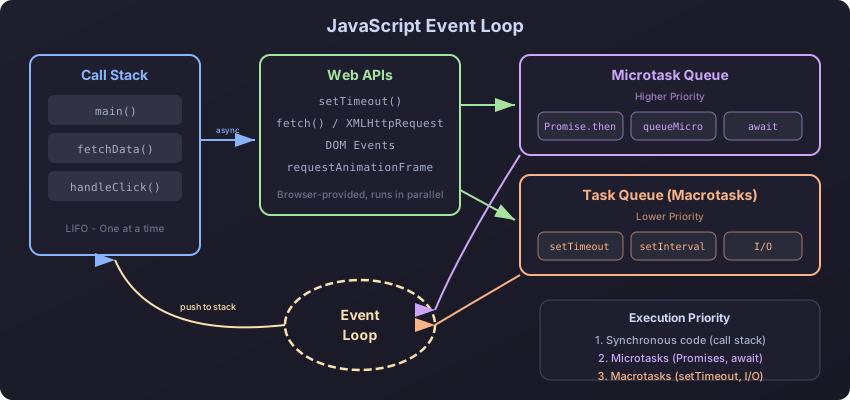
The Core Components
The JavaScript runtime consists of three major pieces working together: the call stack, the heap, and the task queues. The event loop is the coordinator that ties them all together.
The call stack is a LIFO (last in, first out) data structure that tracks function execution. Every time you call a function, a frame gets pushed onto the stack. When that function returns, its frame gets popped off.
function multiply(a, b) {
  return a * b;
}

function square(n) {
  return multiply(n, n);
}

function printSquare(n) {
  const result = square(n);
  console.log(result);
}

printSquare(4);
When printSquare(4) runs, the stack builds up like this: printSquare -> square -> multiply. As each function returns, frames pop off in reverse order. The stack is empty again, and the event loop can pick up the next task.
The Task Queues
There are two types of task queues, and their priority difference explains most async surprises.
Macrotask queue (also called the task queue) handles:
setTimeoutandsetIntervalcallbacks- I/O operations
- UI rendering events
setImmediate(Node.js)
Microtask queue handles:
- Promise
.then(),.catch(),.finally()callbacks queueMicrotask()callbacksMutationObservercallbacks
The critical rule: after each macrotask completes, the event loop drains the entire microtask queue before picking up the next macrotask.
console.log("1: Script start");

setTimeout(() => {
  console.log("2: setTimeout");
}, 0);

Promise.resolve()
  .then(() => {
    console.log("3: Promise 1");
  })
  .then(() => {
    console.log("4: Promise 2");
  });

queueMicrotask(() => {
  console.log("5: queueMicrotask");
});

console.log("6: Script end");
The output is always:
1: Script start
6: Script end
3: Promise 1
5: queueMicrotask
4: Promise 2
2: setTimeout
The synchronous code runs first (1, 6). Then all microtasks drain (3, 5, 4). Only then does the macrotask (2) execute. This order is guaranteed by the spec.
The Event Loop Algorithm
Here is what the event loop does on every iteration, simplified but accurate:
// Pseudocode of the event loop
while (true) {
  const macrotask = macrotaskQueue.dequeue();

  if (macrotask) {
    execute(macrotask);
  }

  while (microtaskQueue.length > 0) {
    const microtask = microtaskQueue.dequeue();
    execute(microtask);
  }

  if (isTimeToRender()) {
    requestAnimationFrame(callbacks);
    render();
  }
}
Three phases per tick: run one macrotask, drain all microtasks, optionally render. This is why a heavy synchronous function blocks rendering and why requestAnimationFrame is tied to the paint cycle.
Practical Example: Fetching Data
Understanding the event loop makes real code predictable:
console.log("A: Before fetch");

fetch("/api/users")
  .then(response => response.json())
  .then(data => {
    console.log("B: Got data", data.length);
  });

console.log("C: After fetch");

setTimeout(() => {
  console.log("D: Timeout");
}, 0);

Promise.resolve().then(() => {
  console.log("E: Resolved promise");
});

console.log("F: End of script");
Output order: A, C, F, E, then D. B arrives later when the network response comes back. The synchronous code (A, C, F) runs first as one macrotask. Then microtasks drain (E). Then the next macrotask (D). The fetch callback (B) runs whenever the response arrives, as a microtask after its macrotask turn.
Microtask Starvation
Because the event loop drains all microtasks before moving to the next macrotask, you can accidentally starve macrotasks and freeze the UI:
function recursiveMicrotask() {
  queueMicrotask(() => {
    recursiveMicrotask();
  });
}

recursiveMicrotask();

setTimeout(() => {
  console.log("This never runs");
}, 0);
Each microtask schedules another microtask. The microtask queue never empties, so the event loop never reaches the setTimeout callback or the rendering step. The page becomes completely unresponsive.
The fix is to use setTimeout to move work to the macrotask queue, giving the browser a chance to render between batches:
function processInChunks(items, batchSize = 100) {
  let index = 0;

  function processBatch() {
    const end = Math.min(index + batchSize, items.length);

    for (let i = index; i < end; i++) {
      processItem(items[i]);
    }

    index = end;

    if (index < items.length) {
      setTimeout(processBatch, 0);
    }
  }

  processBatch();
}
async/await and the Event Loop
async/await is syntactic sugar over Promises, but the execution order can trip you up:
async function foo() {
  console.log("1: foo start");
  const result = await bar();
  console.log("3: foo after await", result);
}

async function bar() {
  console.log("2: bar");
  return 42;
}

console.log("A: before foo");
foo();
console.log("B: after foo");
Output: A, 1, 2, B, 3. Everything before the await in foo runs synchronously. The await yields control back, and "B: after foo" prints. Then the microtask resolves the awaited value, and execution continues at "3: foo after await".
This means await creates a checkpoint where execution pauses and other synchronous code can run. Each await is roughly equivalent to:
bar().then(result => {
  console.log("3: foo after await", result);
});
Node.js Differences
Node.js adds extra phases to the event loop that browsers do not have:
setImmediate(() => {
  console.log("setImmediate");
});

setTimeout(() => {
  console.log("setTimeout");
}, 0);

process.nextTick(() => {
  console.log("nextTick");
});

Promise.resolve().then(() => {
  console.log("Promise");
});
In Node.js, the output is: nextTick, Promise, then either setTimeout or setImmediate (the order of the last two depends on system timing when called from the main module). process.nextTick runs before Promise microtasks, which is a Node-specific behavior.
Node’s event loop has six phases: timers, pending callbacks, idle/prepare, poll, check (setImmediate), and close callbacks. Each phase has its own queue. Between phases, Node drains the microtask queue, with nextTick always first.
requestAnimationFrame Timing
In browsers, requestAnimationFrame (rAF) runs between the microtask drain and the paint step:
requestAnimationFrame(() => {
  console.log("rAF");
});

setTimeout(() => {
  console.log("setTimeout");
}, 0);

Promise.resolve().then(() => {
  console.log("Promise");
});

console.log("sync");
Output: sync, Promise, then either rAF or setTimeout (implementation-dependent, but rAF is tied to the ~16ms paint cycle, while setTimeout fires after the minimum delay). The key takeaway: use rAF for visual updates because it runs right before the browser paints.
Common Pitfalls and Solutions
The Zero-Delay Misconception
setTimeout(fn, 0) does not mean “run immediately.” It means “run this as soon as the call stack is clear and all microtasks are drained, at the start of the next macrotask iteration.” In practice, browsers clamp the minimum delay to 4ms after five nested setTimeout calls.
Order-Dependent Logic
Never rely on the relative order of two setTimeout(fn, 0) calls vs two Promise.resolve().then() calls from different sources. Within the same type of queue, order is guaranteed. Across queue types, only the macro-before-micro rule applies.
Debugging Async Order
When tracing execution order, label every async operation by its queue type:
function traceOrder() {
  console.log("[SYNC] 1");

  setTimeout(() => console.log("[MACRO] 2"), 0);

  Promise.resolve().then(() => {
    console.log("[MICRO] 3");
    setTimeout(() => console.log("[MACRO] 4"), 0);
    Promise.resolve().then(() => console.log("[MICRO] 5"));
  });

  console.log("[SYNC] 6");
}

traceOrder();
Output: [SYNC] 1, [SYNC] 6, [MICRO] 3, [MICRO] 5, [MACRO] 2, [MACRO] 4.
Real-World Patterns
Debouncing with Microtasks
You can use queueMicrotask for batching DOM reads and writes in the same frame:
let pendingUpdates = [];
let scheduled = false;

function scheduleUpdate(update) {
  pendingUpdates.push(update);

  if (!scheduled) {
    scheduled = true;
    queueMicrotask(() => {
      const updates = pendingUpdates;
      pendingUpdates = [];
      scheduled = false;

      updates.forEach(fn => fn());
    });
  }
}
Yielding to the Main Thread
Modern browsers support scheduler.yield() to give the main thread a chance to handle user input:
async function processLargeList(items) {
  for (let i = 0; i < items.length; i++) {
    processItem(items[i]);

    if (i % 50 === 0) {
      await scheduler.yield();
    }
  }
}
This is a more ergonomic alternative to the setTimeout chunking pattern, and it keeps your task at the front of the queue rather than pushing it to the back.
Wrapping Up
The event loop is a simple algorithm with enormous consequences: run one macrotask, drain all microtasks, optionally render, repeat. Once you internalize this cycle, you can predict the execution order of any async code, avoid UI-blocking mistakes, and choose the right scheduling mechanism for your use case. Promises and queueMicrotask for high-priority work, setTimeout for deferring to the next turn, and requestAnimationFrame for visual updates.
Progress is saved locally to your browser.