Scalability Patterns: From Vertical Scaling to CQRS
Master scalability patterns including horizontal scaling, stateless services, read replicas, CQRS, database partitioning, and async processing. See how Instagram handles 2B+ users.
What you'll learn
- ✓Compare vertical and horizontal scaling with concrete cost analysis
- ✓Design stateless services that scale horizontally
- ✓Implement read replicas and write-through caching
- ✓Apply CQRS to optimize read-heavy and write-heavy workloads
- ✓Use message queues for asynchronous processing
- ✓Plan auto-scaling strategies with real-world capacity planning
Prerequisites
- •Basic understanding of web application architecture
- •Familiarity with databases and caching concepts
Scalability is not about handling traffic you have today — it is about handling the traffic you will have tomorrow without rewriting everything. The patterns in this article form a toolkit: you do not use all of them at once, but knowing them lets you reach for the right tool when a specific bottleneck appears.
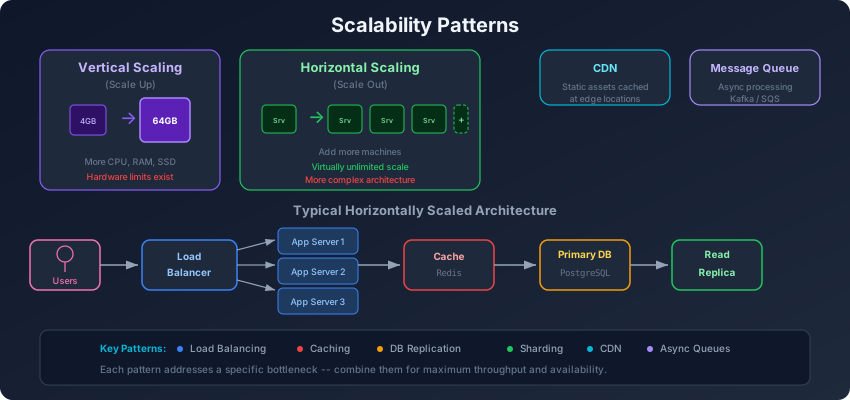
Vertical vs Horizontal Scaling
Vertical scaling (scaling up) means getting a bigger machine: more CPU, more RAM, faster disks. It is the simplest approach and should always be your first move.
Think of it as replacing your sedan with a truck. You can carry more, but there is a limit to how big a truck you can buy — and the biggest ones are disproportionately expensive.
Vertical scaling cost curve:
4 vCPU,  16 GB RAM  →  $50/month
8 vCPU,  32 GB RAM  →  $120/month   (2x resources, 2.4x cost)
16 vCPU, 64 GB RAM  →  $280/month   (4x resources, 5.6x cost)
64 vCPU, 256 GB RAM →  $1,400/month  (16x resources, 28x cost)
Horizontal scaling (scaling out) means adding more machines of the same size. Instead of one truck, you get a fleet of sedans.
Horizontal scaling cost curve:
1 instance  (4 vCPU, 16 GB)  →  $50/month
4 instances (4 vCPU, 16 GB)  →  $200/month  (4x resources, 4x cost)
16 instances (4 vCPU, 16 GB) →  $800/month  (16x resources, 16x cost)
Horizontal scaling costs scale linearly, but it introduces complexity: load balancing, data synchronization, distributed state management. Vertical scaling is simpler but hits a ceiling.
The practical advice: Scale vertically until it becomes unreasonably expensive or until you need redundancy for availability, then scale horizontally for the components that need it most.
Stateless vs Stateful Services
The most important prerequisite for horizontal scaling is making your services stateless. A stateless service does not store any client-specific data between requests — each request contains everything the server needs to process it.
Stateful service (hard to scale):
# Session stored in server memory — tied to this specific instance
class StatefulServer:
    sessions = {}

    def handle_request(self, request):
        session = self.sessions.get(request.session_id)
        if not session:
            return "Session not found"  # Breaks if routed to wrong server
        return f"Welcome back, {session['username']}"
Stateless service (easy to scale):
# Session stored externally — any instance can handle any request
class StatelessServer:
    def __init__(self, redis_client):
        self.redis = redis_client

    def handle_request(self, request):
        session = self.redis.get(f"session:{request.session_id}")
        if not session:
            return "Session not found"
        return f"Welcome back, {session['username']}"
The difference: move state out of the application server into a shared store (Redis, database, S3). Now any server can handle any request, and you can add or remove servers freely behind a load balancer.
Stateless architecture:
                 ┌──────────────┐
                 │Load Balancer │
                 └──┬────┬────┬─┘
                    │    │    │
              ┌─────┘    │    └─────┐
              ▼          ▼          ▼
         ┌────────┐ ┌────────┐ ┌────────┐
         │Server 1│ │Server 2│ │Server 3│  (any request → any server)
         └───┬────┘ └───┬────┘ └───┬────┘
             │          │          │
             └──────────┼──────────┘
                        ▼
                  ┌───────────┐
                  │  Redis    │  (shared session store)
                  └───────────┘
Read Replicas: Scaling Reads
Most applications are read-heavy. A typical web application might have a 90:10 or even 99:1 read-to-write ratio. Read replicas let you multiply your read capacity by distributing read queries across multiple database copies.
class DatabaseRouter:
    def __init__(self, primary, replicas):
        self.primary = primary
        self.replicas = replicas
        self.replica_index = 0

    def execute(self, query, requires_freshness=False):
        if query.is_write():
            return self.primary.execute(query)

        if requires_freshness:
            # Critical reads go to primary
            return self.primary.execute(query)

        # Round-robin across replicas
        replica = self.replicas[self.replica_index % len(self.replicas)]
        self.replica_index += 1
        return replica.execute(query)
The trade-off is replication lag: replicas may be a few milliseconds (or seconds) behind the primary. For most reads — product pages, search results, user feeds — slightly stale data is acceptable. For reads immediately after a write (like viewing a post you just created), route to the primary.
Write-Through and Write-Behind Caching
Caching is the most common scalability pattern, but how you integrate the cache with the database determines both performance and consistency.
Write-through cache: Write to the cache and database simultaneously. The cache is always consistent with the database, but writes are slower because both must succeed.
class WriteThroughCache:
    def write(self, key, value):
        self.database.write(key, value)  # Write to DB
        self.cache.set(key, value)       # Update cache

    def read(self, key):
        cached = self.cache.get(key)
        if cached:
            return cached  # Cache hit
        value = self.database.read(key)
        self.cache.set(key, value)  # Populate cache
        return value
Write-behind (write-back) cache: Write to the cache immediately and asynchronously flush to the database. Writes are fast but there is a window where the cache has data the database does not — if the cache crashes, that data is lost.
class WriteBehindCache:
    def __init__(self):
        self.pending_writes = queue.Queue()
        self.start_flush_worker()

    def write(self, key, value):
        self.cache.set(key, value)  # Fast write to cache
        self.pending_writes.put((key, value))  # Queue for DB

    def flush_worker(self):
        while True:
            batch = self.collect_batch(max_size=100, timeout=1.0)
            if batch:
                self.database.batch_write(batch)
Cache-aside (lazy loading): The most common pattern. The application checks the cache first, falls back to the database on a miss, and populates the cache. Writes go directly to the database, and the cache entry is either invalidated or updated.
For most applications, cache-aside with explicit invalidation on writes is the pragmatic default.
Database Partitioning
When a single database instance cannot handle your data volume or query load, you partition it.
Vertical partitioning splits a table by columns. Frequently accessed columns stay in one table, rarely accessed columns move to another. This is essentially normalization taken further.
-- Before: one wide table
-- users: id, name, email, bio, avatar_url, preferences_json,
--         login_history_json, ...

-- After: vertical partitioning
-- users_core: id, name, email (hot data, cached aggressively)
-- users_profile: id, bio, avatar_url (read occasionally)
-- users_metadata: id, preferences_json, login_history (read rarely)
Horizontal partitioning (sharding) splits a table by rows. Users A-M on shard 1, N-Z on shard 2. This distributes both data volume and query load.
The key decision is the partition key — it determines which shard handles each query. Choose a key that aligns with your access patterns so most queries hit a single shard.
CQRS: Separate Read and Write Models
Command Query Responsibility Segregation (CQRS) uses different models for reading and writing data. The write model is optimized for data integrity and business rules. The read model is optimized for query performance.
Think of it like a restaurant kitchen. The chefs (write side) organize ingredients and prep stations for efficient cooking. The menu (read side) is organized for how customers browse and order. These are fundamentally different organizations of the same underlying data.
┌──────────────────────────────────────────────────┐
│                   Client                          │
│         ┌──────────┐  ┌──────────────┐           │
│         │ Commands  │  │   Queries    │           │
│         │ (writes)  │  │   (reads)    │           │
│         └─────┬─────┘  └──────┬──────┘           │
└───────────────┼───────────────┼──────────────────┘
                │               │
         ┌──────▼──────┐ ┌─────▼───────┐
         │Write Model  │ │ Read Model  │
         │(normalized, │ │(denormalized│
         │ consistent) │ │ fast reads) │
         └──────┬──────┘ └─────▲───────┘
                │              │
                │    events    │
                └──────────────┘
# Write side: normalized, enforces business rules
class OrderCommandHandler:
def handle_create_order(self, command):
# Validate business rules
if not self.inventory.has_stock(command.items):
raise InsufficientStock()
order = Order.create(command)
self.order_repo.save(order)
# Publish event for read side to consume
self.events.publish(OrderCreated(
order_id=order.id,
customer_name=order.customer.name,
items=order.items,
total=order.total
))
# Read side: denormalized, optimized for display
class OrderQueryHandler:
def handle_order_created(self, event):
# Pre-compute the view that the UI needs
self.read_db.upsert('order_summaries', {
'order_id': event.order_id,
'customer_name': event.customer_name,
'item_count': len(event.items),
'total': event.total,
'status': 'created'
})
def get_order_summary(self, order_id):
# Single read, no joins, no computation
return self.read_db.get('order_summaries', order_id)When CQRS makes sense:
- Read and write patterns are significantly different (different fields, different access patterns)
- Read volume vastly exceeds write volume
- You need to serve complex read queries without impacting write performance
- You need different storage technologies for reads and writes
When CQRS is overkill:
- Simple CRUD applications where read and write models are similar
- Small teams that cannot maintain two data models
- Systems where strong consistency between read and write is critical
Asynchronous Processing with Message Queues
Not everything needs to happen synchronously. When a user places an order, they need to see a confirmation immediately, but sending a receipt email, updating analytics, and notifying the warehouse can happen asynchronously.
# Synchronous: user waits for ALL of this
def place_order_sync(order):
    save_order(order)           # 50ms
    charge_payment(order)       # 200ms
    send_confirmation(order)    # 150ms
    update_inventory(order)     # 100ms
    notify_warehouse(order)     # 80ms
    update_analytics(order)     # 50ms
    return "Order placed"       # Total: 630ms

# Asynchronous: user waits only for critical path
def place_order_async(order):
    save_order(order)           # 50ms
    charge_payment(order)       # 200ms

    # Everything else happens in the background
    queue.publish('order.placed', order.to_dict())
    return "Order placed"       # Total: 250ms

# Separate workers process the queue
def order_placed_worker(event):
    send_confirmation(event)
    update_inventory(event)
    notify_warehouse(event)
    update_analytics(event)
The user’s perceived latency drops from 630ms to 250ms. The background work still happens, just not in the critical path. If the email service is temporarily down, the message stays in the queue and gets retried — the user’s order is not affected.
Auto-Scaling and Capacity Planning
Auto-scaling adjusts the number of instances based on demand. The key metrics to scale on:
- CPU utilization: Scale up when average CPU exceeds 70%, scale down below 30%
- Request queue depth: Scale up when the queue grows faster than workers can process
- Response latency: Scale up when p95 latency exceeds your SLA
- Custom metrics: Scale based on business-specific signals (orders per minute, active WebSocket connections)
# Kubernetes Horizontal Pod Autoscaler
apiVersion: autoscaling/v2
kind: HorizontalPodAutoscaler
metadata:
  name: order-service
spec:
  scaleTargetRef:
    apiVersion: apps/v1
    kind: Deployment
    name: order-service
  minReplicas: 3
  maxReplicas: 50
  metrics:
    - type: Resource
      resource:
        name: cpu
        target:
          type: Utilization
          averageUtilization: 70
    - type: Pods
      pods:
        metric:
          name: requests_per_second
        target:
          type: AverageValue
          averageValue: 1000
Capacity planning means estimating how much infrastructure you will need. A useful formula:
Required instances = (Peak RPS × Avg response time) / (Concurrency per instance)

Example:
Peak: 10,000 requests/second
Avg response: 100ms (0.1s)
Concurrency per instance: 200 concurrent requests

Required = (10,000 × 0.1) / 200 = 5 instances
Add 50% headroom = 8 instances minimum
How Instagram Handles 2B+ Users
Instagram is the canonical example of scaling efficiently. Their engineering team has shared several key patterns:
Django monolith. Instagram famously runs on Django (Python). They did not rewrite in a “faster” language — they scaled the infrastructure around the monolith. This let a relatively small engineering team move fast.
PostgreSQL with aggressive sharding. User data is sharded across thousands of PostgreSQL instances using user ID as the shard key. Each shard is replicated for availability.
Extensive caching. Memcached and Redis sit in front of PostgreSQL, caching everything from user profiles to feed data. Cache hit rates above 99% mean most requests never touch the database.
Asynchronous processing. Celery task queues handle background work: push notifications, email, analytics, feed ranking. The critical path (viewing a feed, posting a photo) stays fast.
CDN for media. Photos and videos are served from a global CDN. The application servers never handle media delivery directly.
The lesson: you do not need exotic technology to scale. Proven tools (PostgreSQL, Redis, Django, Celery) combined with solid engineering practices (sharding, caching, async processing) can handle billions of users.
Wrapping Up
Scalability is a progression, not a destination. Start by scaling vertically and making services stateless. Add read replicas and caching when reads become the bottleneck. Introduce message queues to move work off the critical path. Apply CQRS and sharding when your data model demands it. And auto-scale to handle traffic that varies throughout the day. Each pattern adds complexity, so apply them only when the simpler approach genuinely cannot meet your requirements.
Related articles
- System Design CQRS Explained: Command Query Responsibility Segregation
Learn how CQRS separates read and write models for better scalability. Covers architecture, implementation patterns, and when CQRS is worth the complexity.
- System Design Caching Strategies in System Design: A Practical Guide
Compare cache-aside, read-through, write-through, write-behind, and refresh-ahead. Learn when each strategy fits, what consistency you give up, and how to choose for interviews.
- System Design Database Replication: Leaders, Followers, and Consistency
Master database replication patterns — single-leader, multi-leader, and leaderless. Learn about replication lag, conflict resolution, quorum reads, and how Slack handles replication at scale.
- System Design Connection Pooling Patterns in System Design
Learn how connection pooling reduces overhead, compare pool sizing strategies, and configure pools for databases, HTTP, and gRPC in production systems.