Apache Iceberg: The Modern Table Format
Understand Apache Iceberg's architecture, schema evolution, time travel, and hidden partitioning. Learn why table formats matter for data lakes.
What you'll learn
- ✓Why table formats exist and what problems they solve
- ✓Iceberg architecture: metadata layers, manifests, and snapshots
- ✓Schema evolution without rewriting data
- ✓Time travel queries to read historical states
- ✓Hidden partitioning that decouples physical layout from queries
Prerequisites
- •Familiarity with data lakes and lakehouses
- •Basic SQL knowledge
- •Understanding of Parquet or columnar file formats
A data lake without a table format is just a pile of files. You can write Parquet files to S3, but without something managing schema, partitioning, and consistency, you get corrupt reads, stale data, and queries that scan everything. Apache Iceberg is the table format that turns a pile of files into a proper table.
Why table formats matter
Parquet gives you columnar storage. S3 gives you cheap, scalable storage. But neither gives you:
- ACID transactions — what happens when a write fails halfway?
- Schema enforcement — what happens when a column is added or renamed?
- Partition evolution — what happens when you need to repartition without rewriting all data?
- Consistent reads — what happens when a reader and a writer access the table simultaneously?
Table formats solve all of these by adding a metadata layer between the query engine and the data files.
The landscape
Three table formats dominate the lakehouse space:
| Format | Origin | Key strength |
|---|---|---|
| Apache Iceberg | Netflix (2018) | Engine-agnostic, hidden partitioning |
| Delta Lake | Databricks (2019) | Deep Spark integration |
| Apache Hudi | Uber (2016) | Record-level upserts and CDC |
Iceberg has gained significant momentum because it is engine-agnostic — Spark, Trino, Flink, Dremio, Snowflake, and BigQuery all read and write Iceberg tables natively.
Iceberg architecture
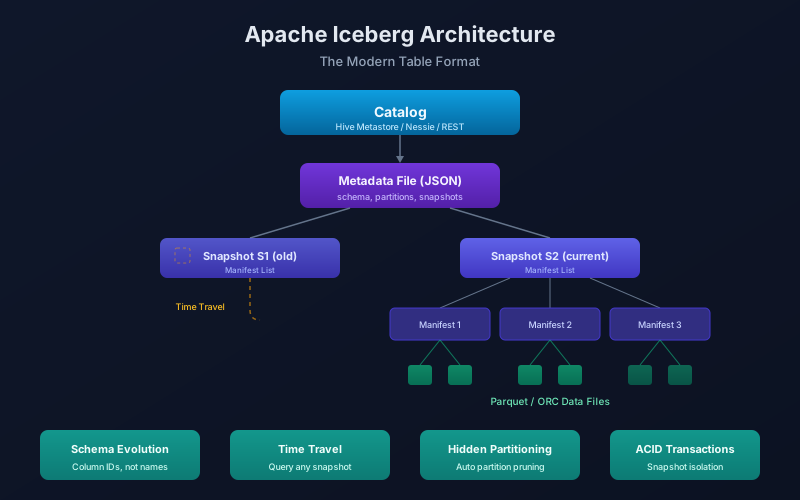
Iceberg uses a tree of metadata files to track the state of a table without ever modifying data files in place.
Catalog (e.g., Hive Metastore, Nessie, REST)
    │
    ▼
Metadata File (JSON)
    │  - table schema, partition spec, properties
    │  - list of snapshots
    │
    ▼
Snapshot → Manifest List (Avro)
              │  - list of manifest files for this snapshot
              │
              ▼
           Manifest File (Avro)
              │  - list of data files
              │  - per-file stats (min/max, row count, null count)
              │
              ▼
           Data Files (Parquet / ORC / Avro)
How a query works
When you run SELECT * FROM events WHERE event_date = '2026-08-09':
- The catalog points to the current metadata file.
- The metadata file points to the latest snapshot.
- The snapshot’s manifest list contains pointers to manifest files.
- Each manifest file contains per-file statistics — min/max values, row counts, null counts.
- Iceberg uses those stats to prune data files. If a file’s max
event_dateis2026-07-31, it is skipped entirely. - Only matching data files are read.
This is fundamentally different from Hive-style partitioning, where the engine lists directories on S3 (slow, expensive) to find relevant files.
Schema evolution
Iceberg supports full schema evolution without rewriting data files:
-- Add a column
ALTER TABLE catalog.events ADD COLUMN browser STRING;

-- Rename a column
ALTER TABLE catalog.events RENAME COLUMN browser TO user_agent;

-- Widen a type (int → long)
ALTER TABLE catalog.events ALTER COLUMN user_id TYPE BIGINT;

-- Reorder columns
ALTER TABLE catalog.events ALTER COLUMN user_agent AFTER event_type;
How it works without rewriting data
Iceberg tracks columns by ID, not by name or position. When you rename browser to user_agent, the column ID stays the same. Old data files that have a column with that ID are read correctly. New data files use the updated name. No data is rewritten.
Compare this to Hive tables where renaming a column requires rewriting every Parquet file, or where adding a column in the wrong position silently shifts data.
# Reading an Iceberg table in PySpark
from pyspark.sql import SparkSession

spark = SparkSession.builder \
    .config("spark.sql.catalog.my_catalog", "org.apache.iceberg.spark.SparkCatalog") \
    .config("spark.sql.catalog.my_catalog.type", "rest") \
    .config("spark.sql.catalog.my_catalog.uri", "http://catalog:8181") \
    .getOrCreate()

# Read the table — schema evolution is transparent
df = spark.table("my_catalog.db.events")
df.printSchema()  # Shows current schema, regardless of how old data files were written
Time travel
Every write to an Iceberg table creates a new snapshot. Old snapshots are retained, allowing you to query the table as it was at any point in the past.
Query a specific snapshot
-- By snapshot ID
SELECT * FROM catalog.events VERSION AS OF 3821550127947089;

-- By timestamp
SELECT * FROM catalog.events TIMESTAMP AS OF '2026-08-08 14:00:00';
Compare two snapshots
-- See what changed between two snapshots (Spark)
SELECT * FROM catalog.events.changes
WHERE _change_type IN ('insert', 'delete')
  AND snapshot_id BETWEEN 382155012794 AND 482155012794;
Practical uses
- Debugging: A dashboard shows wrong numbers. Query yesterday’s snapshot to see if the data was correct before today’s pipeline ran.
- Rollback: A bad write corrupted the table. Roll back to the previous snapshot instead of running a fix-up pipeline.
- Reproducibility: Train an ML model on a specific snapshot. Record the snapshot ID for reproducibility.
-- Rollback to a previous snapshot
CALL catalog.system.rollback_to_snapshot('db.events', 3821550127947089);
Snapshot expiration
Snapshots consume storage (metadata + data files retained for old versions). Configure expiration:
-- Expire snapshots older than 7 days
CALL catalog.system.expire_snapshots(
    table => 'db.events',
    older_than => TIMESTAMP '2026-08-02 00:00:00',
    retain_last => 5
);
Hidden partitioning
This is Iceberg’s most impactful feature. In Hive-style partitioning, users must know the physical partition layout and include partition columns in queries:
-- Hive: you must know the table is partitioned by dt
SELECT * FROM events WHERE dt = '2026-08-09';
-- If you write WHERE event_time = '2026-08-09T10:00:00', no pruning happens
Iceberg decouples the partition spec from the query interface:
-- Create table with hidden partitioning
CREATE TABLE catalog.db.events (
    event_id    BIGINT,
    event_time  TIMESTAMP,
    user_id     BIGINT,
    event_type  STRING,
    payload     STRING
)
USING iceberg
PARTITIONED BY (days(event_time), bucket(16, user_id));
Now queries filter on the source columns, and Iceberg translates filters to partition pruning automatically:
-- This query benefits from partition pruning on days(event_time)
-- even though the user never references a partition column
SELECT * FROM catalog.db.events
WHERE event_time BETWEEN '2026-08-09 00:00:00' AND '2026-08-09 23:59:59'
  AND user_id = 12345;
Partition evolution
When your data grows and the current partitioning is no longer optimal, Iceberg lets you change it without rewriting data:
-- Original: partition by day
-- New requirement: partition by hour for higher granularity
ALTER TABLE catalog.db.events
    SET PARTITION SPEC (hours(event_time), bucket(16, user_id));
Old data stays partitioned by day. New data is partitioned by hour. Iceberg handles the mixed layout transparently during queries.
Creating and writing Iceberg tables
With Spark
# Create a table
spark.sql("""
    CREATE TABLE my_catalog.db.page_views (
        view_id     BIGINT,
        user_id     BIGINT,
        page_url    STRING,
        view_time   TIMESTAMP,
        duration_ms INT
    )
    USING iceberg
    PARTITIONED BY (days(view_time))
    TBLPROPERTIES (
        'write.format.default' = 'parquet',
        'write.parquet.compression-codec' = 'zstd'
    )
""")

# Write data
df.writeTo("my_catalog.db.page_views").append()

# Upsert (merge)
spark.sql("""
    MERGE INTO my_catalog.db.page_views t
    USING updates s
    ON t.view_id = s.view_id
    WHEN MATCHED THEN UPDATE SET *
    WHEN NOT MATCHED THEN INSERT *
""")
With Trino
CREATE TABLE iceberg.db.page_views (
    view_id     BIGINT,
    user_id     BIGINT,
    page_url    VARCHAR,
    view_time   TIMESTAMP(6),
    duration_ms INTEGER
)
WITH (
    format = 'PARQUET',
    partitioning = ARRAY['day(view_time)']
);
Table maintenance
Iceberg tables need periodic maintenance:
-- Compact small files into larger ones (improves read performance)
CALL catalog.system.rewrite_data_files(
    table => 'db.events',
    options => map('target-file-size-bytes', '134217728')  -- 128 MB
);

-- Remove orphan files (data files not referenced by any snapshot)
CALL catalog.system.remove_orphan_files(
    table => 'db.events',
    older_than => TIMESTAMP '2026-08-02 00:00:00'
);

-- Rewrite manifests for better planning performance
CALL catalog.system.rewrite_manifests('db.events');
Automate these with your orchestrator (Dagster, Airflow) on a schedule.
Key takeaways
- Table formats add ACID, schema evolution, and time travel to data lake files.
- Iceberg’s metadata tree enables fast query planning without listing directories.
- Schema evolution by column ID means adding, renaming, and reordering columns never rewrites data.
- Time travel enables debugging, rollback, and reproducible ML training.
- Hidden partitioning decouples query filters from physical layout — the most user-friendly partitioning model available.
- Iceberg is engine-agnostic — Spark, Trino, Flink, and cloud warehouses all support it.
Next steps
- Data Lakes vs Warehouses vs Lakehouses — where Iceberg fits in the architecture.
- Data Partitioning Strategies — deeper dive into partitioning patterns.
- Data Quality and Governance — ensuring quality in your lakehouse.
Related articles
- Data Engineering Data Orchestration with Dagster
Learn Dagster's software-defined assets, ops, jobs, schedules, and sensors. Includes a practical comparison with Apache Airflow.
- Data Engineering Data Partitioning Strategies for Scale
Master hash, range, and list partitioning strategies. Learn to choose partition keys, avoid hot partitions, and scale your data systems.
- Data Engineering Real-Time Data Streaming: Architectures and Patterns
Learn real-time streaming architectures like Lambda, Kappa, CDC, and event sourcing. Understand when to choose streaming over batch processing.
- Data Engineering Apache Spark Fundamentals — Big Data Processing at Scale
Learn Apache Spark: RDDs, DataFrames, SparkSQL, the execution model, PySpark basics, platform comparisons, and essential performance optimization tips.