Data Orchestration with Dagster
Learn Dagster's software-defined assets, ops, jobs, schedules, and sensors. Includes a practical comparison with Apache Airflow.
What you'll learn
- ✓What software-defined assets are and why they matter
- ✓How to build pipelines with ops, jobs, and graphs
- ✓Scheduling and event-driven triggers with schedules and sensors
- ✓IO managers for swappable storage backends
- ✓Practical comparison between Dagster and Airflow
Prerequisites
- •Python fundamentals
- •Basic understanding of ETL/ELT pipelines
- •Familiarity with data pipeline concepts
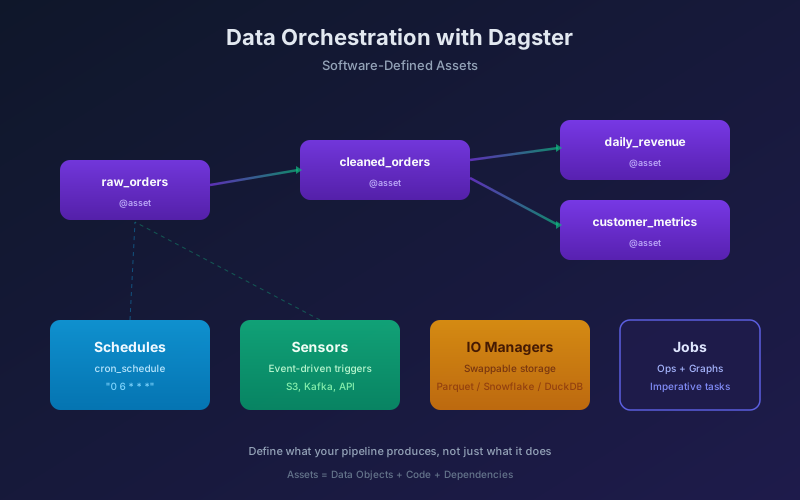
Dagster is a data orchestrator built around a simple idea: define the assets your pipeline produces, not just the tasks it runs. While Airflow models pipelines as directed acyclic graphs (DAGs) of tasks, Dagster models them as a graph of data assets — tables, files, ML models — with the computation to produce them attached.
This is not a philosophical difference. It changes how you test, debug, monitor, and refactor your pipelines.
Software-defined assets
An asset is a persistent object in your data platform — a table, a file, a trained model. A software-defined asset is that object plus the code and upstream dependencies needed to produce it.
from dagster import asset
import pandas as pd

@asset
def raw_orders() -> pd.DataFrame:
    """Ingest orders from the source API."""
    return pd.read_csv("s3://data-lake/raw/orders.csv")

@asset
def cleaned_orders(raw_orders: pd.DataFrame) -> pd.DataFrame:
    """Clean and validate order data."""
    df = raw_orders.dropna(subset=["order_id", "amount"])
    df = df[df["amount"] > 0]
    df["order_date"] = pd.to_datetime(df["order_date"])
    return df

@asset
def daily_revenue(cleaned_orders: pd.DataFrame) -> pd.DataFrame:
    """Aggregate revenue by date and region."""
    return (
        cleaned_orders
        .groupby([cleaned_orders["order_date"].dt.date, "region"])
        .agg(
            total_revenue=("amount", "sum"),
            num_orders=("order_id", "count")
        )
        .reset_index()
    )
Dagster infers the dependency graph from function signatures. daily_revenue depends on cleaned_orders, which depends on raw_orders. You never manually wire dependencies — the data flow is the graph.
Why this matters
- Lineage is automatic. The UI shows exactly which assets depend on which.
- Selective materialization. You can re-materialize just
daily_revenuewithout re-running upstream assets. - Testing is natural. Assets are functions — pass in test data, assert on output.
def test_cleaned_orders():
    raw = pd.DataFrame({
        "order_id": [1, 2, None],
        "amount": [100, -50, 200],
        "order_date": ["2026-08-01", "2026-08-01", "2026-08-02"],
        "region": ["us", "eu", "us"]
    })
    result = cleaned_orders(raw)
    assert len(result) == 1  # only order_id=1 survives
    assert result.iloc[0]["amount"] == 100
Ops, jobs, and graphs
While assets are the recommended abstraction, Dagster also supports ops (operations) for imperative, task-based workflows.
from dagster import op, job, In, Out

@op(out=Out(io_manager_key="warehouse_io"))
def extract_users():
    """Pull user data from the source system."""
    return pd.read_sql("SELECT * FROM users", source_conn)

@op
def validate_users(users: pd.DataFrame) -> pd.DataFrame:
    """Validate user records."""
    invalid = users[users["email"].isna()]
    if len(invalid) > 0:
        raise ValueError(f"{len(invalid)} users missing email")
    return users

@op
def load_users(users: pd.DataFrame):
    """Write users to the warehouse."""
    users.to_sql("dim_users", warehouse_conn, if_exists="replace")

@job
def user_sync_job():
    load_users(validate_users(extract_users()))
When to use assets vs ops:
- Use assets when the output is a persistent, queryable object (tables, models, files).
- Use ops when the work is procedural — sending emails, triggering external systems, running maintenance scripts.
IO managers
IO managers decouple your asset logic from storage. The same asset code can write to Parquet, Snowflake, or DuckDB depending on the environment.
from dagster import Definitions, IOManager, io_manager
import pandas as pd

class LocalParquetIOManager(IOManager):
    def __init__(self, base_dir: str):
        self.base_dir = base_dir

    def handle_output(self, context, obj: pd.DataFrame):
        path = f"{self.base_dir}/{context.asset_key.path[-1]}.parquet"
        obj.to_parquet(path)

    def load_input(self, context) -> pd.DataFrame:
        path = f"{self.base_dir}/{context.asset_key.path[-1]}.parquet"
        return pd.read_parquet(path)

@io_manager
def local_parquet_io(context):
    return LocalParquetIOManager(base_dir="/tmp/dagster")

defs = Definitions(
    assets=[raw_orders, cleaned_orders, daily_revenue],
    resources={"io_manager": local_parquet_io},
)
In production, swap to dagster-snowflake or dagster-duckdb — asset code stays unchanged.
Schedules and sensors
Schedules
Run pipelines on a cron schedule:
from dagster import ScheduleDefinition, define_asset_job

revenue_job = define_asset_job(
    "revenue_job",
    selection=["raw_orders", "cleaned_orders", "daily_revenue"],
)

daily_schedule = ScheduleDefinition(
    job=revenue_job,
    cron_schedule="0 6 * * *",  # 6 AM daily
    default_status=DefaultScheduleStatus.RUNNING,
)
Sensors
Trigger pipelines in response to events — a new file in S3, a database change, or a message on a queue:
from dagster import sensor, RunRequest, SensorEvaluationContext
import boto3

@sensor(job=revenue_job, minimum_interval_seconds=60)
def new_orders_sensor(context: SensorEvaluationContext):
    """Trigger the pipeline when new order files land in S3."""
    s3 = boto3.client("s3")
    last_key = context.cursor or ""

    response = s3.list_objects_v2(
        Bucket="data-lake",
        Prefix="raw/orders/",
        StartAfter=last_key,
    )

    new_files = response.get("Contents", [])
    if new_files:
        latest_key = new_files[-1]["Key"]
        context.update_cursor(latest_key)
        yield RunRequest(run_key=latest_key)
Sensors enable event-driven pipelines without external tooling. The sensor polls, but the pipeline runs only when there is new data.
Dagster vs Airflow
Both are Python-based orchestrators. The differences are architectural.
| Dimension | Dagster | Airflow |
|---|---|---|
| Core abstraction | Software-defined assets | Tasks in a DAG |
| Dependency model | Data-driven (I/O) | Task-driven (run order) |
| Testing | Unit test assets as functions | Harder — tasks coupled to DAG |
| Local development | dagster dev — full UI locally | Requires running scheduler + webserver |
| Backfills | Built-in partition-aware backfills | Manual, error-prone |
| Type system | Optional type checking on I/O | None |
| Community/ecosystem | Growing, modern | Massive, mature |
When to choose Dagster
- Greenfield projects where you control the stack.
- Asset-centric workflows (analytics, ML pipelines, dbt integration).
- Teams that value local development and testing.
When to choose Airflow
- You already have hundreds of Airflow DAGs and the team knows it well.
- You need a specific operator from Airflow’s massive provider ecosystem.
- Your workflows are task-oriented (trigger external systems, orchestrate non-data jobs).
Dagster + dbt
Dagster integrates natively with dbt, treating each dbt model as a software-defined asset:
from dagster_dbt import DbtCliResource, dbt_assets
from pathlib import Path

dbt_project_dir = Path(__file__).parent / "dbt_project"

@dbt_assets(manifest=dbt_project_dir / "target" / "manifest.json")
def my_dbt_assets(context, dbt: DbtCliResource):
    yield from dbt.cli(["build"], context=context).stream()

defs = Definitions(
    assets=[my_dbt_assets],
    resources={"dbt": DbtCliResource(project_dir=str(dbt_project_dir))},
)
Each dbt model appears in the Dagster asset graph with full lineage. You can materialize dbt models alongside Python assets in a single pipeline.
Getting started
pip install dagster dagster-webserver

# Scaffold a new project
dagster project scaffold --name my_pipeline

# Start the local development server
cd my_pipeline
dagster dev
The dagster dev command launches a full UI at http://localhost:3000 where you can explore assets, trigger runs, and inspect logs — all locally.
Key takeaways
- Assets over tasks. Define what your pipeline produces, not just what it does.
- IO managers decouple logic from storage, making testing and environment switching trivial.
- Sensors enable event-driven pipelines without external systems.
- Dagster is not an Airflow replacement — it is a different paradigm. Choose based on your workload shape and team.
Next steps
- dbt Fundamentals — the transformation layer that Dagster orchestrates.
- Data Pipeline CI/CD — automate testing and deployment of Dagster pipelines.
- Data Pipeline Testing — test strategies that pair with Dagster’s asset model.
Related articles
- Pandas Pandas Performance Optimization: From Slow to Fast
Speed up Pandas code with vectorization, categorical dtypes, chunked reading, eval/query, PyArrow backend, and memory profiling techniques.
- Prompt Engineering Prompt Chaining: Build Multi-Step LLM Workflows
Learn how to chain multiple LLM prompts together to solve complex tasks. Covers sequential chains, branching, validation loops, and production patterns in Python.
- Pandas Pandas Data Cleaning Techniques: A Practical Field Guide
Hands-on pandas patterns for cleaning messy real-world data, covering missing values, types, duplicates, strings, and a reliable cleaning pipeline.
- Data Engineering Data Partitioning Strategies for Scale
Master hash, range, and list partitioning strategies. Learn to choose partition keys, avoid hot partitions, and scale your data systems.