Kafka Producers Explained: Architecture, Configuration & Code
Learn how Kafka producers work including batching, partitioning, serialization, delivery guarantees, and idempotent production with Python and Java examples.
What you'll learn
- ✓Kafka producer architecture and internal workflow
- ✓Configuring producers for reliability and performance
- ✓Writing producers in Python with confluent-kafka
- ✓Idempotent and Avro-serialized producers
- ✓Partitioning strategies and custom partitioners
Prerequisites
- •Basic Kafka concepts (topics, partitions, brokers)
- •Python 3.8+ installed
- •A running Kafka cluster or Docker setup
What Does a Producer Actually Do?
Think of a Kafka producer as a mail clerk in a large organization. Every department generates letters (messages) that need to reach the right mailbox (topic partition). The mail clerk does not run to the post office after every single letter. Instead, they collect letters into batches, sort them by destination, and send them out efficiently. That is exactly what a Kafka producer does with your data.
When your application calls produce(), the message does not fly across the network immediately. It goes on a carefully orchestrated journey through several stages inside the producer before it ever reaches a Kafka broker. Understanding this journey is the key to configuring producers correctly and avoiding common pitfalls like data loss or duplicate messages.
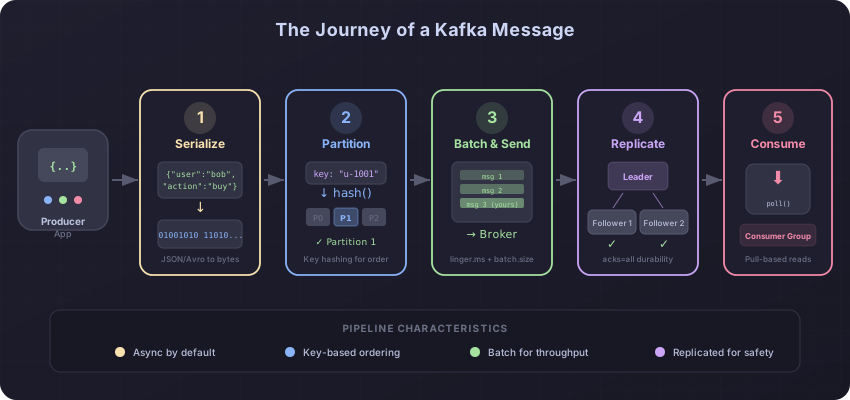
Here is the journey a single message takes from your application code to its final resting place on a Kafka broker:
-
Serialization — Your message starts as a Python dictionary, a Java object, or some other in-memory structure. The producer converts it into raw bytes that can travel over the network. This is serialization. You choose the format: JSON, Avro, Protobuf, or plain strings.
-
Partitioning — Next, the producer decides which partition of the topic this message belongs to. If you provided a key (like a user ID), the producer hashes that key to consistently route all messages with the same key to the same partition. No key? The producer spreads messages across partitions for load balancing.
-
Batching — Instead of sending each message individually, the producer adds it to a batch destined for a specific partition. The batch accumulates messages until either a size threshold is reached or a time limit expires. This is like the mail clerk waiting until they have a full bag before making a trip.
-
Compression — Before sending the batch over the network, the producer can compress it. Compression shrinks the data, reducing network bandwidth and storage costs on the broker side.
-
Network send — The compressed batch is sent to the broker that leads the target partition. The producer maintains connections to all relevant brokers automatically.
-
Acknowledgment — Finally, the broker confirms it received the message. How many brokers need to confirm depends on your
ackssetting, which we will cover shortly.
This pipeline makes the producer inherently asynchronous. Your produce() call returns almost immediately, while the actual network send happens in a background thread. This design is what gives Kafka producers their remarkable throughput.
Understanding Batching: Why Not Send Messages One at a Time?
Imagine you need to move 1,000 bricks from one side of a construction site to the other. You could carry them one at a time — making 1,000 trips — or you could load them into a wheelbarrow and make far fewer trips. Batching in Kafka works the same way.
Every network call has overhead: establishing connections, sending headers, waiting for responses. If you sent each message as its own network request, that overhead would dominate your throughput. By grouping messages into batches, the producer amortizes that overhead across many messages.
Two settings control batching behavior. The batch.size setting (in bytes) determines how large a batch can grow before the producer sends it. The linger.ms setting determines how long the producer waits for more messages to arrive before sending a partially-full batch. Setting linger.ms to 0 means “send immediately,” while a value like 10-20 milliseconds allows time for more messages to accumulate, resulting in fuller batches and better throughput.
The trade-off is straightforward: larger batches and longer linger times improve throughput but add a small amount of latency. For most applications, a linger.ms of 5-20 milliseconds is a sweet spot where you get significant throughput gains with barely noticeable latency increase.
Understanding Acknowledgments: The “Receipt” Analogy
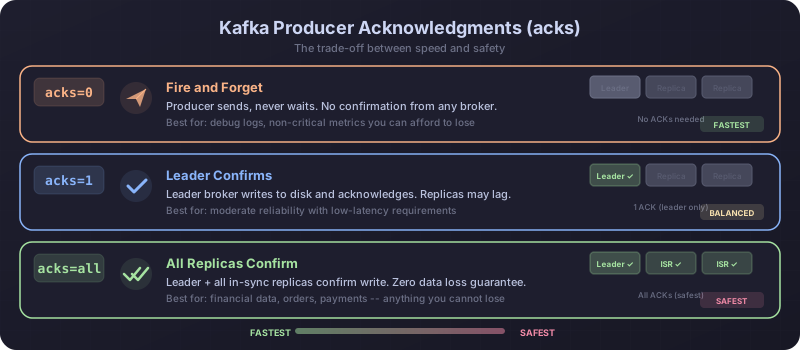
When you send an important package, you want some confirmation it arrived. Kafka gives you three levels of confirmation through the acks setting, and the best way to understand them is through a shipping analogy.
acks=0 (No receipt) — You drop the package at the shipping counter and walk away. You do not wait for any confirmation. The package might have fallen behind the counter, but you will never know. This is the fastest option but the least safe. Messages can be lost without any notification. Use this only for data you can afford to lose, like debug logs or non-critical metrics.
acks=1 (Store receipt) — You wait until the shipping clerk scans the package and hands you a receipt. You know the local store has it. But if that store burns down before forwarding your package to the regional warehouse, your package is lost even though you have a receipt. In Kafka terms, the partition leader broker acknowledges the write, but if it crashes before replicating to followers, the message is gone.
acks=all (All warehouses confirm) — You wait until the shipping company confirms that your package has been received at the local store AND copied to all regional warehouses. Only then do you get your receipt. This is the slowest option but the safest. In Kafka, this means all in-sync replicas have written the message before the producer gets a success response. Combined with min.insync.replicas=2 on the topic, this guarantees no data loss as long as at least two brokers are alive.
For production workloads where data matters, always use acks=all. The latency difference is typically just a few milliseconds, and the durability guarantee is worth it.
The Duplicate Message Problem and Idempotent Producers
Here is a scenario that catches many teams off guard. Your producer sends a message to the broker. The broker receives it, writes it to disk, and tries to send back an acknowledgment. But at that exact moment, a network glitch swallows the acknowledgment. Your producer, having received no response, assumes the message was lost and retries the send. The broker, which already has the message, happily writes it again. Now you have a duplicate.
In many systems, duplicates are more than just annoying. Imagine an e-commerce platform where a “charge customer $50” event gets duplicated. The customer gets charged twice. Or a banking system where a “transfer $1,000” event gets duplicated. These are real problems that have caused real financial losses.
Kafka solves this with idempotent producers. When you enable idempotence, the producer assigns a unique producer ID and a sequence number to every message it sends to each partition. The broker keeps track of these sequence numbers. If a retried message arrives with a sequence number the broker has already seen, the broker silently discards the duplicate and returns a success response. Your producer thinks the retry worked, and the broker avoids the duplicate. Everyone wins.
Enabling idempotence is a single configuration flag, and the performance overhead is negligible. There is no good reason to leave it off in production.
Serialization: Turning Objects into Bytes
Before a message can travel over the network, it needs to be converted from whatever data structure your application uses into raw bytes. This process is called serialization, and the reverse (bytes back to objects) is deserialization.
The simplest approach is JSON serialization: convert your Python dictionary to a JSON string, then encode that string to UTF-8 bytes. This is easy to implement and human-readable, making it great for development and debugging. The downside is that JSON is verbose (field names are repeated in every message) and has no built-in schema enforcement. A typo in a field name silently produces invalid data.
For production systems, many teams graduate to Avro or Protobuf serialization with a Schema Registry. These formats are compact (using binary encoding instead of text), enforce schemas (the producer cannot send data that does not match the expected structure), and support schema evolution (you can add new fields without breaking existing consumers). The Schema Registry stores schemas centrally and assigns each one a version number, so producers and consumers always agree on the data format.
Partitioning: Choosing Where Messages Land
Partitioning determines how your messages are distributed across a topic’s partitions. This decision has two important consequences: it controls the degree of parallelism (more partitions means more consumers can read in parallel) and it controls ordering guarantees (messages in the same partition are always read in order).
When you provide a key with your message, the producer hashes that key and maps the hash to a specific partition. This guarantees that all messages with the same key always land in the same partition, which in turn guarantees they are read in order. For example, if you use a user ID as the key, all events for that user are processed in the exact order they were produced. This is critical for scenarios like maintaining a user’s session state or processing a sequence of financial transactions.
When you do not provide a key, the producer distributes messages across partitions using a round-robin or sticky strategy. This maximizes throughput by spreading load evenly but provides no ordering guarantees across partitions.
The rule of thumb is simple: if ordering matters for a group of messages, give them the same key. If ordering does not matter and you want maximum throughput, omit the key.
A Complete Python Producer Example
Now that you understand the concepts, let us put them all together in a single, well-explained Python example using the confluent-kafka library, which is a high-performance wrapper around the C library librdkafka.
First, install the library:
pip install confluent-kafkaThe following example produces user activity events to a Kafka topic. Every line of configuration and every function is explained:
from confluent_kafka import Producer
import json
import socket


# --- Configuration ---
# Each setting maps to a concept we discussed above.
config = {
    # The address of your Kafka cluster. The producer uses this to
    # discover all brokers and partition leaders automatically.
    'bootstrap.servers': 'localhost:9092',

    # A human-readable name for this producer instance, useful
    # for debugging and monitoring. We use the hostname here.
    'client.id': socket.gethostname(),

    # Acknowledgments: "all" means every in-sync replica must confirm
    # the write before the producer considers it successful.
    'acks': 'all',

    # Idempotence: prevents duplicate messages caused by network
    # retries. Requires acks=all, which we already set.
    'enable.idempotence': True,

    # Batching: wait up to 10ms for more messages to accumulate
    # before sending a batch. This improves throughput.
    'linger.ms': 10,

    # Maximum batch size in bytes (64KB). Larger batches mean
    # fewer network round-trips.
    'batch.size': 65536,

    # Compress batches with Snappy for a good balance of
    # speed and compression ratio.
    'compression.type': 'snappy',
}

producer = Producer(config)


def delivery_callback(err, msg):
    """
    Called once for each message to report delivery success or failure.
    This is how you know whether your message actually made it to Kafka.
    Without this callback, failures would be silent.
    """
    if err is not None:
        print(f'DELIVERY FAILED: {err}')
        # In production, you would log this, increment a metric,
        # or send the failed message to a dead letter queue.
    else:
        print(f'Delivered to {msg.topic()} '
              f'[partition {msg.partition()}] '
              f'at offset {msg.offset()}')


def produce_event(topic: str, key: str, value: dict):
    """
    Produce a single event to the specified Kafka topic.

    The key determines which partition the message goes to.
    The value is serialized to JSON bytes.
    """
    try:
        producer.produce(
            topic=topic,
            # Serialize the key to bytes. All messages with the
            # same key land in the same partition.
            key=key.encode('utf-8'),
            # Serialize the value dict to a JSON byte string.
            value=json.dumps(value).encode('utf-8'),
            # Register our callback to be notified of the result.
            callback=delivery_callback,
        )
        # poll(0) triggers any pending delivery callbacks without
        # blocking. This keeps memory usage stable by processing
        # results from previous produce() calls.
        producer.poll(0)

    except BufferError:
        # The internal buffer is full, meaning the producer is
        # generating messages faster than it can send them.
        # Flush forces all buffered messages to be sent.
        print('Buffer full -- flushing before retry...')
        producer.flush(timeout=30)
        producer.produce(
            topic=topic,
            key=key.encode('utf-8'),
            value=json.dumps(value).encode('utf-8'),
            callback=delivery_callback,
        )


# --- Produce sample events ---
events = [
    {'user_id': 'u-1001', 'action': 'page_view', 'page': '/home'},
    {'user_id': 'u-1002', 'action': 'purchase', 'amount': 49.99},
    {'user_id': 'u-1001', 'action': 'page_view', 'page': '/checkout'},
]

for event in events:
    produce_event(
        topic='user-events',
        key=event['user_id'],  # User ID as key ensures per-user ordering
        value=event,
    )

# flush() blocks until all buffered messages are delivered (or timeout).
# Always call this before your application exits to avoid losing
# messages still sitting in the internal buffer.
producer.flush(timeout=30)
print('All messages delivered.')
There are a few things worth highlighting about this code. The delivery_callback function is your safety net. Because produce() is asynchronous, you will not know if a message failed unless you check the callback. The poll(0) call after each produce() is a best practice that processes pending callbacks without blocking, keeping memory usage predictable. And the final flush() call is essential — without it, your application might exit with messages still sitting in the internal buffer, never sent.
Compression: Shrinking Your Data on the Wire
Compression is applied at the batch level, not per message. This is important because batches of similar messages compress much better than individual messages. The producer compresses each batch before sending it, and the broker stores the batch in its compressed form. Consumers decompress when they read.
You have four compression options, each with different trade-offs:
- Snappy — Fast compression and decompression with moderate compression ratio (roughly 2x). A solid default for most workloads.
- LZ4 — The fastest decompression speed with good compression ratio (roughly 2.5x). Great when consumers need to read quickly.
- Zstd — The best compression ratio (3-4x) with slightly slower speed. Best for high-volume topics where storage savings matter.
- Gzip — Good compression ratio (roughly 3x) but the slowest option. Rarely the best choice for Kafka.
For most use cases, start with Snappy or LZ4. Switch to Zstd if you need to minimize storage costs and network bandwidth on high-volume topics.
Summary
The Kafka producer is your application’s gateway to the Kafka ecosystem. It handles the complex work of serializing your data, routing it to the right partition, batching it for efficiency, compressing it for size, and confirming delivery with the broker. Here are the key takeaways:
- Always use
acks=allandenable.idempotence=Truein production. The performance cost is negligible, and the safety guarantees are substantial. - Configure
linger.ms(5-20ms) andbatch.size(64KB-256KB) to balance latency and throughput for your workload. - Implement delivery callbacks. Without them, message failures are silent.
- Choose message keys carefully. Same key means same partition means guaranteed ordering for that key.
- Use Avro with Schema Registry for production systems where multiple teams produce and consume from the same topics.
Next Steps
- Learn how consumers read these messages in Consumers and Consumer Groups
- Understand how topics and partitions are structured in Topics, Partitions, and Offsets
Related articles
- Kafka Dead Letter Queues in Kafka: Handling Failed Messages
Learn how to implement Dead Letter Queues in Kafka to gracefully handle failed messages with retry strategies, monitoring, and production patterns.
- Kafka Kafka Connect: Streaming Data Integration Framework
Master Kafka Connect for integrating external systems with Kafka using source and sink connectors, Debezium CDC, JDBC, Elasticsearch, REST API management, and SMTs.
- Kafka Kafka Architecture Explained: Brokers, Replication, and KRaft
A detailed look at Kafka's internal architecture — broker clusters, KRaft consensus, replication protocols, partition leadership, log segments, and how they combine to deliver fault tolerance at scale.
- Kafka Kafka Consumers and Consumer Groups: Complete Guide
Master Kafka consumers and consumer groups including poll loops, offset management, rebalancing strategies, and partition assignment with Python and Java examples.