Airflow Operators Guide: Built-in, Provider, and Custom
Master Apache Airflow operators from BashOperator to building your own custom operators with template fields and provider packages.
What you'll learn
- ✓Use BashOperator with templated commands and environment variables
- ✓Write PythonOperator tasks with context and return values
- ✓Configure EmailOperator with SMTP
- ✓Build production-grade custom operators
Prerequisites
- •Basic Airflow concepts (DAGs, tasks)
- •Python fundamentals
- •Familiarity with Jinja templating
What Are Operators?
If a DAG is the blueprint for your entire data pipeline, then operators are the blueprints for individual tasks within that pipeline. Think of it this way: a DAG says “do step A, then step B, then step C,” but operators define what each of those steps actually does. One step might run a shell command, another might execute Python code, and a third might send an email notification.
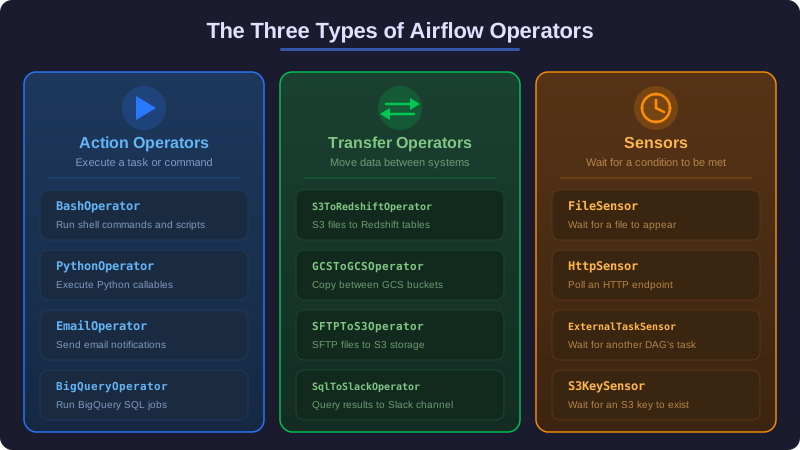
Every operator represents a single, well-defined unit of work. When you place an operator inside a DAG and give it a task_id, it becomes a task — something Airflow can schedule, execute, monitor, and retry. The operator itself is a template. The task is a specific instance of that template, configured with your parameters and wired into your pipeline.
This separation matters because it gives you reusability. The BashOperator does not care whether you are running date or a complex ETL script — it just knows how to execute shell commands. You configure what command to run, and the operator handles the rest: logging output, tracking status, handling retries, and reporting results back to Airflow.
Airflow ships with a core set of operators for common tasks like running Python functions, executing shell commands, and sending emails. The community maintains hundreds more through provider packages that connect Airflow to external systems like AWS, Google Cloud, Snowflake, and Slack. And when none of those fit, you can build your own custom operator. Let’s walk through each category.
BashOperator
The BashOperator is usually the first operator people encounter, and for good reason. It runs any shell command you give it, making it the go-to choice when you need to call a script, trigger a CLI tool, or run a quick system command as part of your pipeline.
In practice, you will use the BashOperator for tasks like calling data processing scripts written in languages other than Python, running database CLI tools, triggering file transfers, or executing system maintenance commands. Anywhere you would normally type a command into a terminal, the BashOperator can handle it inside your pipeline.
One of the most powerful features of the BashOperator is its support for Jinja templating. Airflow provides template variables like {{ ds }} (the execution date) that get replaced with actual values at runtime. This means your commands can be date-aware without any hardcoding.
from airflow import DAG
from airflow.operators.bash import BashOperator
from datetime import datetime

with DAG(
    dag_id="bash_operator_examples",
    start_date=datetime(2026, 1, 1),
    schedule="@daily",
    catchup=False,
) as dag:

    print_date = BashOperator(
        task_id="print_date",
        bash_command="date",
    )

    templated_command = BashOperator(
        task_id="templated",
        bash_command="echo 'Processing data for {{ ds }}'",
    )
You can also pass environment variables to your bash commands using the env parameter. This is especially useful when your scripts need configuration values that live in Airflow’s variable store. The values support Jinja templating too, so you can inject execution dates, Airflow variables, and connection details directly into the script’s environment.
extract_data = BashOperator(
    task_id="extract_data",
    bash_command="python /opt/scripts/extract.py",
    env={
        "SOURCE_DB": "{{ var.value.source_database }}",
        "TARGET_PATH": "/data/{{ ds_nodash }}/",
    },
)
The Trailing Space Gotcha
There is one quirk worth mentioning. When your bash_command points to a script file, you need to add a trailing space after the file path. Without it, Airflow’s Jinja engine tries to find a template file at that path instead of treating it as a literal command. This trips up many newcomers, so watch out for it.
# This will FAIL -- Airflow looks for a Jinja template file
run_script_wrong = BashOperator(
    task_id="run_script_wrong",
    bash_command="/opt/scripts/process.sh",
)

# This works -- the trailing space tells Airflow it is a command
run_script_correct = BashOperator(
    task_id="run_script_correct",
    bash_command="/opt/scripts/process.sh ",
)
PythonOperator
While the BashOperator is great for shell commands, most data pipeline logic lives in Python. The PythonOperator lets you call any Python function as a task, making it the most flexible built-in operator. If you can write it in Python, you can run it with PythonOperator.
Think of it this way: the PythonOperator is the bridge between your existing Python code and Airflow’s orchestration engine. You write a normal Python function, point the operator at it, and Airflow takes care of scheduling, retrying, logging, and passing context information (like the execution date) into your function.
The function receives Airflow’s context through keyword arguments. The ds parameter gives you the execution date as a string, and **kwargs captures the full context dictionary, including the task instance (ti) which you can use to interact with XComs. Whatever your function returns is automatically stored as an XCom value that downstream tasks can access.
from airflow.operators.python import PythonOperator

def process_data(ds, **kwargs):
    """Process data for the given execution date."""
    ti = kwargs["ti"]
    raw_path = ti.xcom_pull(task_ids="extract_task")
    print(f"Processing data for {ds}")
    return f"/processed/{ds}/output.parquet"

process_task = PythonOperator(
    task_id="process_data",
    python_callable=process_data,
)
Passing Arguments with op_kwargs
Often your functions need more than just the Airflow context. The op_kwargs parameter lets you pass additional keyword arguments to your callable. These values also support Jinja templating, so you can inject dynamic values based on the execution date or Airflow variables. This keeps your functions clean and testable — they accept normal arguments instead of reaching into Airflow internals.
def load_to_warehouse(file_path, schema, table_name, **kwargs):
    print(f"Loading {file_path} into {schema}.{table_name}")
    return {"rows_loaded": 15000, "table": f"{schema}.{table_name}"}

load_task = PythonOperator(
    task_id="load_to_warehouse",
    python_callable=load_to_warehouse,
    op_kwargs={
        "file_path": "/data/{{ ds_nodash }}/output.parquet",
        "schema": "analytics",
        "table_name": "daily_metrics",
    },
)
Any value your function returns is automatically pushed to XCom with the key return_value. Downstream tasks can pull it using ti.xcom_pull(task_ids="load_to_warehouse"). This makes it easy to chain tasks together — one task produces a result, and the next task consumes it.
EmailOperator
Pipelines do not run in a vacuum. Stakeholders need to know when things complete, fail, or produce interesting results. The EmailOperator sends emails using SMTP, letting you build notifications directly into your pipeline flow rather than relying solely on Airflow’s built-in alerting.
In practice, you might use the EmailOperator to send a daily report to the analytics team after a pipeline completes, notify stakeholders when data quality checks pass, or send a summary of processed records. It supports Jinja templating in the subject line and body, so you can include execution dates, XCom values, and other dynamic data.
Before using it, you need to configure SMTP in your airflow.cfg. Once configured, the operator is straightforward to use.
from airflow.operators.email import EmailOperator

send_report = EmailOperator(
    task_id="send_report",
    to=["data-team@yourcompany.com"],
    subject="Daily Pipeline Report - {{ ds }}",
    html_content="""
    <h2>Pipeline Completed</h2>
    <p>The daily pipeline for <strong>{{ ds }}</strong> finished successfully.</p>
    <p>Rows processed: {{ ti.xcom_pull(task_ids='process_data') }}</p>
    """,
)
Building Custom Operators
Sooner or later, you will encounter a task that does not fit neatly into any existing operator. Maybe you need to call a proprietary internal API, run a data quality check against your warehouse, or interact with a system that has no provider package. This is where custom operators come in.
Why Build a Custom Operator?
The immediate question is: why not just use a PythonOperator? You absolutely can, and for one-off tasks that is the right call. But consider what happens when five different DAGs all need to run the same kind of data quality check. With PythonOperator, you end up duplicating the same function across multiple files, or importing it from a shared utility module and re-configuring it each time.
A custom operator encapsulates both the logic and the configuration into a reusable component. It gives you a clean interface (just pass conn_id, table, and checks), built-in Jinja templating support for parameters, a custom color in the Airflow UI for visual identification, and proper logging integration. Think of it as turning a one-off script into a professional tool that anyone on your team can use without understanding the implementation details.
The Anatomy of a Custom Operator
Every custom operator extends BaseOperator and implements one required method: execute(self, context). The __init__ method defines the parameters your operator accepts, and template_fields declares which of those parameters should support Jinja templating.
Here is a data quality operator that runs validation checks against a database table. Notice how it accepts a connection ID, table name, and list of checks — a clean, reusable interface.
from airflow.models import BaseOperator

class DataQualityOperator(BaseOperator):
    """Runs data quality checks against a SQL database."""

    template_fields = ("table", "checks")
    ui_color = "#89DA59"

    def __init__(self, conn_id: str, table: str, checks: list, **kwargs):
        super().__init__(**kwargs)
        self.conn_id = conn_id
        self.table = table
        self.checks = checks

    def execute(self, context):
        from airflow.hooks.base import BaseHook
        hook = BaseHook.get_hook(self.conn_id)
        failures = []

        for check in self.checks:
            result = hook.get_first(check["sql"])
            if result is None or result[0] != check["expected"]:
                failures.append(f"Check failed: {check['sql']}")

        if failures:
            raise ValueError(
                f"Data quality failed for {self.table}:\n" + "\n".join(failures)
            )

        self.log.info(f"All {len(self.checks)} checks passed for {self.table}")
        return {"table": self.table, "checks_passed": len(self.checks)}
A few key things to understand about this code. The template_fields tuple tells Airflow which attributes to render as Jinja templates before calling execute(). This means you can use {{ ds }} inside your SQL checks, and Airflow will replace it with the actual execution date. The execute method receives the full Airflow context dictionary, giving you access to the execution date, task instance, DAG run, and more. If the method raises an exception, Airflow marks the task as failed. If it returns a value, that value is automatically pushed to XCom.
Using the custom operator in a DAG looks just like using any built-in operator — clean and declarative.
quality_check = DataQualityOperator(
    task_id="check_orders_table",
    conn_id="postgres_warehouse",
    table="public.orders",
    checks=[
        {"sql": "SELECT COUNT(*) FROM public.orders WHERE order_date = '{{ ds }}'", "expected": None},
        {"sql": "SELECT COUNT(*) FROM public.orders WHERE amount < 0", "expected": 0},
    ],
)
Provider Packages
Starting with Airflow 2.0, operators for external systems are no longer bundled into the core package. Instead, they live in separate provider packages that you install as needed. Think of providers as plug-and-play connectors — each one gives you operators, hooks, and sensors for a specific external system.
This modular design matters for two reasons. First, it keeps your Airflow installation lean. If you only use AWS, you do not need Google Cloud or Snowflake libraries cluttering your environment. Second, provider packages can release updates independently of Airflow core, so you get bug fixes and new features faster.
The pattern for using a provider is always the same: install the package, import the operator, and configure a connection in Airflow’s UI. Here are the most common ones.
Google Cloud Provider
If your data lives in BigQuery, Cloud Storage, or Dataflow, the Google provider gives you operators for all of them. Install it with pip install apache-airflow-providers-google, then use operators like BigQueryInsertJobOperator to run queries directly from your pipeline.
from airflow.providers.google.cloud.operators.bigquery import BigQueryInsertJobOperator

bq_query = BigQueryInsertJobOperator(
    task_id="run_analytics_query",
    configuration={
        "query": {
            "query": "SELECT * FROM `project.dataset.table` WHERE date = '{{ ds }}'",
            "useLegacySql": False,
        }
    },
)
Amazon Web Services Provider
For teams on AWS, pip install apache-airflow-providers-amazon unlocks operators for S3, Redshift, EMR, Glue, and dozens of other services. Instead of writing boto3 code inside a PythonOperator, you get dedicated operators with built-in error handling and connection management.
from airflow.providers.amazon.aws.operators.s3 import S3CopyObjectOperator

copy_to_archive = S3CopyObjectOperator(
    task_id="archive_raw_data",
    source_bucket_name="raw-data",
    source_bucket_key="incoming/{{ ds_nodash }}/data.csv",
    dest_bucket_name="archive",
    dest_bucket_key="historical/{{ ds_nodash }}/data.csv",
)
Snowflake Provider
The Snowflake provider (pip install apache-airflow-providers-snowflake) is common in modern data stacks. It lets you run SQL commands against Snowflake warehouses, load data from stages, and manage Snowflake resources — all from within your DAG.
from airflow.providers.snowflake.operators.snowflake import SnowflakeOperator

load_stage = SnowflakeOperator(
    task_id="load_from_stage",
    snowflake_conn_id="snowflake_default",
    sql="""
        COPY INTO analytics.daily_metrics
        FROM @raw_stage/{{ ds_nodash }}/
        FILE_FORMAT = (TYPE = 'PARQUET');
    """,
)
Choosing the Right Operator
With so many options, how do you pick the right one? Here is a simple decision framework.
| Situation | Operator | Why |
|---|---|---|
| Run a shell command or script | BashOperator | Simplest option for CLI tools |
| Execute Python logic | PythonOperator | Most flexible for custom code |
| Wait for a condition | Sensor (see Sensors) | Purpose-built for waiting |
| Interact with cloud services | Provider operator | Pre-built, tested, maintained |
| Reusable domain-specific logic | Custom operator | Encapsulates and standardizes |
In practice, most pipelines use a mix. You might use a provider operator to extract data from BigQuery, a PythonOperator to transform it, a BashOperator to call an external tool, and an EmailOperator to notify your team. The key is to pick the operator that gives you the cleanest, most maintainable code for each task.
Next Steps
You now understand the full spectrum of Airflow operators — from built-in basics to custom solutions to the provider ecosystem. Here is where to go from here:
- Learn how Sensors let your pipeline wait for external conditions before proceeding
- Explore the TaskFlow API for a more Pythonic way to write tasks using decorators
- Revisit DAG fundamentals to see how operators fit into the bigger picture of pipeline orchestration
- Browse the official provider index to find operators for your specific tech stack
Related articles
- Airflow Airflow Architecture Explained: Components and Executors
Understand the architecture of Apache Airflow -- Scheduler, Web Server, Metadata Database, Executors, and Workers -- and learn which executor fits your workload.
- Airflow Airflow Connections and Variables: Managing Configuration
Master Airflow connections for external system credentials and variables for runtime configuration, including secrets backends for production deployments.
- Airflow Branching and Conditional Logic in Apache Airflow
Learn how to implement conditional workflows in Airflow using BranchPythonOperator, ShortCircuitOperator, trigger rules, and the TaskFlow branch decorator.
- Airflow Airflow Sensors: Waiting for Conditions in Your Pipelines
Learn how Airflow sensors pause tasks until conditions are met, including poke vs reschedule modes, custom sensors, and deferrable operators.