Schema Registry and Avro Serialization in Apache Kafka
Learn how Confluent Schema Registry manages Avro schemas for Kafka producers and consumers, enabling safe schema evolution and decoupled services.
What you'll learn
- ✓Why Schema Registry is essential for Kafka at scale
- ✓Avro schema definition and serialization with Python
- ✓Schema compatibility modes and evolution strategies
- ✓Using the Schema Registry REST API
Prerequisites
- •Kafka producers and consumers basics
- •Python fundamentals
- •JSON familiarity
The Problem: What Happens When Message Formats Change?
Imagine you run an e-commerce platform. Your orders service produces messages to a Kafka topic, and three downstream services consume them: a billing service, a shipping service, and an analytics dashboard. Everything works fine until one day, a developer on the orders team renames the field customer_id to user_id and deploys the change. Suddenly, all three downstream services start throwing errors. The billing service cannot find the customer_id field it expects. The shipping service crashes. The analytics dashboard shows blank entries.
This is not a hypothetical scenario. It is the single most common source of production outages in event-driven architectures. The root cause is simple: there is no contract between the producer and its consumers. The producer changed the message format, and nobody told the consumers. Even worse, nobody checked whether the change was safe before it reached production.
In a REST API world, you have explicit contracts like OpenAPI specifications and versioned endpoints. But Kafka topics have no built-in way to enforce message structure. Producers send raw bytes, and consumers decode those bytes however they want. If the two sides disagree about the format, things break silently or loudly, but they always break at the worst possible time.
Schema Registry: A Contract Between Producers and Consumers
Confluent Schema Registry solves this problem by acting as a centralized authority for message formats. Think of it as a notary public for your data. Before a producer can send a message in a new format, it must register that format with the Schema Registry. The registry checks whether the new format is compatible with the existing one. If the change would break consumers, the registration is rejected, and the producer cannot send the message.
This creates an enforceable contract between producers and consumers. Producers cannot silently change message formats. Consumers can trust that messages will always conform to a known structure. And teams can evolve their data formats independently, as long as they follow the compatibility rules.
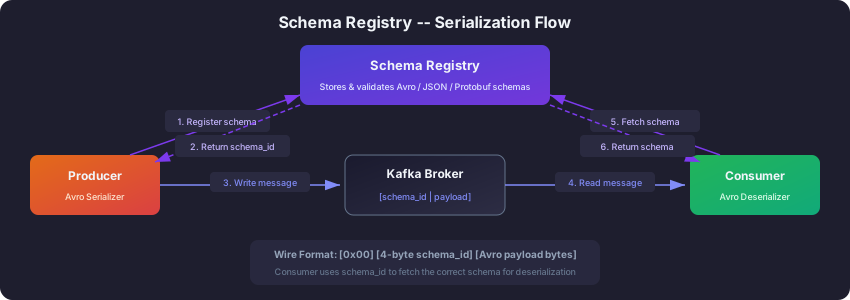
Here is how the pieces fit together at runtime. When a producer sends a message, it first contacts the Schema Registry to register (or look up) the schema. The registry returns a unique schema ID. The producer then serializes the message using that schema and prepends a small 5-byte header: a magic byte followed by the 4-byte schema ID. When a consumer reads the message, it extracts the schema ID from the header, fetches the corresponding schema from the registry, and uses it to deserialize the data. The schemas are cached on both sides, so this lookup only happens once per schema version, not once per message.
Understanding Avro: A Structured Format with a Built-In Dictionary
Before we dive into how Schema Registry works in practice, we need to understand Avro, the most popular serialization format used with it. You might wonder why we cannot just use JSON. After all, JSON is human-readable and everyone knows it.
The problem with JSON is twofold. First, every single message includes the field names along with the values. If you send a million messages with a field called customer_id, that string appears a million times on the wire and on disk. That is a lot of wasted space. Second, JSON has no schema enforcement. A producer can send {"amount": "fifty"} when the consumer expects {"amount": 50.0}, and nothing catches the mismatch until runtime.
Avro solves both problems. It is a binary serialization format that separates the schema (the field names and types) from the data (the actual values). Think of it like a dictionary at the front of a book. The dictionary says “field 1 is a string called order_id, field 2 is a double called amount,” and then the data only contains the values in order, without repeating the field names. This makes Avro messages dramatically smaller than JSON, often 50-70% smaller, which directly translates to lower network costs and faster throughput.
Here is an Avro schema for a simple order. Notice how it uses JSON to define the structure, but the actual serialized messages will be compact binary:
{
  "type": "record",
  "name": "Order",
  "namespace": "com.codeloom.orders",
  "fields": [
    {"name": "order_id", "type": "string"},
    {"name": "customer_id", "type": "string"},
    {"name": "amount", "type": "double"},
    {"name": "currency", "type": "string"},
    {"name": "status", "type": "string", "default": "PENDING"},
    {"name": "shipping_address", "type": ["null", "string"], "default": null},
    {"name": "created_at", "type": "long"}
  ]
}
A few things to notice here. The namespace acts like a package name in Java — it prevents naming collisions when different teams both have a record called “Order.” The default keyword is critical for schema evolution, which we will discuss shortly. And the ["null", "string"] syntax is an Avro union type, meaning the field can be either null or a string. This is how Avro handles optional fields.
Schema Compatibility Modes: The Rules of the Contract
The real power of Schema Registry is not just storing schemas — it is enforcing compatibility rules that prevent breaking changes. When you register a new version of a schema, the registry checks it against the previous version and rejects it if the change violates the configured compatibility mode.
There are four main compatibility modes, and understanding them requires thinking about the relationship between old and new schemas in a system where producers and consumers deploy at different times.
BACKWARD compatibility (the default) means that consumers using the new schema can still read data written with the old schema. This is the most common choice because it matches a typical deployment pattern: you upgrade consumers first, then producers. Imagine your team adds a new discount field to the Order schema. Under BACKWARD compatibility, this is allowed as long as the new field has a default value. Old messages that do not contain discount will simply use the default when deserialized by the new consumer.
FORWARD compatibility is the mirror image. It means consumers using the old schema can still read data written with the new schema. This is useful when you upgrade producers first and consumers later. Forward compatibility allows removing fields and adding optional fields with defaults.
FULL compatibility requires both backward and forward compatibility simultaneously. This is the strictest useful mode. It means you can only add or remove fields that have defaults. This is ideal for organizations where you cannot control the deployment order of producers and consumers.
NONE disables all compatibility checking. Use this only during development or for topics where you intentionally want to allow breaking changes. In production, this is almost always a mistake.
Here is a practical scenario to make this concrete. Your team starts with an Order schema that has five fields. Six months later, you want to add a discount field and remove the currency field (because you have standardized on USD). Under BACKWARD mode, adding discount with a default value is fine, and removing currency is fine. Under FORWARD mode, adding discount with a default is fine, but removing currency would break old consumers that still expect it. Under FULL mode, you can add discount with a default, but you cannot remove currency unless it also has a default. This forces you to deprecate currency gradually rather than removing it abruptly.
A Complete Python Producer with Avro
Now let us see how all of this works in code. We will build a producer that serializes Order messages using Avro and registers the schema with Schema Registry automatically.
First, install the required packages. The confluent-kafka[avro] package includes both the Kafka client and the Avro serialization support:
pip install confluent-kafka[avro]The producer code below does several things. It connects to Schema Registry, defines an Avro schema, creates a serializer that will automatically register the schema, and then produces messages. The key insight is that the AvroSerializer handles all the schema registration and binary encoding for you. You hand it a Python dictionary, and it converts it to compact Avro bytes with the schema ID prepended:
from confluent_kafka import Producer
from confluent_kafka.serialization import (
    SerializationContext,
    MessageField,
    StringSerializer,
)
from confluent_kafka.schema_registry import SchemaRegistryClient
from confluent_kafka.schema_registry.avro import AvroSerializer
import time

# Connect to Schema Registry
schema_registry_client = SchemaRegistryClient({"url": "http://localhost:8081"})

# Define the Avro schema as a JSON string
order_schema_str = """{
  "type": "record",
  "name": "Order",
  "namespace": "com.codeloom.orders",
  "fields": [
    {"name": "order_id", "type": "string"},
    {"name": "customer_id", "type": "string"},
    {"name": "amount", "type": "double"},
    {"name": "currency", "type": "string"},
    {"name": "status", "type": "string", "default": "PENDING"},
    {"name": "created_at", "type": "long"}
  ]
}"""

# The serializer registers the schema automatically on first use
avro_serializer = AvroSerializer(
    schema_registry_client,
    order_schema_str,
    conf={"auto.register.schemas": True},
)
string_serializer = StringSerializer("utf_8")

producer = Producer({
    "bootstrap.servers": "localhost:9092",
    "client.id": "order-producer",
})

def delivery_report(err, msg):
    if err:
        print(f"Delivery failed: {err}")
    else:
        print(f"Delivered to {msg.topic()} [{msg.partition()}] @ {msg.offset()}")

# Produce 10 sample orders
for i in range(10):
    order = {
        "order_id": f"ORD-{i:04d}",
        "customer_id": f"CUST-{i % 3:03d}",
        "amount": 29.99 + i * 10,
        "currency": "USD",
        "status": "PENDING",
        "created_at": int(time.time() * 1000),
    }

    producer.produce(
        topic="orders",
        key=string_serializer(order["order_id"]),
        value=avro_serializer(
            order, SerializationContext("orders", MessageField.VALUE)
        ),
        on_delivery=delivery_report,
    )

producer.flush()
Notice that the delivery_report callback is how Kafka tells you whether each message was successfully written. The flush() call at the end blocks until all messages have been acknowledged by the broker. In production, you would typically call poll(0) periodically instead of waiting for all messages at the end.
On the consumer side, things are even simpler. The AvroDeserializer reads the schema ID from each message header, fetches the schema from the registry (caching it after the first lookup), and deserializes the binary data back into a Python dictionary. You do not need to provide the schema at all — the consumer discovers it automatically:
from confluent_kafka import Consumer
from confluent_kafka.serialization import SerializationContext, MessageField
from confluent_kafka.schema_registry import SchemaRegistryClient
from confluent_kafka.schema_registry.avro import AvroDeserializer

schema_registry_client = SchemaRegistryClient({"url": "http://localhost:8081"})
avro_deserializer = AvroDeserializer(schema_registry_client)

consumer = Consumer({
    "bootstrap.servers": "localhost:9092",
    "group.id": "order-consumer-group",
    "auto.offset.reset": "earliest",
})
consumer.subscribe(["orders"])

try:
    while True:
        msg = consumer.poll(timeout=1.0)
        if msg is None:
            continue
        if msg.error():
            print(f"Consumer error: {msg.error()}")
            continue

        order = avro_deserializer(
            msg.value(), SerializationContext(msg.topic(), MessageField.VALUE)
        )
        print(f"Received order: {order['order_id']} - ${order['amount']:.2f}")
except KeyboardInterrupt:
    pass
finally:
    consumer.close()
Schema Evolution: What Happens When Schemas Change
Schema evolution is the real-world story of how your data formats grow and change over time. Let us walk through a realistic scenario.
Your Order schema has been in production for three months. The business team now wants to track discounts. You need to add a discount field to every order. But here is the challenge: there are millions of existing messages on the topic that do not have a discount field, and three consumer services are actively reading from this topic. You cannot update everything at once.
Under BACKWARD compatibility (the default mode), the solution is straightforward. You add the new field with a default value:
{
  "name": "discount",
  "type": "double",
  "default": 0.0
}
When you register this updated schema, the Schema Registry checks it against the previous version and confirms it is backward compatible. The new field has a default, so when consumers using the new schema read old messages that lack a discount field, they will simply see 0.0. Your three downstream services can upgrade at their own pace. Until they upgrade, they will ignore the new field entirely (their old schema does not mention it, so it gets skipped during deserialization). After they upgrade, they will start seeing the discount field with either real values from new messages or 0.0 from old messages.
Now consider what would happen if you tried to make an unsafe change, like renaming customer_id to user_id. The Schema Registry would reject this change under any compatibility mode except NONE. Why? Because Avro treats a rename as removing one field and adding another. Old messages have customer_id but no user_id, so consumers with the new schema would not be able to read old data. The registry catches this before a single bad message reaches your topic.
Here is a quick reference for safe and unsafe changes:
Safe changes (under BACKWARD compatibility): adding a field with a default value, removing a field that consumers no longer need.
Unsafe changes (rejected by the registry): renaming a field, changing a field’s type (for example, string to int), adding a field without a default, removing a field that has no default in the old schema.
Checking Compatibility with the REST API
Schema Registry provides a REST API that you can integrate into your CI/CD pipeline. Before deploying a new schema version, your build pipeline can check compatibility and fail the build if the change would break consumers.
To check whether a new schema is compatible with the latest registered version:
curl -X POST http://localhost:8081/compatibility/subjects/orders-value/versions/latest \
  -H "Content-Type: application/vnd.schemaregistry.v1+json" \
  -d '{
    "schema": "{\"type\":\"record\",\"name\":\"Order\",\"namespace\":\"com.codeloom.orders\",\"fields\":[{\"name\":\"order_id\",\"type\":\"string\"},{\"name\":\"customer_id\",\"type\":\"string\"},{\"name\":\"amount\",\"type\":\"double\"},{\"name\":\"discount\",\"type\":\"double\",\"default\":0.0}]}"
  }'
A response of {"is_compatible": true} means you are safe to deploy. A response of {"is_compatible": false} means the change would break consumers, and you need to rethink your approach. This check should be a mandatory gate in your deployment pipeline — it catches schema problems before they reach production, which is exactly where you want to catch them.
You can also retrieve the latest schema (useful for documentation and debugging) and list all registered subjects:
# Get the latest schema for a subject
curl http://localhost:8081/subjects/orders-value/versions/latest

# List all registered subjects
curl http://localhost:8081/subjects
Avro vs Protobuf vs JSON Schema
Schema Registry supports three serialization formats, and choosing between them depends on your situation. Avro is the most popular choice for Kafka because it was designed for exactly this use case: compact binary serialization with built-in schema evolution. If you are starting fresh with Kafka, Avro is the safe default.
Protobuf is a strong alternative if your organization already uses it for gRPC services. It has excellent tooling, strong typing, and generates code in many languages. The trade-off is that Protobuf’s schema evolution rules are slightly different from Avro’s, and you need to manage .proto files separately.
JSON Schema is the easiest to adopt because the serialized format is still human-readable JSON. But you lose the size benefits of binary serialization, which matters at high throughput. JSON Schema is a good choice for low-volume topics where debuggability matters more than performance.
Next Steps
Schema Registry is the foundation for building reliable, evolvable event-driven systems with Kafka. Once your schemas are managed centrally and compatibility is enforced automatically, teams can move independently without fear of breaking each other.
From here, you should explore securing the data flowing through your Kafka cluster. Schema Registry protects message structure, but it does not protect message content:
- Kafka Security: SSL and SASL Authentication — encrypt and authenticate your Kafka traffic
- Kafka Connect for Data Integration — move data in and out of Kafka with connectors
Related articles
- Kafka Kafka Connect: Streaming Data Integration Framework
Master Kafka Connect for integrating external systems with Kafka using source and sink connectors, Debezium CDC, JDBC, Elasticsearch, REST API management, and SMTs.
- Kafka Kafka Architecture Explained: Brokers, Replication, and KRaft
A detailed look at Kafka's internal architecture — broker clusters, KRaft consensus, replication protocols, partition leadership, log segments, and how they combine to deliver fault tolerance at scale.
- Kafka Kafka Consumers and Consumer Groups: Complete Guide
Master Kafka consumers and consumer groups including poll loops, offset management, rebalancing strategies, and partition assignment with Python and Java examples.
- Kafka Kafka Producers Explained: Architecture, Configuration & Code
Learn how Kafka producers work including batching, partitioning, serialization, delivery guarantees, and idempotent production with Python and Java examples.