Git Workflow Strategies for Teams
Compare Gitflow, trunk-based, GitHub Flow, and Ship/Show/Ask. Learn which git workflow fits your team, with branch naming and PR conventions.
What you'll learn
- ✓Four popular git workflows and when each one fits
- ✓Branch naming conventions that scale
- ✓PR conventions that reduce review friction
- ✓How to choose the right workflow for your team size and release cadence
Prerequisites
- •Comfortable with git basics — branching, merging, and pull requests
- •Experience working on a team with shared repositories
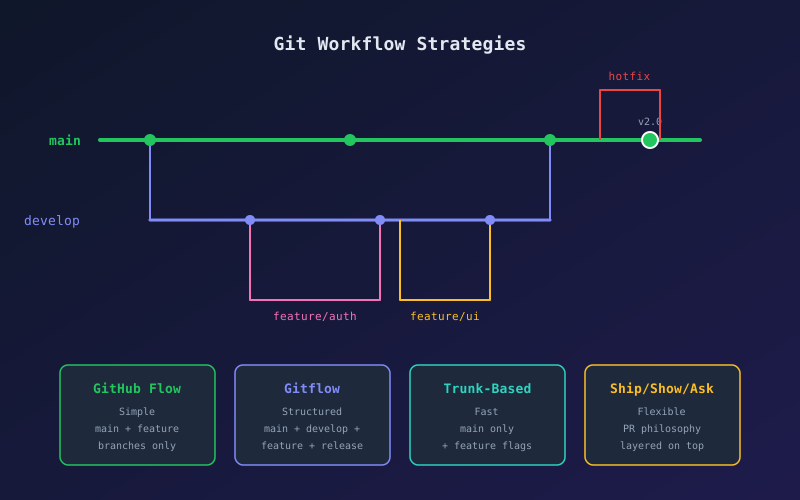
Every team argues about git workflow eventually. Should you use long-lived feature branches or merge to main constantly? Does anyone actually need a develop branch? The answer depends on your team size, release cadence, and tolerance for risk.
Here are four workflows worth understanding, with honest opinions about when each one works and when it falls apart.
1. GitHub Flow (Start Here)
GitHub Flow is the simplest workflow that actually works for teams.
The rules:
mainis always deployable- Create a feature branch from
main - Commit to the feature branch and push regularly
- Open a pull request when ready for review
- After review and CI passes, merge to
main - Deploy from
main
git checkout main
git pull origin main
git checkout -b feature/user-avatars
# ... work, commit, push ...
git push -u origin feature/user-avatars
# Open PR, get review, merge, delete branch
Best for: Small to medium teams (2-15 developers) shipping continuously. SaaS products with automated deployment.
Breaks down when: You need to maintain multiple release versions simultaneously, or when main deploys automatically and you are not ready for that discipline.
GitHub Flow is my default recommendation. It is simple enough that every team member understands it, and the constraint that main is always deployable forces good habits: small PRs, feature flags, and solid CI.
2. Gitflow (The Classic)
Gitflow uses two long-lived branches (main and develop) plus three types of short-lived branches (feature/*, release/*, hotfix/*).
main ─────────●──────────●──────────●──── (tagged releases)
               \        / \        /
develop ────●───●──●───●───●──●───●────── (integration)
            \  /       \  /
feature/x ──●          │
                   release/1.2 ──●
The flow:
- Branch features from
develop - Merge features back into
develop - When ready to release, branch
release/x.yfromdevelop - Fix release bugs on the release branch
- Merge release branch into both
main(tag it) anddevelop - Hotfixes branch from
mainand merge back into bothmainanddevelop
# Start a feature
git checkout develop
git checkout -b feature/payment-refunds

# Start a release
git checkout develop
git checkout -b release/2.1.0

# Hotfix
git checkout main
git checkout -b hotfix/fix-login-crash
Best for: Teams shipping versioned software (mobile apps, SDKs, on-premise products) where you maintain multiple versions.
Breaks down when: You ship continuously. The develop branch becomes a merge bottleneck, and the ceremony of release branches adds friction without value if you deploy to production every day.
My take: Gitflow is over-prescribed. Most web teams do not need it. If your releases are “merge main and deploy,” Gitflow adds complexity for no benefit.
3. Trunk-Based Development
Trunk-based development means everyone commits directly to main (the “trunk”) or uses very short-lived branches (merged within a day or two).
The rules:
mainis the single source of truth- Branches live for hours, not days
- Feature flags gate incomplete work
- CI runs on every commit to
main
# Short-lived branch approach
git checkout main
git pull
git checkout -b short/add-search-bar
# ... small, focused changes ...
git push -u origin short/add-search-bar
# PR, quick review, merge same day

# Or even direct commits for trivial changes
git checkout main
git commit -m "fix typo in error message"
git push
Best for: High-trust teams with strong CI/CD, feature flags infrastructure, and a culture of small changes. Google, Meta, and many startups use this.
Breaks down when: Your team lacks CI discipline, code review is slow, or you cannot use feature flags to hide incomplete work. Without those guardrails, main breaks constantly.
Trunk-based development produces the highest throughput (see the DORA metrics research), but it demands investment in CI, testing, and feature flags. It is the destination, not the starting point.
4. Ship / Show / Ask
Ship/Show/Ask is less a branching strategy and more a PR philosophy that layers on top of any workflow. Every change falls into one of three categories:
- Ship: Merge directly, no review needed. Typo fixes, dependency bumps, changes to code you own.
- Show: Merge immediately but open a PR for visibility. The team can comment async, but it does not block the merge.
- Ask: Open a PR and wait for review before merging. Architectural changes, security-sensitive code, unfamiliar areas.
# Ship — merge directly
git checkout main && git merge feature/fix-typo && git push

# Show — merge, then open PR for visibility
git push origin feature/refactor-utils
gh pr create --title "Show: refactored utils" --body "Merged already. FYI."

# Ask — standard PR flow
gh pr create --title "Ask: new auth provider" --body "Need review before merge."
Best for: Teams that want to reduce PR bottlenecks without abandoning code review entirely. Works well with trunk-based development.
Breaks down when: Team members misjudge which category a change belongs to, or when “Ship” becomes the default for everything.
Branch Naming Conventions
Consistent branch names make automation and readability easier. Here is a convention that scales:
type/short-description

# Examples
feature/user-avatars
fix/login-timeout
chore/upgrade-react-19
docs/api-authentication
refactor/payment-module
test/checkout-edge-cases
Rules:
- Use lowercase with hyphens (no underscores, no camelCase)
- Keep it short but descriptive
- Prefix with the change type
- Optionally include a ticket number:
feature/PROJ-123-user-avatars
Avoid branch names like johns-branch, test2, or fix. Your future self reading git log --oneline will thank you.
PR Conventions That Reduce Friction
Good PR hygiene matters more than which workflow you pick.
Size
Keep PRs under 400 lines of meaningful changes. Large PRs get rubber-stamped; small PRs get real reviews. If a feature is too big, split it into stacked PRs or use feature flags.
Title format
feat: add user avatar upload
fix: resolve login timeout on slow connections
chore: upgrade React to v19
docs: document authentication API
Description template
## What
Brief description of the change.

## Why
The problem or feature request this addresses.

## Testing
How you verified this works.

## Screenshots
If applicable.
Review etiquette
- Authors: Respond to every comment, even if it is just “done” or “won’t fix because…”
- Reviewers: Distinguish between blocking comments and suggestions. Use “nit:” for non-blocking style preferences.
- Everyone: Approve when the code is good enough, not when it is perfect. Perfection is the enemy of shipping.
Choosing the Right Workflow
| Factor | GitHub Flow | Gitflow | Trunk-Based |
|---|---|---|---|
| Team size | 2-15 | 5-50 | Any (with discipline) |
| Release cadence | Continuous | Scheduled | Continuous |
| Versioned releases | No | Yes | No |
| CI/CD maturity needed | Medium | Low | High |
| Feature flags needed | Optional | No | Yes |
If you are unsure, start with GitHub Flow. It is the sweet spot of simplicity and structure. Add Ship/Show/Ask on top when the team is ready. Move toward trunk-based development as your CI and testing mature. Use Gitflow only if you genuinely need to maintain multiple release versions.
The best git workflow is one your entire team understands and follows consistently. A simple workflow followed strictly beats a sophisticated workflow followed loosely, every time.
Related articles
- Git Git Worktrees for Parallel Development
Master parallel feature development with git worktrees. Run multiple branches simultaneously, handle urgent hotfixes without stashing, and optimize team workflows.
- Git Git Stash Tutorial: Saving Work in Progress
Learn how to use git stash to safely shelve uncommitted changes, switch contexts, and recover work using push, pop, apply, and branch workflows.
- Git Git Worktree Explained
Use git worktree to check out multiple branches at once without cloning. Speed up code review, hotfixes, and experimentation.
- Productivity Dotfiles Management: Sync Your Dev Setup Across Machines
Learn to manage dotfiles with GNU Stow, chezmoi, or a bare git repo. Bootstrap any new machine in minutes with your exact config.