Airflow Architecture Explained: Components and Executors
Understand the architecture of Apache Airflow -- Scheduler, Web Server, Metadata Database, Executors, and Workers -- and learn which executor fits your workload.
What you'll learn
- ✓The role of each Airflow component: Scheduler, Web Server, Metadata DB, Executor, Workers
- ✓How components communicate with each other
- ✓The four executor types and when to use each one
- ✓Key configuration settings that affect performance
Prerequisites
- •Understanding of what Airflow is (see What Is Airflow?)
- •Basic familiarity with databases and web servers
Why Architecture Matters
Before diving into components, let us talk about why you should care about Airflow’s architecture. When your pipeline fails at 3 AM, understanding the architecture is the difference between fixing it in five minutes and staring at logs for an hour. When your DAGs start running slowly as your team scales, knowing which component is the bottleneck tells you exactly what to upgrade.
Think of Airflow as a factory. A factory does not have one machine that does everything — it has specialized stations for different jobs, a manager coordinating the work, a shipping department, and a front desk where customers check on their orders. Airflow works the same way, with each component playing a distinct role. This separation of concerns is what allows Airflow to scale from a single laptop to a cluster processing thousands of tasks per day.
Architecture Overview
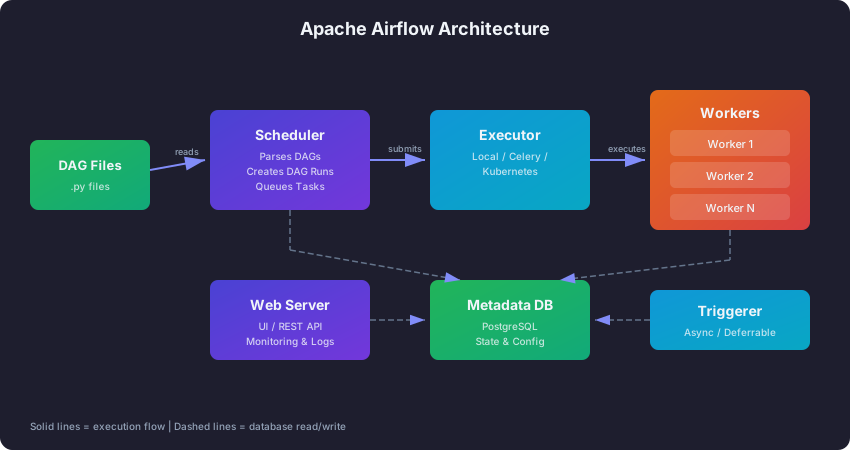
At the highest level, Airflow has six components that work together. Here is how they fit into our factory analogy:
- The Scheduler is the factory manager. It looks at the master plan (your DAG files), decides which tasks are ready to run, and assigns them to workers.
- The Web Server is the front desk. Customers (you, your team) walk up and ask “What is the status of my order?” It shows you dashboards, logs, and lets you trigger or cancel runs.
- The Metadata Database is the filing cabinet. Every piece of state — which tasks are running, which have failed, what credentials are stored — lives here. It is the single source of truth.
- The Executor is the floor supervisor who decides how work gets done. Should we do it in-house? Send it to a specialized workshop? Spin up a temporary workstation?
- Workers are the factory workers who actually build the product (execute your task code).
- The Triggerer is the lookout who watches for deliveries. Instead of tying up a worker to stand at the loading dock all day, the Triggerer efficiently monitors for external events and alerts the team when something arrives.
The reason Airflow splits these responsibilities instead of putting everything in one process is flexibility. You can run the Web Server on a small machine since it is just serving a website. You can put workers on beefy machines with lots of CPU and memory. You can run multiple schedulers for redundancy. This modularity is what makes Airflow work for a two-person startup and a thousand-person enterprise.
Core Components
1. The Scheduler
The Scheduler is the brain of the entire operation. Without it, nothing runs. It is a persistent process that continuously does four things in a loop:
First, it parses your DAG files. The Scheduler reads every Python file in your DAGs folder, executes the code to discover DAG objects, and records what it finds in the database. This is why your DAG file should never contain heavy computation at the top level — the Scheduler runs this code repeatedly, typically every 30 seconds.
Second, it creates DAG Runs. When the current time passes a DAG’s next scheduled interval, the Scheduler creates a new DAG Run record in the database. Think of it as the manager looking at the clock, checking the production schedule, and saying “It is 6 AM, time to start the daily sales pipeline.”
Third, it evaluates task dependencies. For each task in an active DAG Run, the Scheduler checks whether all upstream tasks have succeeded. If Task B depends on Task A, the Scheduler will not mark B as ready until A shows a “success” status in the database.
Fourth, it submits tasks to the Executor. Once a task’s dependencies are met, the Scheduler hands it to the Executor and says “This one is ready — get it done.” The task moves from “scheduled” to “queued” state.
The Scheduler runs this loop every few seconds (controlled by scheduler_heartbeat_sec, which defaults to 5 seconds). This is why Airflow is not designed for sub-minute scheduling — there is inherent latency in this loop.
One important detail: in production setups, you can run multiple Scheduler instances for high availability. They coordinate through database row-level locking to avoid scheduling the same task twice. If one Scheduler goes down, the others continue without interruption.
2. The Web Server
The Web Server provides the Airflow UI — a Flask web application served by Gunicorn. It is the “front desk” of your Airflow factory, and it is important to understand one key fact: the Web Server never executes tasks. It only reads state from the database and displays it.
This means the Web Server is stateless. You could shut it down entirely and your pipelines would keep running. You could run five Web Server instances behind a load balancer for high availability. It does not matter, because each one is just a window into the same database.
The Web Server provides DAG visualization (graph, grid, and Gantt views), task instance logs (pulled from workers or remote storage like S3), manual DAG triggers and task management, user authentication and role-based access control, and a REST API for programmatic access.
In practice, the Web Server is where you will spend most of your time with Airflow. You will use it to check whether yesterday’s pipeline succeeded, dig into logs when something fails, and manually re-trigger tasks after fixing an issue.
3. The Metadata Database
If the Scheduler is the brain, the Metadata Database is the memory. Every component reads from it and writes to it. It stores DAG definitions, the status of every DAG Run and Task Instance, XCom values (data passed between tasks), encrypted connection credentials, configuration variables, and user accounts.
Think of it this way: the Scheduler and Web Server never talk to each other directly. There is no direct network connection between them. Instead, the Scheduler writes “Task X just succeeded” to the database, and the Web Server reads that same record to show you a green box in the UI. The database is the communication hub that ties everything together.
This design has a practical consequence: the Metadata Database is a single point of failure. If the database goes down, nothing works — no scheduling, no UI, no task execution. That is why production deployments always use a robust database setup with replication and failover.
For database choice, PostgreSQL is the recommended option for production. MySQL is supported but has some feature limitations. SQLite ships as the default for development convenience, but it cannot handle concurrent access, which means you cannot run the Scheduler and Web Server simultaneously in separate processes with SQLite.
4. The Executor
The Executor is the component that determines how and where your task code actually runs. It sits between the Scheduler (which decides what to run) and the Workers (which do the work). Think of it as a staffing strategy: do you hire full-time employees, use a temp agency, or outsource each job to a specialist contractor?
This is the most impactful architectural decision you will make with Airflow. The right executor depends on your scale, your infrastructure, and your team’s expertise. We will cover each option in detail below.
5. Workers
Workers are the processes that actually execute your task code. When the Executor receives a task from the Scheduler, it assigns that task to a Worker, and the Worker runs your Python function, bash command, SQL query, or whatever the task entails.
The form Workers take depends entirely on your Executor. With LocalExecutor, workers are subprocesses on the same machine as the Scheduler — imagine the factory manager pulling a worker off the floor right there in the building. With CeleryExecutor, workers are separate processes that might run on different machines, connected through a message queue — like an outsourcing company with offices in different cities. With KubernetesExecutor, each task gets its own temporary container that is created on demand and destroyed after completion — like hiring a freelancer for exactly one job.
6. The Triggerer
The Triggerer was introduced in Airflow 2.2 to solve a specific and expensive problem: waiting. Before the Triggerer existed, if your pipeline needed to wait for an external event (like an API becoming available, a file landing in S3, or another pipeline finishing), you would use a sensor task. The problem is that a sensor task occupies a Worker slot the entire time it is waiting, even if it is just checking a condition every 60 seconds. If you have 20 sensors each waiting for an hour, that is 20 Worker slots doing almost nothing.
The Triggerer fixes this with a handoff pattern. A task starts running on a Worker, realizes it needs to wait for something, and “defers” itself — giving up the Worker slot. The Triggerer picks up the watch duty and monitors the external condition asynchronously. A single Triggerer process can handle thousands of deferred tasks simultaneously because it uses asyncio rather than dedicating a process to each one. When the condition is met, the Triggerer wakes the task up, and it resumes execution on a Worker.
In practice, this matters most when your pipelines have lots of waiting — for file arrivals, API readiness, or cross-pipeline dependencies. Without the Triggerer, waiting is expensive. With it, waiting is nearly free.
Executor Types: Choosing the Right One
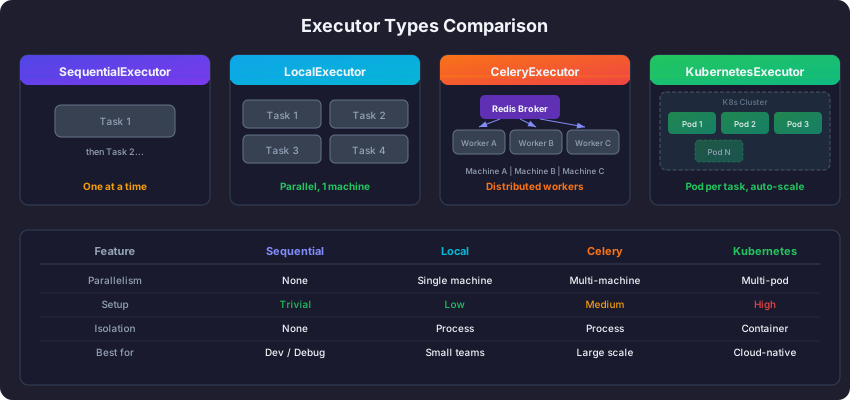
The executor you choose shapes how your entire Airflow deployment works. Here is a detailed breakdown of each option with guidance on when to use it.
SequentialExecutor
The SequentialExecutor is the simplest option. Tasks run one at a time, in sequence, within the Scheduler process itself. There is zero parallelism — if Task A takes 10 minutes and Task B takes 10 minutes, the total time is 20 minutes even if the tasks are independent and could theoretically run simultaneously.
When to use it: Only for local development, debugging a single DAG, or running tests in CI/CD. It works with SQLite, which makes it the zero-setup option. If you ran airflow standalone on your laptop to try Airflow for the first time, you were using the SequentialExecutor.
When to move away from it: As soon as you need any parallelism at all, or when you want to run more than one DAG. In practice, most people outgrow SequentialExecutor within their first week of using Airflow.
LocalExecutor
The LocalExecutor runs tasks as parallel subprocesses on the same machine as the Scheduler. It is the natural next step up from SequentialExecutor. If your machine has 8 CPU cores, you can run 8 tasks simultaneously.
Think of it as a small workshop where the manager and all the workers are in the same building. Communication is fast (no network overhead), setup is simple (no message broker needed), and it works well for a surprising range of workloads. Many small-to-medium teams run LocalExecutor in production without any issues.
When to use it: Small to medium deployments with up to about 50 concurrent tasks. Teams that do not have Kubernetes expertise. Projects where a single server with decent specs (8+ cores, 16+ GB RAM) can handle the load.
When to move away from it: When you consistently max out the machine’s CPU or memory. When you need tasks to have different Python dependencies or different resource requirements. When you need the resilience of distributed workers — if the single machine goes down, everything stops.
The LocalExecutor requires PostgreSQL or MySQL (not SQLite) because it needs a database that supports concurrent connections.
CeleryExecutor
The CeleryExecutor distributes tasks to Celery workers via a message broker (Redis or RabbitMQ). Workers can run on multiple machines, giving you horizontal scaling.
Think of it as a company with offices in different cities. The headquarters (Scheduler) posts tasks to a job board (the message broker), and workers in different offices pick up tasks and execute them. This means you can add more workers by spinning up new machines, and if one worker machine goes down, the broker re-queues its tasks to other workers.
When to use it: Large deployments with many concurrent tasks (hundreds or more). When you need horizontal scaling but do not have Kubernetes infrastructure. When you want the battle-tested reliability of Celery, which has been a production workhorse in the Python ecosystem for over a decade.
When to avoid it: The main downsides are infrastructure overhead (you need to manage a Redis or RabbitMQ cluster in addition to Airflow) and idle resource waste. Celery workers are persistent processes — they consume memory and CPU even when no tasks are running. If your workload is bursty (heavy during business hours, idle at night), you are paying for those idle workers around the clock.
Another important constraint: all Celery workers must have the same Python dependencies installed. If Task A needs pandas 1.5 and Task B needs pandas 2.0, you have a problem. KubernetesExecutor solves this with per-task container isolation.
KubernetesExecutor
The KubernetesExecutor creates a new Kubernetes Pod for each task. The Pod runs the task, and then it is destroyed. No persistent workers, no idle resources.
Think of it as hiring a freelancer for each job. You describe exactly what you need (the container image, CPU, memory), the freelancer does the work, delivers the result, and you never hear from them again. If you need a different type of specialist for the next job, no problem — just specify a different container image.
When to use it: Kubernetes-native environments where your team already manages a cluster. Workloads where different tasks need different dependencies (one task uses Python 3.9 with TensorFlow, another uses Python 3.11 with pandas). Cost-sensitive deployments where paying for idle workers is unacceptable. Workloads with variable demand — during off-peak hours, the cluster scales to zero task pods.
When to avoid it: If your team does not have Kubernetes expertise, the learning curve is steep. Pod startup latency (typically 10-30 seconds) means this is not ideal for pipelines with many small, fast tasks. If you have 200 tasks that each take 3 seconds, the Pod startup overhead will dominate your total pipeline time.
Executor Comparison Summary
| Factor | Sequential | Local | Celery | Kubernetes |
|---|---|---|---|---|
| Parallelism | None | Single machine | Multi-machine | Multi-pod |
| Setup complexity | Trivial | Low | Medium | High |
| Scaling | None | Vertical only | Horizontal | Horizontal + auto |
| Resource efficiency | N/A | Moderate | Low (idle workers) | High (scale to zero) |
| Task isolation | None | Process-level | Process-level | Container-level |
| Startup latency | None | ~0s | ~0s | 10-30s |
| Production ready | No | Small teams | Yes | Yes |
In practice, most teams follow this progression: start with SequentialExecutor during initial learning, switch to LocalExecutor for development and small production setups, and then move to CeleryExecutor or KubernetesExecutor as they scale. There is no shame in running LocalExecutor in production if it meets your needs — do not over-engineer your infrastructure.
How Components Communicate
One of the most common misconceptions about Airflow is that the components talk to each other directly. They do not. Almost all communication goes through the Metadata Database.
When the Scheduler decides a task is ready, it writes a status update to the database. The Executor reads from the database to find queued tasks. Workers write task results back to the database. The Web Server reads from the database to show you the UI. This database-centric design is elegant but has an important implication: the database must be reliable and performant, because every component depends on it.
The one exception to the database-centric pattern is log files. Workers write logs locally or to remote storage (like S3 or GCS), and the Web Server reads them directly. This avoids stuffing potentially large log files into the database.
For distributed setups with CeleryExecutor, there is an additional communication path: the Scheduler sends tasks to the message broker (Redis or RabbitMQ), and workers pull tasks from the broker. But the status updates still flow through the database.
Key Configuration Settings
Airflow’s behavior is controlled by airflow.cfg (or environment variables using the AIRFLOW__SECTION__KEY pattern). Rather than listing every setting, let us focus on the ones that matter most for performance and behavior.
Parallelism (parallelism = 32) is the global maximum number of tasks that can run simultaneously across all DAGs. Think of it as the total number of workstations in your factory. If you set this to 32, only 32 tasks can execute at the same time, no matter how many DAGs you have.
Max active runs per DAG (max_active_runs_per_dag = 16) limits how many runs of a single DAG can be active at once. This prevents a single DAG from monopolizing all your resources. If you are doing a large backfill, this setting controls how aggressively Airflow fills in historical runs.
Max active tasks per DAG (max_active_tasks_per_dag = 16) limits the concurrency within a single DAG run. If your DAG has 50 independent tasks, this setting prevents all 50 from running at once.
These three settings work together like nested limits. The global parallelism is the ceiling, and the per-DAG settings are sub-ceilings underneath it.
Pools give you fine-grained resource control. For example, if your production database can only handle 5 simultaneous connections, you create a pool with 5 slots and assign all database-querying tasks to that pool. Even if Airflow has 32 parallelism slots available, only 5 of those tasks can run at once.
task = PythonOperator(
    task_id="query_prod_db",
    python_callable=my_function,
    pool="production_db_pool",
)
High Availability Considerations
For production deployments where downtime is unacceptable, here is how each component handles high availability:
Scheduler HA (Airflow 2.0+): Run multiple Scheduler instances. They coordinate through database row-level locking, so no task gets scheduled twice. If one Scheduler crashes, the others pick up the work seamlessly.
Web Server HA: Run multiple instances behind a load balancer. Since they are stateless (all state is in the database), this is straightforward.
Database HA: Use your database provider’s built-in replication and failover. PostgreSQL streaming replication, AWS RDS Multi-AZ, or Google Cloud SQL HA are all well-tested options.
Worker HA (CeleryExecutor): Run multiple workers. If one dies, the broker re-queues its unfinished tasks to the remaining workers.
Filesystem Requirements
One practical detail that trips up many teams in distributed setups: not all components need access to the same files, but some definitely do.
All components that parse or execute DAGs (Scheduler, Workers, Triggerer) must be able to read your DAG files. In a single-machine setup this is trivial — everyone reads the same folder. In a distributed setup, you need to synchronize DAG files across machines. Common approaches include shared filesystems (NFS, EFS), git-sync sidecars that pull from your DAG repository, or baking DAGs into your Docker image.
The Web Server also needs access to DAG files for rendering the UI, and to log files for displaying task output. In distributed setups, remote log storage (S3, GCS) is the standard approach so that the Web Server does not need to reach into individual worker machines.
Next Steps
With a solid understanding of Airflow’s architecture, you are ready to set it up:
- Installation and Setup — Install Airflow locally and configure it for development.
- What Is Apache Airflow? — Review the fundamentals if any concepts here were unfamiliar.
Related articles
- Airflow Airflow Connections and Variables: Managing Configuration
Master Airflow connections for external system credentials and variables for runtime configuration, including secrets backends for production deployments.
- Airflow Branching and Conditional Logic in Apache Airflow
Learn how to implement conditional workflows in Airflow using BranchPythonOperator, ShortCircuitOperator, trigger rules, and the TaskFlow branch decorator.
- Airflow Airflow Operators Guide: Built-in, Provider, and Custom
Master Apache Airflow operators from BashOperator to building your own custom operators with template fields and provider packages.
- Airflow Airflow Sensors: Waiting for Conditions in Your Pipelines
Learn how Airflow sensors pause tasks until conditions are met, including poke vs reschedule modes, custom sensors, and deferrable operators.