Kafka Multi-Cluster Replication with MirrorMaker 2
Master Kafka multi-cluster replication using MirrorMaker 2 with active-passive and active-active topologies, offset sync, and disaster recovery.
What you'll learn
- ✓Why single-cluster Kafka is not enough for many organizations
- ✓Active-passive vs active-active replication topologies
- ✓MirrorMaker 2 architecture and how it improves on MirrorMaker 1
- ✓Topic renaming, offset synchronization, and consumer migration
- ✓Setting up disaster recovery with automated failover
- ✓Monitoring replication lag and handling split-brain scenarios
Prerequisites
- •Solid understanding of Kafka topics, partitions, and consumer groups
- •Experience operating a Kafka cluster
- •Familiarity with Kafka Connect concepts
Why Multi-Cluster Replication
A single Kafka cluster, no matter how well configured, has limits. It exists in one data center or one cloud region. If that region goes down — and regions do go down — your entire event streaming platform goes with it. For organizations where Kafka is the central nervous system of their data infrastructure, this is an unacceptable risk.
Multi-cluster replication solves several real problems:
Disaster recovery: if your primary cluster becomes unavailable, a replicated cluster in another region can take over. The Recovery Point Objective (RPO) depends on replication lag, but in a well-tuned setup, you lose seconds of data, not hours.
Geographic locality: if your users are spread across continents, consuming from a cluster on the other side of the world adds hundreds of milliseconds of latency to every fetch. Replicating data to regional clusters lets consumers read locally.
Cluster migration: when you need to upgrade a cluster, change cloud providers, or resize infrastructure, replication lets you stand up a new cluster, mirror data to it, and cut over consumers with minimal disruption.
Regulatory compliance: some jurisdictions require that data stays within geographic boundaries. Multi-cluster replication lets you selectively replicate only the data that is allowed to cross borders.
MirrorMaker 1 vs MirrorMaker 2
The original MirrorMaker (MM1) was a simple consumer-producer bridge: it consumed from one cluster and produced to another. It worked, but it had painful limitations. It did not replicate topic configurations, it had no concept of offset translation (so consumers could not seamlessly switch clusters), and managing it at scale required significant custom tooling.
MirrorMaker 2 (MM2), introduced in KIP-382, is a complete redesign built on top of Kafka Connect. It is not an incremental improvement — it is a fundamentally different architecture that addresses all of MM1’s shortcomings.
What MM2 Brings
Automatic topic discovery and creation: MM2 detects new topics on the source cluster and creates them on the target with matching partition counts and configurations. You do not need to manually create topics on the target cluster.
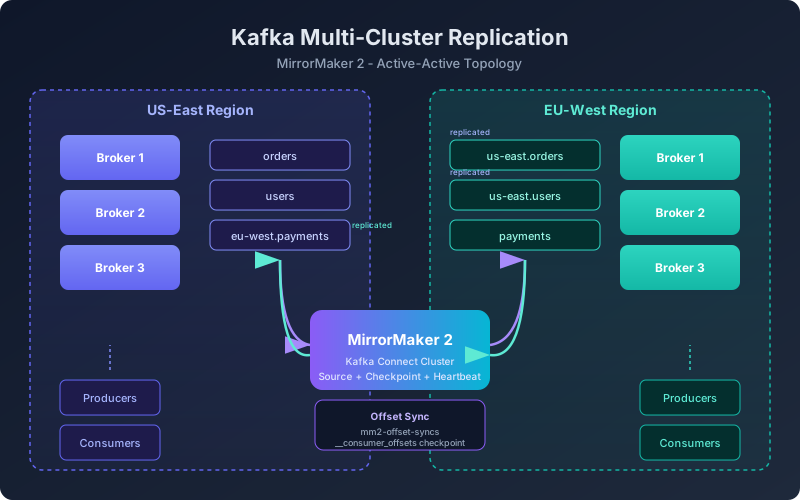
Offset synchronization: MM2 maintains a mapping between source and target offsets, stored in an internal topic called mm2-offset-syncs. This enables consumers to migrate between clusters without reprocessing or missing messages.
Consumer group checkpointing: MM2 periodically checkpoints the translated offsets for every consumer group, making failover possible without manual offset calculation.
Topic renaming with aliases: by default, MM2 prefixes replicated topics with the source cluster alias (e.g., us-east.orders). This prevents naming collisions in active-active setups and makes it clear where data originated.
Replication Topologies
Active-Passive
In active-passive, one cluster handles all production traffic while the second cluster is a hot standby that receives replicated data. Consumers and producers only interact with the active cluster during normal operations.
Producers --> [US-East Cluster (Active)] --MM2--> [EU-West Cluster (Passive)]
                      ^
              Consumers read here
This is the simplest topology and the right choice when your primary goal is disaster recovery. The passive cluster is ready to take over if the active cluster fails, but during normal operations it serves no traffic.
Failover process: when the active cluster fails, you redirect producers and consumers to the passive cluster. Consumers use the checkpointed offsets from MM2 to resume from approximately where they left off. There may be a small amount of duplicate processing (messages that were replicated but whose consumer offsets had not yet been checkpointed), but this is typically seconds of data.
Active-Active
In active-active, both clusters handle production traffic. Each cluster replicates its data to the other. This is common when you have users in multiple regions and want them to produce and consume locally.
Producers (US) --> [US-East Cluster] --MM2--> [EU-West Cluster] <-- Producers (EU)
                   [US-East Cluster] <--MM2-- [EU-West Cluster]
Active-active is more complex because you need to prevent replication loops. If cluster A replicates topic orders to cluster B as us-east.orders, cluster B must not replicate us-east.orders back to cluster A. MM2 handles this automatically through its topic renaming convention — it only replicates topics that do not already have a cluster prefix.
Configuring MirrorMaker 2
MM2 runs as a set of Kafka Connect connectors. You can deploy it as a dedicated Connect cluster or use the standalone connect-mirror-maker.sh script. Here is a configuration for active-passive replication:
# mm2.properties - Active-passive configuration

# Define the two clusters
clusters = us-east, eu-west
us-east.bootstrap.servers = kafka-us-east-1:9092,kafka-us-east-2:9092
eu-west.bootstrap.servers = kafka-eu-west-1:9092,kafka-eu-west-2:9092

# Replicate from us-east to eu-west
us-east->eu-west.enabled = true
eu-west->us-east.enabled = false

# Topic selection: replicate everything except internal topics
us-east->eu-west.topics = .*
us-east->eu-west.topics.exclude = .*[\-\.]internal, .*\.replica, __.*

# Consumer group sync
us-east->eu-west.groups = .*
us-east->eu-west.emit.checkpoints.enabled = true
us-east->eu-west.sync.group.offsets.enabled = true

# Replication tuning
replication.factor = 3
refresh.topics.interval.seconds = 30
refresh.groups.interval.seconds = 30
sync.group.offsets.interval.seconds = 10
emit.checkpoints.interval.seconds = 10
Start MM2 with:
bin/connect-mirror-maker.sh mm2.propertiesTopic Renaming and the Prefix Convention
By default, MM2 prefixes replicated topics with the source cluster alias. A topic called orders on us-east becomes us-east.orders on eu-west. This is intentional — it prevents naming collisions and makes the data lineage explicit.
If you need the replicated topic to have the same name as the source (common in active-passive for simpler failover), you can configure a custom ReplicationPolicy:
replication.policy.class = org.apache.kafka.connect.mirror.IdentityReplicationPolicyWith IdentityReplicationPolicy, orders on the source becomes orders on the target. Be careful with this in active-active setups — without prefixes, you will create replication loops.
Offset Synchronization and Consumer Migration
One of MM2’s most valuable features is offset synchronization. Here is how it works:
-
MM2 reads records from the source cluster and writes them to the target cluster. The source and target offsets will be different because the target topic may have pre-existing data or different compaction behavior.
-
For every batch of records, MM2 records the mapping: “source offset 1000 corresponds to target offset 1247.” These mappings are stored in the
mm2-offset-syncsinternal topic on the target cluster. -
Periodically, MM2 reads the committed offsets for every consumer group on the source cluster, translates them using the offset sync mappings, and writes the translated offsets to the
__consumer_offsetstopic on the target cluster.
This means that if a consumer group on us-east has committed offset 5000 for partition 0 of orders, MM2 calculates the corresponding offset on eu-west and commits it there. When you fail over consumers to eu-west, they resume from approximately the right position.
# After failover, consumers on eu-west automatically pick up
# the translated offsets -- no manual intervention needed
consumer = Consumer({
    'bootstrap.servers': 'kafka-eu-west-1:9092',
    'group.id': 'order-processor',  # Same group ID as on us-east
    'auto.offset.reset': 'earliest'
})
# If using IdentityReplicationPolicy, same topic name
consumer.subscribe(['orders'])
# Consumer resumes from the checkpointed offset
Monitoring Replication
Replication lag is the most critical metric. If your source cluster is producing 100,000 messages per second and MM2 can only replicate 80,000, the lag grows continuously and your disaster recovery guarantee erodes.
Key Metrics
MM2 exposes metrics through JMX. The most important ones:
# Records replicated per second
kafka.connect.mirror:type=MirrorSourceConnector,target=eu-west,topic=orders,partition=0
  replication-latency-ms-avg

# Checkpoint lag
kafka.connect.mirror:type=MirrorCheckpointConnector,source=us-east,group=order-processor
  checkpoint-latency-ms-avg
Set up alerts for:
- Replication latency exceeding your RPO target (e.g., alert if average latency goes above 30 seconds)
- Connector status — MM2 connectors can fail and need to be restarted
- Topic count mismatch — if the source cluster has topics that are not being replicated, your disaster recovery is incomplete
Automated Health Check
from confluent_kafka.admin import AdminClient

def check_replication_health(source_servers, target_servers, source_alias):
    source_admin = AdminClient({'bootstrap.servers': source_servers})
    target_admin = AdminClient({'bootstrap.servers': target_servers})

    source_topics = set(source_admin.list_topics().topics.keys())
    target_topics = set(target_admin.list_topics().topics.keys())

    # Filter out internal topics
    source_user_topics = {t for t in source_topics if not t.startswith('_')}

    # Check which source topics are replicated on target
    expected_on_target = {f"{source_alias}.{t}" for t in source_user_topics}
    missing = expected_on_target - target_topics

    if missing:
        print(f"WARNING: {len(missing)} topics not replicated: {missing}")
    else:
        print(f"OK: All {len(source_user_topics)} topics replicated")

    return len(missing) == 0
Disaster Recovery Playbook
When your primary cluster fails, follow this sequence:
- Confirm the failure is real and not a transient network issue. Check from multiple vantage points.
- Stop MM2 to prevent partial data from complicating the picture.
- Verify consumer group offsets on the target cluster. MM2’s checkpoints should be recent (within your RPO window).
- Redirect producers to the target cluster by updating DNS, configuration, or load balancer settings.
- Redirect consumers to the target cluster. If using
IdentityReplicationPolicy, consumers connect with the same topic names. If using the default prefix policy, consumers need to be reconfigured to read from prefixed topics. - Monitor the target cluster closely for the first hour. Watch for increased error rates from consumers that may encounter duplicate messages near the failover boundary.
When the primary cluster recovers:
- Set up reverse replication from the target back to the primary to capture any data produced during the outage.
- Merge the data streams carefully — there will be a window where both clusters have unique data.
- Fail back to the primary when you are confident the data is consistent.
Disaster recovery is not something you can set up and forget. Run failover drills quarterly. The worst time to discover that your failover process has a gap is during an actual outage.
Sizing and Performance Tuning
MM2 throughput depends on the number of tasks (Connect tasks), the network bandwidth between clusters, and the target cluster’s write capacity. Key tuning parameters:
# Increase parallelism
tasks.max = 10

# Producer batching for higher throughput
producer.batch.size = 524288
producer.linger.ms = 100
producer.buffer.memory = 67108864

# Consumer fetch size
consumer.max.poll.records = 2000
consumer.fetch.min.bytes = 1048576
As a rough guideline, a single MM2 task can replicate 10-30 MB/s depending on message size and network conditions. For a cluster producing 200 MB/s, you need at minimum 7-20 tasks, plus headroom for bursts.
Multi-cluster replication adds operational complexity, but for organizations that depend on Kafka for critical data flows, it is essential infrastructure. Start with active-passive for disaster recovery, get comfortable with the failover process, and evolve to active-active only when your use case genuinely requires it.
Related articles
- Kafka KRaft Mode and Kafka Cluster Management
Understand why Kafka is removing ZooKeeper, how KRaft consensus works, and master cluster operations including broker management and disaster recovery.
- Kafka Dead Letter Queues in Kafka: Handling Failed Messages
Learn how to implement Dead Letter Queues in Kafka to gracefully handle failed messages with retry strategies, monitoring, and production patterns.
- Kafka Building Data Pipelines with Apache Kafka
Build production-grade data pipelines using Kafka Connect, Debezium CDC, sink connectors, schema evolution, and dead letter queues for robust error handling.
- Kafka Event-Driven Architecture with Kafka
Master event-driven architecture patterns including event sourcing, CQRS, and the saga pattern using Apache Kafka for real-world microservices systems.