Pandas Performance Optimization: From Slow to Fast
Speed up Pandas code with vectorization, categorical dtypes, chunked reading, eval/query, PyArrow backend, and memory profiling techniques.
What you'll learn
- ✓Why vectorized operations are 10-100x faster than Python loops
- ✓How categorical dtypes slash memory and speed up groupby
- ✓How to process files larger than RAM with chunked reading
- ✓How eval() and query() bypass intermediate array creation
- ✓How the PyArrow backend improves string and nullable type performance
- ✓How to profile memory usage and find bottlenecks
Prerequisites
- •Comfortable with Pandas DataFrames and Series
- •Basic understanding of Python performance concepts
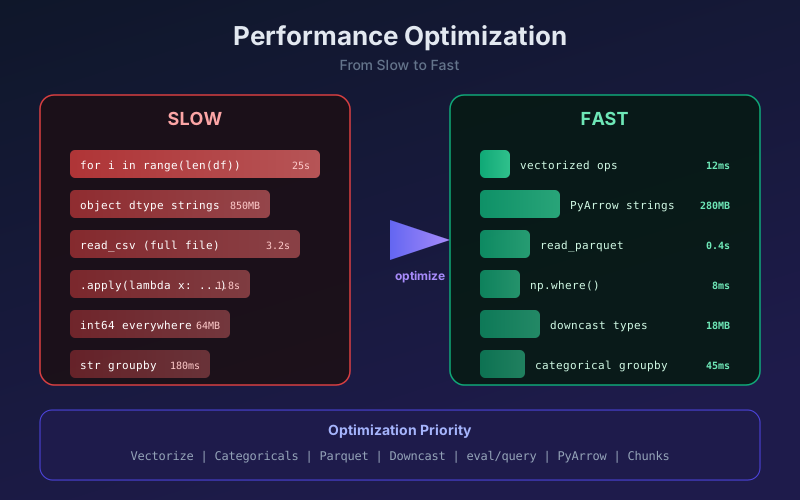
Most slow Pandas code is not slow because of Pandas. It is slow because of how it is used. This guide covers the six highest-impact optimizations, ordered by how often they matter in practice.
1. Vectorize Everything
The single biggest speedup: replace Python loops with Pandas/NumPy operations.
import pandas as pd
import numpy as np

df = pd.DataFrame({
    'price': np.random.uniform(10, 100, 1_000_000),
    'quantity': np.random.randint(1, 50, 1_000_000),
})

# SLOW: Python loop (20+ seconds)
totals = []
for i in range(len(df)):
    totals.append(df.iloc[i]['price'] * df.iloc[i]['quantity'])
df['total'] = totals

# FAST: vectorized (< 10 ms)
df['total'] = df['price'] * df['quantity']
The vectorized version is 2000x faster because NumPy multiplies entire arrays in compiled C without per-element Python overhead.
Conditional Logic Without Loops
Replace if/else loops with np.where or np.select:
# SLOW
df['label'] = df['price'].apply(
    lambda x: 'expensive' if x > 50 else 'cheap'
)

# FAST
df['label'] = np.where(df['price'] > 50, 'expensive', 'cheap')

# multiple conditions
conditions = [
    df['price'] > 75,
    df['price'] > 50,
    df['price'] > 25,
]
choices = ['premium', 'mid', 'budget']
df['tier'] = np.select(conditions, choices, default='economy')
2. Use Categorical Dtypes
String columns with few unique values (country, status, category) waste memory. Converting to category dtype compresses them dramatically and speeds up groupby.
df = pd.DataFrame({
    'country': np.random.choice(
        ['US', 'UK', 'DE', 'FR', 'JP'], 1_000_000
    ),
    'revenue': np.random.uniform(100, 10000, 1_000_000),
})

# before: ~8 MB for the country column
print(df['country'].memory_usage(deep=True) / 1e6)  # ~8.0

df['country'] = df['country'].astype('category')

# after: ~1 MB
print(df['country'].memory_usage(deep=True) / 1e6)  # ~1.0

# groupby is also faster with categorical
df.groupby('country')['revenue'].mean()
Rule of thumb: If a column has fewer unique values than 50% of its rows, make it categorical.
3. Chunked Reading for Large Files
When a CSV is too large for memory, process it in chunks:
# process 100k rows at a time
chunks = pd.read_csv('huge_file.csv', chunksize=100_000)

results = []
for chunk in chunks:
    # filter and aggregate per chunk
    filtered = chunk[chunk['status'] == 'active']
    summary = filtered.groupby('region')['sales'].sum()
    results.append(summary)

# combine chunk results
final = pd.concat(results).groupby(level=0).sum()
Smarter File Formats
CSV is the worst format for performance. Switch to Parquet for large datasets:
# write once
df.to_parquet('data.parquet', engine='pyarrow')

# read: 5-10x faster, 3-5x smaller files
df = pd.read_parquet('data.parquet')

# read only the columns you need
df = pd.read_parquet('data.parquet', columns=['date', 'revenue'])
Parquet is columnar, compressed, and preserves dtypes. No more guessing column types on every read.
4. eval() and query() for Complex Expressions
When you chain multiple operations, Pandas creates intermediate arrays. eval() and query() parse the expression and execute it in one pass, reducing memory allocations.
# STANDARD: creates 3 temporary arrays
df['profit'] = df['revenue'] - df['cost']
mask = (df['profit'] > 1000) & (df['region'] == 'US')
result = df[mask]

# OPTIMIZED: one pass, less memory
df.eval('profit = revenue - cost', inplace=True)
result = df.query('profit > 1000 and region == "US"')
eval and query shine on DataFrames with millions of rows where intermediate array allocation is the bottleneck. For small DataFrames, the parsing overhead makes them slower.
When to Use eval/query
- DataFrames with 100k+ rows.
- Expressions involving 2+ columns.
- Memory-constrained environments.
5. PyArrow Backend
Pandas 2.0+ supports a PyArrow backend that handles strings, nullables, and mixed types more efficiently than the traditional NumPy backend.
# read directly into PyArrow-backed types
df = pd.read_csv('data.csv', engine='pyarrow',
                 dtype_backend='pyarrow')

# or convert existing DataFrame
df = df.convert_dtypes(dtype_backend='pyarrow')

# check dtypes
print(df.dtypes)
# name     string[pyarrow]
# age      int64[pyarrow]
# salary   double[pyarrow]
Benefits
| Feature | NumPy Backend | PyArrow Backend |
|---|---|---|
| String memory | High (Python objects) | Low (Arrow buffers) |
| Null handling | Casts int to float | Native nullable int |
| String ops | Slow | 2-5x faster |
| Interop | Limited | Zero-copy to Arrow/Polars |
PyArrow strings alone can cut memory usage by 50-70% on text-heavy DataFrames.
6. Memory Profiling
You cannot optimize what you do not measure. Use these tools to find the real bottlenecks.
DataFrame Memory Usage
# quick overview
df.info(memory_usage='deep')

# per-column breakdown in MB
mem = df.memory_usage(deep=True) / 1e6
print(mem.sort_values(ascending=False))
Downcast Numeric Types
# before: int64 uses 8 bytes per value
df['age'] = pd.to_numeric(df['age'], downcast='integer')
# after: int8 uses 1 byte (if values fit in -128 to 127)

df['price'] = pd.to_numeric(df['price'], downcast='float')
# float64 -> float32 if precision allows
Full Profiling Example
def profile_memory(df: pd.DataFrame) -> pd.DataFrame:
    """Show memory usage and optimization opportunities."""
    stats = []
    for col in df.columns:
        col_mem = df[col].memory_usage(deep=True) / 1e6
        nunique = df[col].nunique()
        ratio = nunique / len(df)
        suggestion = ''
        if df[col].dtype == 'object' and ratio < 0.5:
            suggestion = 'convert to category'
        elif df[col].dtype == 'float64':
            suggestion = 'try downcast=float'
        elif df[col].dtype == 'int64':
            suggestion = 'try downcast=integer'
        stats.append({
            'column': col,
            'dtype': str(df[col].dtype),
            'mb': round(col_mem, 2),
            'nunique': nunique,
            'suggestion': suggestion,
        })
    return pd.DataFrame(stats).sort_values('mb', ascending=False)

print(profile_memory(df))
Optimization Checklist
Apply these in order of impact:
- Replace loops with vectorized operations or
np.where. - Convert low-cardinality strings to
category. - Use Parquet instead of CSV for repeated reads.
- Read only needed columns with
usecolsor Parquet column selection. - Downcast numeric types after loading.
- Use
query()/eval()for complex multi-column expressions. - Enable PyArrow backend for string-heavy data.
- Process in chunks when data exceeds available RAM.
Quick Benchmarks
These are typical speedups on a 1M-row DataFrame:
| Technique | Before | After | Speedup |
|---|---|---|---|
| Vectorize vs loop | 25s | 12ms | 2000x |
| Categorical groupby | 180ms | 45ms | 4x |
| Parquet vs CSV read | 3.2s | 0.4s | 8x |
| PyArrow strings | 850 MB | 280 MB | 3x memory |
| Downcasted numerics | 64 MB | 18 MB | 3.5x memory |
Most Pandas performance problems are solved by the first two items on this list. Vectorize your computations and pick the right dtypes. Everything else is refinement.
Related articles
- Pandas Pandas: apply vs Vectorization
When to reach for .apply and when vectorized operations win. A practical comparison with benchmarks, mental models, and the patterns that keep Pandas code both readable and fast.
- Pandas Pandas Data Cleaning Techniques: A Practical Field Guide
Hands-on pandas patterns for cleaning messy real-world data, covering missing values, types, duplicates, strings, and a reliable cleaning pipeline.
- Python Python Profiling: Find and Fix Performance Bottlenecks
Learn how to profile Python code with cProfile, line_profiler, memory_profiler, and timeit to identify slow functions, memory leaks, and optimize runtime performance.
- Pandas Pandas Window Functions: Rolling, Expanding, and EWM
Master Pandas window functions: rolling averages, expanding cumulative stats, exponential weighting, groupby + rolling, and custom window operations.