Kafka Topics, Partitions, and Offsets Explained
A deep dive into Kafka's core data model — how topics organize data, how partitions enable parallelism and ordering, how offsets track consumer progress, and how retention and compaction manage storage.
What you'll learn
- ✓What topics are and how to configure them
- ✓How partitions provide parallelism and ordering guarantees
- ✓Key-based partitioning vs round-robin distribution
- ✓What offsets are and how consumer position tracking works
- ✓Time-based and size-based log retention
- ✓Log compaction and when to use it
Prerequisites
- •Basic understanding of what Kafka is (producers, consumers, brokers)
- •Familiarity with the command line
Topics, partitions, and offsets are the three concepts that everything in Kafka is built on top of. Every decision you make about throughput, ordering, parallelism, and storage traces back to how you configure these three things. This article explains each one in depth, using analogies and concrete scenarios so that the concepts feel intuitive rather than abstract.
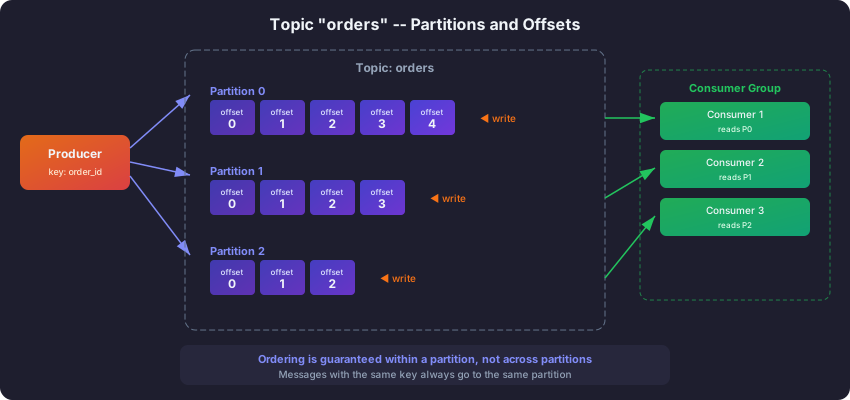
Topics: channels on a TV
A topic is a named, logical channel for a category of events. The simplest way to think about it is like a TV channel. ESPN carries sports. CNN carries news. The Weather Channel carries forecasts. Each channel has a specific focus, and viewers tune into the channels they care about.
Kafka topics work the same way. You create a topic for each category of data in your system. An e-commerce company might have topics named user-signups (every new registration), order-events (the lifecycle of every order from creation to delivery), page-views (every page load across all services), and inventory-changes (database change stream from the inventory system).
Producers publish events to a specific topic. Consumers subscribe to the topics they need. The order service does not need to know about page views, so it never subscribes to that topic. The analytics team needs everything, so they subscribe to all of them.
Why not just one big topic for everything?
You could technically dump all your data into a single topic, but that would be like having one TV channel that broadcasts sports, news, weather, cooking shows, and cartoons all mixed together. Every consumer would have to filter through mountains of irrelevant data to find what it cares about. Separate topics give you clean boundaries, independent configuration (different retention periods, different partition counts), and the ability to manage access control per topic.
The multi-subscriber model: reading without consuming
This is one of the most important things to understand about Kafka topics, and it is where Kafka fundamentally differs from traditional message queues.
In a traditional queue (like RabbitMQ or SQS), when a consumer reads a message, that message is removed from the queue. It is like taking a book off a library shelf — once you take it, nobody else can read it. This means if three different services need the same data, you need three separate queues with three copies of every message.
In Kafka, reading a message does not remove it. The data stays in the topic regardless of how many consumers have read it. It is more like a newspaper archive — everyone can read the same edition, nobody’s reading affects anyone else, and the newspapers stay on the shelf until the library decides to clear them out (based on the retention policy).
                    order-events topic
                    (12 partitions)
                         |
         +---------------+---------------+
         |               |               |
   Consumer Group A  Consumer Group B  Consumer Group C
   (Order Service)   (Analytics)       (Fraud Detection)
   reads at offset   reads at offset   reads at offset
   1,205,000         1,180,000         1,204,500
In this example, three completely independent teams consume the same order-events topic. The Order Service is the furthest ahead, the Fraud Detection team is slightly behind, and the Analytics team is the furthest behind (perhaps because it does heavier processing per message). None of them affect each other. The Analytics team being slow does not block the Order Service. And Kafka does not need to maintain three copies of the data — there is one topic, and each consumer group simply tracks its own reading position.
Partitions: lanes on a highway
A partition is a single ordered, append-only sequence of records within a topic. When you create a topic with 12 partitions, you are creating 12 independent logs that together make up the topic.
The highway analogy works well here. A single-lane road can only handle one car at a time. If traffic gets heavy, you get a bottleneck. Adding more lanes lets more cars travel simultaneously, increasing throughput. Partitions are Kafka’s lanes — more partitions means more consumers can read in parallel, and more brokers can share the storage load.
Why partitions exist: the two problems they solve
Partitions solve two critical problems simultaneously.
Problem 1: Parallelism. If a topic has only one partition, only one consumer in a group can read from it at a time. That consumer becomes a bottleneck if data arrives faster than it can process. With 12 partitions, up to 12 consumers in a single group can each read from their own partition simultaneously, multiplying your processing throughput by 12.
Problem 2: Distributed storage. A single server has limited disk space and I/O bandwidth. Partitions let you spread a topic’s data across multiple brokers. A topic with 12 partitions on a 3-broker cluster will have roughly 4 partition leaders per broker, distributing the I/O load evenly.
Topic: order-events (12 partitions, 3 brokers)

Broker 0            Broker 1            Broker 2
--------            --------            --------
P0 (Leader)         P1 (Leader)         P2 (Leader)
P3 (Leader)         P4 (Leader)         P5 (Leader)
P6 (Leader)         P7 (Leader)         P8 (Leader)
P9 (Leader)         P10 (Leader)        P11 (Leader)
How many partitions should you use?
This is one of the most common questions, and the answer depends on your situation. Here is a simplified framework.
If you have a small application with modest throughput (a few hundred messages per second), 3-6 partitions is usually plenty. If you are building a high-throughput pipeline processing thousands of messages per second with a large team of consumers, you might use 30-100+ partitions. A good rule of thumb is to start with at least as many partitions as the maximum number of consumers you expect to have in a single consumer group.
One important constraint: you can increase the number of partitions for an existing topic, but you cannot decrease them without deleting and recreating the topic. So it is better to start with a reasonable number rather than having to change it later. For most topics, 6-12 partitions is a sensible starting point.
Key-based partitioning: same customer, same lane
When a producer sends a message with a key, Kafka uses a hash function to determine which partition the message goes to:
partition = hash(key) % number_of_partitionsThis guarantees that all messages with the same key always land in the same partition. And since messages within a partition are strictly ordered, this gives you ordering guarantees per key.
Why does this matter? Consider an order processing system. An order goes through stages: created, paid, shipped, delivered. If these events land in different partitions, a consumer might process “shipped” before “created” because different consumers read different partitions at different speeds. By using the order ID as the key, all events for order-123 go to the same partition and are guaranteed to arrive in order.
// All events for order-123 go to the same partition, in order
producer.send(new ProducerRecord<>("order-events", "order-123", orderCreatedJson));
producer.send(new ProducerRecord<>("order-events", "order-123", orderPaidJson));
producer.send(new ProducerRecord<>("order-events", "order-123", orderShippedJson));
Think of it like lanes at a toll booth. You want all the cars from the same family to stay in the same lane so they arrive at the destination in the order they left. If they split across lanes, a car that left later might arrive first because its lane was faster.
Round-robin partitioning: when order does not matter
When no key is specified (key is null), Kafka distributes messages across partitions for even load balancing. Use this when you care about throughput but not about ordering — for example, page view events where it does not matter which page view is processed first.
// No key: distributed across partitions for maximum throughput
producer.send(new ProducerRecord<>("page-views", null, pageViewJson));
Ordering guarantees: within a partition only
This is a critical point that trips up many beginners. Kafka guarantees message ordering within a single partition, not across partitions. Messages A, B, and C in Partition 0 will always be read in that order. Messages D, E, and F in Partition 1 will always be read in that order. But the relative order of A and D is not guaranteed.
If you absolutely need total ordering across an entire topic, you must use a single partition — but this limits you to a single consumer and sacrifices all parallelism. In practice, this is rarely necessary. You design your key space so that ordering only matters within a key (all events for a given user, order, or device), and key-based partitioning handles the rest.
Offsets: bookmarks that track your reading position
An offset is a sequential, monotonically increasing integer assigned to each record within a partition. Think of it as a bookmark in a book. The book (the partition) has numbered pages (offsets), and your bookmark tells you where you left off reading.
Partition 0:
Offset:  0    1    2    3    4    5    6    7    8
         |    |    |    |    |    |    |    |    |
Data:   [A]  [B]  [C]  [D]  [E]  [F]  [G]  [H]  [I]
                              ^
                              |
                    Consumer's current position (offset 4)
                    Has processed 0-3, will read 4 next
Each consumer group maintains its own bookmark for each partition. This is stored in a special internal Kafka topic called __consumer_offsets. When a consumer restarts (after a crash, a deployment, or routine maintenance), it checks its bookmark and picks up exactly where it left off. No data is lost, and no data is processed twice (assuming you handle offset commits correctly).
Committing offsets: saving your bookmark
“Committing” an offset is like placing your bookmark at a specific page. It tells Kafka “I have successfully processed everything up to this point.” The next time the consumer starts, it will begin reading from the committed offset.
There are two approaches to committing offsets.
Automatic commit is the default behavior. Every 5 seconds, the consumer automatically saves its current position. This is simple but has a subtle risk: if the consumer crashes after auto-committing but before finishing processing the last batch of messages, those messages will be skipped on restart because the bookmark has already moved past them.
Manual commit gives you precise control. You explicitly tell Kafka “I am done with these messages” only after your application has fully processed them. This is more work to implement but eliminates the risk of losing messages during crashes. For any application where missing a message has real consequences (financial transactions, order processing, compliance logging), use manual commits.
// Manual commit - you control exactly when the bookmark is saved
consumer.commitSync();
The auto.offset.reset setting: where to start reading
When a consumer group encounters a partition for the first time (no bookmark exists yet), or when its bookmark points to a position that no longer exists (because the data was deleted by retention), Kafka needs to know where to start. The auto.offset.reset setting controls this.
Setting it to earliest means “start from the very beginning — I want to read all available historical data.” Setting it to latest means “start from right now — I only care about new messages going forward.” Setting it to none throws an error, which is useful in production when you want to fail loudly rather than silently starting from the wrong position.
Replaying data: the power of resettable bookmarks
One of Kafka’s most powerful features is the ability to move your bookmark backward. In a traditional message queue, once you read a message, it is gone forever. In Kafka, the data stays in the topic (until retention deletes it), and you can reset your consumer group’s offset to any position.
This is transformative for debugging and reprocessing. If your analytics pipeline had a bug that produced incorrect results for the past 3 days, you can fix the bug, reset the consumer group’s offset back to 3 days ago, and reprocess everything correctly. No data was lost. No emergency database restores needed.
# Reset to the beginning of all partitions
bin/kafka-consumer-groups.sh --reset-offsets \
  --group my-consumer-group \
  --topic order-events \
  --to-earliest \
  --bootstrap-server localhost:9092 \
  --execute

# Reset to a specific point in time
bin/kafka-consumer-groups.sh --reset-offsets \
  --group my-consumer-group \
  --topic order-events \
  --to-datetime "2026-07-01T00:00:00.000" \
  --bootstrap-server localhost:9092 \
  --execute
Note that the consumer group must be inactive (no running consumers) when resetting offsets. You cannot move the bookmark while someone is actively reading the book.
Log retention: when old data gets cleaned up
Kafka does not keep data forever by default. Retention controls when old data becomes eligible for deletion, and understanding it helps you balance storage costs against the ability to replay.
Time-based retention
The default retention period is 7 days. Any log segment whose newest message is older than 7 days will be deleted. Think of it like a newspaper stand that keeps the last week’s editions and throws away anything older.
You set this based on your business needs. If your consumers always process data within a few hours, 1 day of retention might be enough. If you need the ability to reprocess last month’s data after finding a bug, you might keep 30 days. For compliance or event sourcing, you might keep data indefinitely by setting retention to -1.
| Use case | Retention period | Reasoning |
|---|---|---|
| Real-time processing | 1 day | Events consumed within hours |
| Analytics replay | 7 days (default) | Ability to reprocess recent data |
| Compliance / audit | 90 days | Regulatory requirement |
| Event sourcing | Infinite (-1) | Complete history is the system of record |
Size-based retention
Alternatively (or additionally), you can cap retention by total partition size. When the total size of all segments in a partition exceeds the limit, the oldest segments are deleted first. This is useful when you want to limit disk usage regardless of time.
When both time-based and size-based retention are configured, a segment is deleted if either condition is met. If you want truly infinite retention, set both to -1.
Log compaction: keeping only the latest state
For some use cases, you do not care about the complete history of changes. You only care about the current state of each entity. Imagine a topic that stores user profiles. Over time, a user might update their profile dozens of times. If you are building a service that loads user profiles at startup, you only need the latest version — you do not need to replay all 47 profile updates to arrive at the current state.
Log compaction solves this. When a topic is configured with cleanup.policy=compact, Kafka runs a background process that scans the log and removes older records with duplicate keys, keeping only the most recent value for each key. It is like a filing cabinet where you periodically go through and shred old revisions, keeping only the current version of each document.
Before compaction:
Offset  Key     Value
0       user-1  {"name": "Alice", "plan": "free"}
1       user-2  {"name": "Bob", "plan": "free"}
2       user-1  {"name": "Alice", "plan": "pro"}
3       user-3  {"name": "Charlie", "plan": "free"}
4       user-2  {"name": "Bob", "plan": "enterprise"}

After compaction:
Offset  Key     Value
2       user-1  {"name": "Alice", "plan": "pro"}
3       user-3  {"name": "Charlie", "plan": "free"}
4       user-2  {"name": "Bob", "plan": "enterprise"}
Notice that the offsets are preserved — they are never reassigned. Offset 0 and 1 simply no longer exist in the log because newer values replaced them.
Tombstones: how to delete from a compacted topic
To remove a key entirely from a compacted topic, you produce a message with that key and a null value. This special record is called a tombstone. The compactor will eventually remove the tombstone and all prior records for that key.
// Delete user-1 from the compacted topic
producer.send(new ProducerRecord<>("user-profiles", "user-1", null));
Tombstones are retained for a configurable period (default: 24 hours) after compaction, giving downstream consumers time to observe the deletion before it disappears entirely.
When to use compaction vs. deletion
Use deletion (the default) when you care about time-windowed history — “show me everything that happened in the last 7 days.” This is the right choice for event streams like page views, log entries, and transaction records.
Use compaction when you care about the latest state per key — “show me the current profile for each user.” This is the right choice for lookup tables, configuration distribution, and Kafka Streams changelog topics.
You can even combine both policies by setting cleanup.policy=delete,compact. This keeps the latest value per key (compaction) but also deletes any record older than the retention period, even if it is the latest for its key.
Checking consumer lag: is your consumer keeping up?
Consumer lag is the difference between the latest offset in a partition (the most recently produced message) and the consumer group’s committed offset (the most recently processed message). A growing lag means the consumer is falling behind — data is arriving faster than it can be processed.
bin/kafka-consumer-groups.sh --describe \
  --group order-processor \
  --bootstrap-server localhost:9092
GROUP TOPIC PARTITION CURRENT-OFFSET LOG-END-OFFSET LAG
order-processor order-events 0 15000 15230 230
order-processor order-events 1 15180 15180 0
order-processor order-events 2 15100 15295 195In this output, Partition 1 has zero lag (the consumer is fully caught up), while Partitions 0 and 2 are behind by 230 and 195 messages respectively. If this lag keeps growing, you need to either optimize your consumer’s processing speed or add more consumers to the group (up to the number of partitions) to increase parallelism.
Next steps
You now have a thorough understanding of Kafka’s core data model — topics as channels, partitions as parallel lanes, and offsets as bookmarks. Here is where to go from here:
- Kafka Producers Explained — learn how producers batch, partition, and deliver messages reliably.
- Kafka Consumers and Consumer Groups — understand rebalancing, offset management, and scaling consumption.
- Kafka Architecture Explained — see how the broker infrastructure underneath supports everything you learned here.
Related articles
- Kafka Kafka Installation and Setup: Local, Docker, and CLI
Step-by-step guide to running Apache Kafka locally using KRaft mode binaries and Docker Compose — includes Schema Registry, Kafka UI, topic creation, and CLI producer/consumer testing.
- Kafka What Is Apache Kafka? A Complete Introduction
A practical introduction to Apache Kafka — what it is, why it exists, its core concepts, and how it differs from traditional message queues. Includes your first producer and consumer code.
- Kafka Dead Letter Queues in Kafka: Handling Failed Messages
Learn how to implement Dead Letter Queues in Kafka to gracefully handle failed messages with retry strategies, monitoring, and production patterns.
- Kafka Kafka Multi-Cluster Replication with MirrorMaker 2
Master Kafka multi-cluster replication using MirrorMaker 2 with active-passive and active-active topologies, offset sync, and disaster recovery.