Kafka Architecture Explained: Brokers, Replication, and KRaft
A detailed look at Kafka's internal architecture — broker clusters, KRaft consensus, replication protocols, partition leadership, log segments, and how they combine to deliver fault tolerance at scale.
What you'll learn
- ✓How a Kafka broker cluster is organized
- ✓ZooKeeper (legacy) vs KRaft mode and why the migration happened
- ✓How KRaft consensus works internally
- ✓Replication: leaders, followers, and In-Sync Replicas (ISR)
- ✓How partition leadership and failover work
- ✓Log segments, compaction, and retention mechanics
Prerequisites
- •Basic understanding of what Kafka is (topics, producers, consumers)
- •Familiarity with distributed systems concepts like replication and consensus
Understanding Kafka’s architecture is not just academic — it directly affects how you operate, troubleshoot, and tune Kafka in production. When a broker goes down at 3 AM, knowing how replication and leader election work is the difference between calmly watching the cluster self-heal and frantically Googling error messages. This article walks through the key architectural components using real-world analogies to make each concept stick.
The broker cluster: a warehouse complex for your data
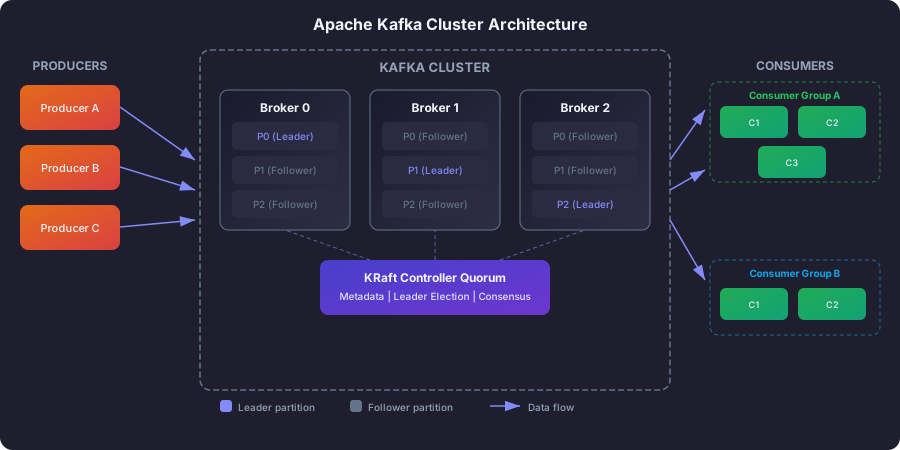
Think of a Kafka cluster as a warehouse complex — a group of buildings, each storing goods, each capable of receiving deliveries and fulfilling orders. In Kafka terms, each building is a broker (a server), and the goods being stored are your messages.
A Kafka deployment consists of one or more brokers that form a cluster. Each broker is identified by a unique integer ID and is responsible for storing a subset of the data (partitions) and serving client requests. A production cluster typically runs at least 3 brokers, because if you only have one warehouse and it catches fire, you lose everything.
                    Kafka Cluster
 +------------------------------------------------+
 |                                                |
 |   +----------+  +----------+  +----------+    |
 |   | Broker 0 |  | Broker 1 |  | Broker 2 |    |
 |   |          |  |          |  |          |    |
 |   | P0 (L)   |  | P0 (F)   |  | P1 (L)   |    |
 |   | P1 (F)   |  | P2 (L)   |  | P2 (F)   |    |
 |   +----------+  +----------+  +----------+    |
 |                                                |
 |         L = Leader    F = Follower             |
 +------------------------------------------------+
In a well-configured cluster, the work is distributed evenly. Each partition has one leader broker that handles all reads and writes, and one or more follower brokers that maintain backup copies. One broker also takes on the role of cluster controller, handling administrative operations like deciding which broker leads which partition and what happens when a broker goes down.
Here is how to think about each broker’s daily responsibilities. The broker accepting produce requests is like a warehouse dock worker receiving deliveries and putting goods on the right shelves. Serving fetch requests is like fulfilling customer orders — pulling items from the shelves and handing them over. Managing replicas (for partitions where the broker is a follower) is like a backup warehouse periodically copying the inventory list from the main warehouse so it can take over if needed.
ZooKeeper vs KRaft: why Kafka fired its manager
The ZooKeeper era: an external brain
For over a decade, Kafka relied on a completely separate system called Apache ZooKeeper to manage its cluster. ZooKeeper stored critical information: which brokers are alive, which topics exist, who leads which partition, and various configuration details.
Think of it this way. Imagine a warehouse complex where the buildings themselves have no idea how many other buildings exist, who is storing what, or who is in charge. So you hire an external management company (ZooKeeper) that sits in a separate office building across town and keeps track of everything. Every time a warehouse needs to know anything about the complex, it calls the management company.
This worked, but it created serious operational headaches.
Two systems to babysit instead of one. You had to provision, configure, monitor, and upgrade ZooKeeper separately from Kafka. ZooKeeper had its own scaling characteristics, its own failure modes, and its own configuration language. Running Kafka in production meant being an expert in two distributed systems, not one.
ZooKeeper was a single point of fragility. If ZooKeeper went down or became partitioned from the Kafka cluster, the entire cluster could stop accepting new topic creations, partition reassignments, or leader elections. Your data kept flowing (existing leaders continued serving reads and writes), but you lost the ability to manage the cluster.
Scaling limitations. ZooKeeper stored all metadata in memory. As clusters grew to tens of thousands of partitions, the metadata volume could overwhelm ZooKeeper, causing slow leader elections and unstable behavior. Kafka was designed to scale horizontally, but ZooKeeper was the bottleneck that did not scale the same way.
The KRaft revolution: Kafka becomes self-managing
Starting with Kafka 3.3 and becoming production-ready in Kafka 3.5, KRaft (Kafka Raft) mode eliminates the ZooKeeper dependency entirely. Kafka now manages its own metadata using a built-in consensus protocol based on Raft.
Going back to the warehouse analogy: instead of relying on an external management company, the warehouses now elect a manager from among themselves. A small group of warehouses (the controller quorum) vote on decisions, keep a shared logbook of every management decision ever made, and distribute updates to all the other warehouses. If the current manager becomes unavailable, the remaining members of the quorum immediately elect a new one. No phone calls to an outside office. No dependency on a separate system.
  ZooKeeper Mode (Legacy)           KRaft Mode (Modern)
  -----------------------           -------------------

  +----------+    +---------+       +-------------------+
  |  Kafka   |<-->|ZooKeeper|       |   Kafka Cluster   |
  |  Cluster |    | Ensemble|       |                   |
  +----------+    +---------+       | Controller Quorum |
                                    | (internal Raft)   |
  Two separate systems              +-------------------+
  to deploy and manage
                                    Single system
How KRaft works under the hood
In KRaft mode, a small subset of brokers (typically 3 or 5) form a controller quorum. These nodes use the Raft consensus protocol to agree on every metadata change — topic creation, partition reassignment, broker registration, and more.
All metadata is stored in a special internal topic called __cluster_metadata. Every metadata change is written as a record to this topic, creating an ordered log of every decision ever made. All brokers in the cluster consume this metadata log to stay up to date, much like how every warehouse in the complex reads from a shared bulletin board.
Each controller leader is assigned a monotonically increasing epoch number. If an old controller comes back from the dead after a network partition, it cannot make stale decisions because all brokers will reject requests from outdated epochs. This is called epoch-based fencing, and it prevents the “split-brain” problem where two nodes both think they are in charge.
For small development clusters, you can run each node as both a broker and a controller (combined mode). For production, it is better to have dedicated controller nodes that do nothing but manage metadata, keeping that responsibility separate from the heavy lifting of storing and serving data.
# Combined mode: broker + controller on same node (dev/small clusters)
process.roles=broker,controller

# Separated mode: dedicated controller nodes (production)
# On controller nodes:
process.roles=controller

# On broker nodes:
process.roles=broker
Replication: backup copies in different buildings
Replication is the mechanism that makes Kafka fault-tolerant. The idea is straightforward: if you keep your only copy of important data on a single server and that server’s hard drive fails, the data is gone. So Kafka stores multiple copies of every partition on different brokers.
Think of it like storing important documents. You would not keep the only copy of your passport in one drawer. You would keep the original in a safe (the leader), a photocopy at your office (follower 1), and another photocopy at a relative’s house (follower 2). If any one location is destroyed, the document survives.
Leader and followers: who does the work
For each partition, one replica is designated the leader and the rest are followers. The leader handles all the real work — receiving messages from producers and serving messages to consumers. Followers have one job: stay up to date with the leader by continuously copying new data from it.
This might seem wasteful — why have copies that do not serve reads? The answer is simplicity and consistency. If multiple replicas served reads simultaneously, you would need complex coordination to ensure every reader sees the same data at the same time. By funneling everything through the leader, Kafka avoids an entire class of consistency bugs. The followers are there as insurance, ready to take over if the leader fails.
In-Sync Replicas (ISR): who is keeping up
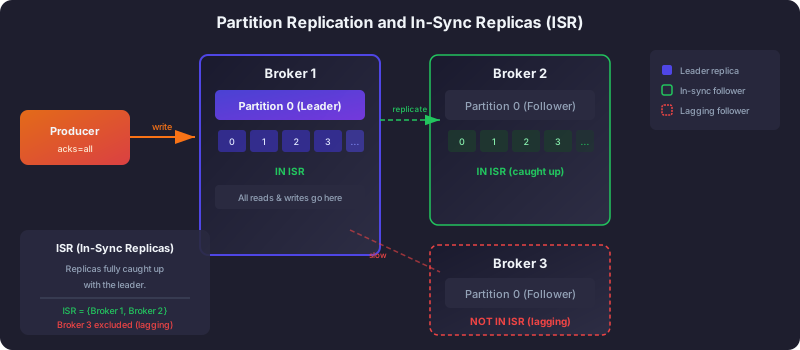
Not all followers are equal at any given moment. A follower that is fully caught up with the leader is called an In-Sync Replica (ISR). A follower that has fallen behind — perhaps because of a slow disk, a network hiccup, or a garbage collection pause — falls out of the ISR.
The ISR is critical because it determines Kafka’s durability guarantees. When a producer sends a message with acks=all, Kafka waits until every broker in the ISR has acknowledged the write before telling the producer “success.” This means the message is safely stored in multiple locations before the producer moves on.
Here is a concrete scenario. Imagine a partition with a replication factor of 3, spread across Brokers 0, 1, and 2. Broker 0 is the leader, and it has written messages up through offset 99. Broker 1 has also replicated all messages through offset 99, so it is in the ISR. But Broker 2 is experiencing a slow disk and has only replicated through offset 95. It has fallen behind by more than the allowed lag time (replica.lag.time.max.ms, which defaults to 30 seconds), so it has been removed from the ISR.
Partition 0, Replication Factor = 3

  Broker 0 (Leader)     Broker 1 (Follower)    Broker 2 (Follower)
  offset: 0-99          offset: 0-99           offset: 0-95
  [IN ISR]              [IN ISR]               [NOT IN ISR - lagging]

  ISR = {Broker 0, Broker 1}
At this point, with acks=all, a produce request needs acknowledgment from Brokers 0 and 1 (the ISR members). If Broker 2 eventually catches up, it rejoins the ISR. If it stays behind, the cluster continues operating with a reduced ISR.
The acks setting: choosing your durability level
Producers control how many replicas must acknowledge a write before the producer considers it successful. This is a direct tradeoff between durability and latency.
With acks=0, the producer does not wait for any acknowledgment. It fires the message and immediately moves on. This is the fastest option but provides no guarantee that the message was even received. Use this for data you can afford to lose, like debug logs or metrics where an occasional dropped data point is acceptable.
With acks=1, the producer waits for the leader to write the message to its local log. This is a middle ground — your data is safe as long as the leader does not crash before a follower copies it. For many use cases, this is good enough.
With acks=all, the producer waits for every ISR replica to acknowledge. Combined with min.insync.replicas=2, this means at least two brokers have the data on disk before the producer gets a success response. This is the gold standard for critical data like financial transactions or order events where losing a single message is unacceptable.
# Recommended production settings for critical data:
# Topic: replication.factor=3
min.insync.replicas=2
# Producer: acks=all
This configuration tolerates the failure of 1 broker without data loss and without blocking writes.
Partition leadership and failover: what happens when a broker dies
When a leader broker becomes unavailable — whether due to a crash, a network partition, or a planned shutdown — the controller needs to elect a new leader for the affected partitions. This process is automatic and typically completes in seconds.
Here is what happens step by step. First, the controller detects that the broker is unreachable (through heartbeat timeouts in KRaft mode). Then, for each partition whose leader was on the failed broker, the controller picks a new leader from the ISR — one of the followers that was already fully caught up. The controller updates the metadata and pushes the change to all brokers. Producers and consumers that were talking to the old leader get a “not leader” error on their next request, refresh their metadata, discover the new leader, and resume normal operation.
The entire process is transparent to your application code. You do not need to write failover logic in your producer or consumer. The Kafka client library handles leader discovery automatically.
Unclean leader election: the safety vs. availability tradeoff
There is one edge case worth understanding. What happens if a leader goes down and none of the ISR followers are available either? Kafka faces a stark choice: wait for an ISR replica to come back (which could mean the partition is unavailable for minutes or hours), or promote a non-ISR replica that has fallen behind (which means some recent messages might be lost).
This is controlled by unclean.leader.election.enable, which defaults to false since Kafka 0.11. For most production systems, you should leave it disabled. It is better to have a partition temporarily unavailable than to silently lose data. The only exception might be systems where availability is more important than correctness, like a real-time dashboard that can tolerate gaps.
Log segments on disk: how Kafka stores data
Kafka stores each partition as a sequence of log segments on disk. Understanding this helps you reason about retention, disk usage, and performance.
Each segment is a file that contains a batch of messages. Only the latest segment (the “active” segment) accepts new writes. Once a segment reaches a configured size (default: 1 GB) or age, it is “rolled” (closed) and a new segment begins. Closed segments are immutable — they are never modified, only eventually deleted or compacted.
Alongside each segment file, Kafka maintains index files that map offsets to byte positions and timestamps to offsets. These indexes allow Kafka to quickly seek to any offset without scanning the entire log — similar to an index at the back of a textbook that tells you exactly which page to flip to.
Retention: when old data gets cleaned up
Kafka provides two mechanisms for cleaning up old data. Time-based retention deletes segments whose newest message is older than a configured threshold (default: 7 days). Size-based retention deletes the oldest segments when the total partition size exceeds a limit. When both are configured, a segment is deleted if either condition is met.
Retention operates at the segment level, not the message level. This means actual data lifetime can slightly exceed your configured retention by up to one segment’s worth of time, because Kafka will not delete an active segment.
Log compaction: keeping the latest state
For some use cases, you do not care about the full history of changes — you only care about the current state of each entity. This is where log compaction comes in.
When a topic is configured with cleanup.policy=compact, Kafka runs a background process that scans the log and removes older records that share the same key, keeping only the most recent value for each key. It is like a filing cabinet where you only keep the latest version of each document and shred the old revisions.
Before compaction:           After compaction:
offset  key   value          offset  key   value
  0     A     v1               2     A     v3
  1     B     v1               3     B     v2
  2     A     v3               4     C     v1
  3     B     v2
  4     C     v1
Compacted topics are ideal for things like user profiles (you always want the latest profile), configuration distribution (consumers need current config values), and Kafka Streams changelog topics. Kafka itself uses compaction for the internal __consumer_offsets topic that tracks consumer positions.
The complete journey of a message
Now that you understand all the components, here is the full lifecycle of a single message flowing through Kafka. Following this path from start to finish ties all the architecture concepts together.
The producer serializes the message and determines which partition it belongs to (via key hash or round-robin). It sends a produce request to the leader broker for that partition. The leader appends the message to its active log segment on disk. Followers fetch the new message from the leader and append it to their own local logs. Once all ISR replicas have acknowledged (if using acks=all), the leader sends a success response to the producer. The message is now “committed” and visible to consumers.
On the consumer side, the consumer sends a fetch request to the leader with its current offset. The leader reads from the log (often served directly from the operating system’s page cache, which is why Kafka is so fast) and returns a batch of messages. The consumer processes them and commits its new offset. The message remains in the log until retention or compaction removes it, regardless of how many consumer groups have read it.
Next steps
You now understand how Kafka is built from the inside out — brokers, replication, KRaft consensus, and log storage. Here is where to go next:
- Installation and Setup — get a Kafka cluster running on your machine and start interacting with it hands-on.
- Topics, Partitions, and Offsets — dive deeper into the data model that sits on top of this architecture.
- What Is Apache Kafka? — revisit the fundamentals if any concept here was unfamiliar.
Related articles
- Kafka Kafka Connect: Streaming Data Integration Framework
Master Kafka Connect for integrating external systems with Kafka using source and sink connectors, Debezium CDC, JDBC, Elasticsearch, REST API management, and SMTs.
- Kafka Kafka Consumers and Consumer Groups: Complete Guide
Master Kafka consumers and consumer groups including poll loops, offset management, rebalancing strategies, and partition assignment with Python and Java examples.
- Kafka Kafka Producers Explained: Architecture, Configuration & Code
Learn how Kafka producers work including batching, partitioning, serialization, delivery guarantees, and idempotent production with Python and Java examples.
- Kafka Schema Registry and Avro Serialization in Apache Kafka
Learn how Confluent Schema Registry manages Avro schemas for Kafka producers and consumers, enabling safe schema evolution and decoupled services.