Branching and Conditional Logic in Apache Airflow
Learn how to implement conditional workflows in Airflow using BranchPythonOperator, ShortCircuitOperator, trigger rules, and the TaskFlow branch decorator.
What you'll learn
- ✓Use BranchPythonOperator to select execution paths
- ✓Configure trigger rules for join points and complex dependencies
- ✓Skip downstream tasks with ShortCircuitOperator
- ✓Implement branching with the @task.branch() decorator
Prerequisites
- •Basic Airflow DAG authoring
- •Python fundamentals
- •Airflow TaskFlow API basics
Why Branching Matters
Not every pipeline should run the same way every time. Think about it: your company processes customer orders on weekdays, but on weekends you run a full data warehouse refresh instead. Or maybe you have a pipeline that handles small CSV files with pandas but switches to Spark when the data exceeds a million rows. Perhaps you want to skip sending marketing emails entirely during a holiday freeze.
These are all examples of conditional logic, and they come up constantly in real-world data engineering. Without branching, you would need separate DAGs for each scenario, or worse, a single monolithic task stuffed with if/else statements that becomes impossible to debug. Branching lets you express these decisions directly in your DAG’s structure, so that Airflow can visualize, track, and manage each path independently.
Think of it like a railroad switch. A train approaches a junction and the switch determines which track it takes. The other track still exists, but the train simply does not travel down it. In Airflow, the “train” is your task execution, the “switch” is a branch operator, and the unused track gets marked as “skipped” in the UI so you can see exactly what happened and why.
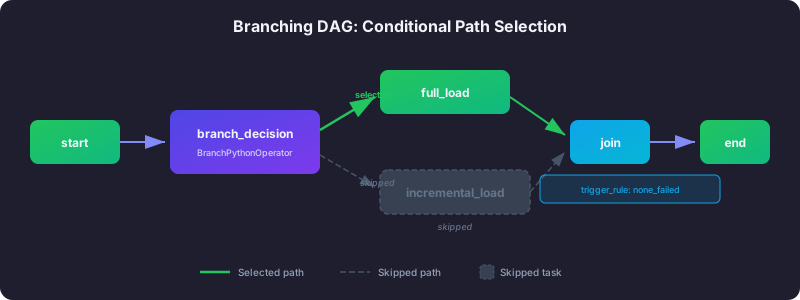
Airflow gives you several tools for implementing conditional logic. Each one is designed for a different kind of decision, and picking the right one makes the difference between a clean, maintainable DAG and a tangled mess. Let us walk through each one.
BranchPythonOperator: Choosing Between Multiple Paths
The BranchPythonOperator is the workhorse of Airflow branching. It works like this: you give it a Python function, that function runs and returns the name (task ID) of whichever downstream task should execute next. Every other downstream task gets marked as “skipped.” It is the equivalent of standing at a fork in the road and pointing down one path.
Here is a concrete scenario. Your pipeline processes orders, and Monday through Friday you run an incremental update that only handles new records since yesterday. On Saturday and Sunday, you run a heavier full-refresh job that rebuilds the entire table. Rather than building two separate DAGs or cramming everything into one task, you create a branch that checks the day of the week and routes execution accordingly.
The function you write receives Airflow’s context, which includes the logical execution date. You inspect that date, make your decision, and return the task ID of the path you want. Airflow handles the rest — it runs the selected task and marks the other as skipped.
from airflow import DAG
from airflow.operators.python import BranchPythonOperator
from airflow.operators.empty import EmptyOperator
from datetime import datetime

def choose_branch(**context):
    execution_date = context['logical_date']
    day_of_week = execution_date.weekday()

    if day_of_week < 5:
        return 'weekday_processing'
    else:
        return 'weekend_processing'

with DAG(
    dag_id='branching_example',
    start_date=datetime(2026, 1, 1),
    schedule='@daily',
    catchup=False,
) as dag:

    branch = BranchPythonOperator(
        task_id='branch_decision',
        python_callable=choose_branch,
    )

    weekday = EmptyOperator(task_id='weekday_processing')
    weekend = EmptyOperator(task_id='weekend_processing')

    branch >> [weekday, weekend]
Notice that the function returns a string — the task ID — not the task object itself. This is a common source of confusion for beginners. Also, the task ID you return must be a direct downstream dependency of the branch operator. You cannot skip levels in the chain, so if your branch operator connects to task A, which connects to task B, you cannot return 'task_b' directly from the branch function.
You can also return a list of task IDs to activate multiple branches simultaneously. This is useful when some branches should always run while others are conditional. For example, you might always generate reports but only send notifications on certain days.
def choose_multiple_branches(**context):
    branches = ['always_run']
    if context['params'].get('include_reports'):
        branches.append('generate_reports')
    if context['params'].get('send_notifications'):
        branches.append('send_notifications')
    return branches
One important thing to remember: your branch function must always return a valid task ID. If it returns None or a task ID that does not exist, the entire DAG run will fail. Always handle edge cases and consider adding a default branch as a safety net.
Trigger Rules: Controlling What Happens After a Branch
Here is the problem most people hit right after they get branching working. They add a “cleanup” or “finalize” task after their branches, expecting it to run no matter which branch was taken. But it gets skipped every time. Why?
By default, every Airflow task uses the trigger rule all_success, which means “only run if every single upstream task succeeded.” When a branch operator skips one path, those skipped tasks count as neither success nor failure — they are skipped. And since all_success requires all parents to succeed, a skipped parent causes the downstream task to be skipped too. It is like a chain reaction of skipping that cascades all the way down.
The fix is to change the trigger rule on your join point — the task where branches converge. Think of trigger rules as answering the question: “Under what conditions should this task run?” The most useful one for branching is none_failed_min_one_success, which means “run this task as long as no parent failed and at least one parent succeeded.” A skipped parent is fine. A successful parent counts. Only an actual failure stops execution.
Here are the trigger rules you will use most often in practice:
| Trigger Rule | When to Use It |
|---|---|
all_success | The default. All parents must succeed. Use for normal sequential tasks. |
none_failed_min_one_success | Join points after branches. Runs if at least one parent succeeded and none failed. |
one_success | Fire-and-forget patterns. Runs as soon as any one parent succeeds. |
all_done | Cleanup tasks that must run regardless. All parents must finish (any state). |
none_failed | Similar to join points but does not require any parent to have succeeded. |
always | Absolute last resort. Runs no matter what. Use sparingly. |
Here is a complete example showing how to set up a proper join point. The decide task picks either the fast or slow path. Whichever path is not chosen gets skipped. But the join_and_process task runs regardless because its trigger rule tolerates skipped upstream tasks.
from airflow.operators.empty import EmptyOperator
from airflow.operators.python import BranchPythonOperator, PythonOperator

def choose_path(**context):
    value = context['params'].get('mode', 'fast')
    return f'{value}_path'

def process_result(**context):
    print("Processing final result regardless of which branch ran")

with DAG(
    dag_id='trigger_rule_join',
    start_date=datetime(2026, 1, 1),
    schedule=None,
    catchup=False,
) as dag:

    branch = BranchPythonOperator(
        task_id='decide',
        python_callable=choose_path,
    )

    fast = EmptyOperator(task_id='fast_path')
    slow = EmptyOperator(task_id='slow_path')

    join = PythonOperator(
        task_id='join_and_process',
        python_callable=process_result,
        trigger_rule='none_failed_min_one_success',
    )

    branch >> [fast, slow] >> join
If you forget the trigger rule on that join task, it will be skipped every single time because one of its two upstream tasks will always be skipped. This is the number one branching mistake in Airflow, and nearly everyone makes it at least once.
ShortCircuitOperator: The Kill Switch
Sometimes you do not need to choose between paths. You just need a simple yes-or-no decision: should the rest of the pipeline run at all?
The ShortCircuitOperator is exactly this — a kill switch for everything downstream. Your function returns True or False. If True, execution continues normally as if the operator were not there. If False, every single downstream task gets skipped. No branching, no path selection, just “go” or “stop.”
This is incredibly useful for guard conditions. Imagine a pipeline that processes hourly data uploads. Sometimes there is no new data to process. Without a guard, your pipeline would spin up expensive Spark jobs, run quality checks, and send notification emails — all on zero records. With a ShortCircuitOperator at the top, you check whether new data exists and skip the entire pipeline if the answer is no.
Think of it like a circuit breaker in your house. When the breaker trips, everything on that circuit goes dark. You do not get to pick which appliances keep running. It is all or nothing.
from airflow.operators.python import ShortCircuitOperator

def check_data_available(**context):
    """Return True if there is data to process, False otherwise."""
    ti = context['ti']
    record_count = ti.xcom_pull(task_ids='count_records')
    return record_count > 0

with DAG(
    dag_id='short_circuit_example',
    start_date=datetime(2026, 1, 1),
    schedule='@hourly',
    catchup=False,
) as dag:

    count = SQLExecuteQueryOperator(
        task_id='count_records',
        conn_id='my_database',
        sql="SELECT COUNT(*) FROM staging_table WHERE processed = false",
    )

    check = ShortCircuitOperator(
        task_id='check_has_data',
        python_callable=check_data_available,
    )

    process = PythonOperator(
        task_id='process_data',
        python_callable=lambda: print("Processing..."),
    )

    notify = PythonOperator(
        task_id='send_notification',
        python_callable=lambda: print("Done processing"),
    )

    count >> check >> process >> notify
One subtle behavior to be aware of: by default, the ShortCircuitOperator overrides downstream trigger rules when it short-circuits. This means even a downstream task with trigger_rule='always' will still be skipped. If you want downstream trigger rules to be respected when the circuit is broken, set ignore_downstream_trigger_rule=False on the operator. Most of the time, you want the default behavior — when the kill switch is flipped, everything stops.
The @task.branch() Decorator: Cleaner Syntax for TaskFlow
If you are already using Airflow’s TaskFlow API (the decorator-based style of writing DAGs), there is a more elegant way to write branches. The @task.branch() decorator turns any decorated function into a branch operator, and it integrates naturally with the rest of your TaskFlow code.
The biggest advantage over BranchPythonOperator is that your branch function can accept arguments directly. With the classic operator, you typically have to pull values from XCom inside the function. With @task.branch(), you pass values in just like any other Python function call, and Airflow’s TaskFlow system handles the XCom wiring behind the scenes.
Here is an example where the pipeline checks the size of the dataset and routes to different processing strategies. Small datasets get simple Python processing, medium datasets use pandas, and large datasets spin up a Spark job. The branch function receives the data size as a regular argument.
from airflow.decorators import dag, task
from datetime import datetime

@dag(
    dag_id='taskflow_branching',
    start_date=datetime(2026, 1, 1),
    schedule='@daily',
    catchup=False,
)
def taskflow_branching():

    @task.branch()
    def decide_processing_type(data_size: int):
        if data_size > 1_000_000:
            return 'heavy_processing'
        elif data_size > 10_000:
            return 'medium_processing'
        else:
            return 'light_processing'

    @task
    def get_data_size():
        return 500_000

    @task
    def heavy_processing():
        print("Running Spark job for large dataset")

    @task
    def medium_processing():
        print("Running pandas processing for medium dataset")

    @task
    def light_processing():
        print("Running simple Python processing")

    @task(trigger_rule='none_failed_min_one_success')
    def finalize():
        print("Finalizing results")

    size = get_data_size()
    branch = decide_processing_type(size)

    heavy = heavy_processing()
    medium = medium_processing()
    light = light_processing()

    branch >> [heavy, medium, light] >> finalize()

taskflow_branching()
Notice that finalize() still needs the none_failed_min_one_success trigger rule. Whether you use the classic operator or the TaskFlow decorator, the join-point problem is the same. The decorator changes the syntax, not the underlying behavior.
The return value is still a task ID string (or a list of strings). This is one place where @task.branch() might feel slightly awkward — you are returning hardcoded string names rather than Python references. But this is a fundamental part of how Airflow’s branching mechanism works under the hood.
Common Pitfalls and How to Avoid Them
Before we wrap up, here are the mistakes that trip up even experienced Airflow users.
Forgetting trigger rules at join points. We covered this extensively, but it bears repeating because it is the single most common branching bug. If a task follows a branch and keeps getting skipped, check its trigger rule first.
Using branching when a simple if-statement would suffice. If you just need to conditionally execute some logic inside a single task, use a normal Python if statement. Creating separate branch paths for something that could be three lines of code inside one task adds unnecessary complexity to your DAG graph and makes it harder to understand.
Not handling all possible return values. If your branch function can encounter unexpected input, make sure it always returns a valid task ID. Add a default case or raise a clear error rather than letting it return None silently.
Branching to non-immediate downstream tasks. The task ID returned by your branch function must be a direct child of the branch operator in the dependency chain. You cannot skip intermediate tasks.
When to Use Each Pattern
Choosing the right branching tool is straightforward once you understand what each one does. Use ShortCircuitOperator when you need a simple go/no-go decision — should the rest of the pipeline run or not? Use BranchPythonOperator when you are working with classic operator-based DAGs and need to select between multiple paths. Use @task.branch() when you are already using the TaskFlow API and want cleaner integration with typed arguments. And sometimes, trigger rules alone are enough — if your conditional logic is about what happens when upstream tasks fail or get skipped, you may not need an explicit branch operator at all.
| Pattern | Best For |
|---|---|
ShortCircuitOperator | Simple go/no-go decisions (skip everything downstream) |
BranchPythonOperator | Classic DAGs with clear multi-path selection |
@task.branch() | TaskFlow DAGs where you want typed arguments |
| Trigger rules alone | Complex dependency logic without explicit branching |
Next Steps
Now that you understand how to build conditional workflows, here are some directions to explore:
- Connections and Variables — Learn how to externalize the configuration values your branch decisions depend on, so you can change behavior without modifying code.
- TaskFlow API — If you liked the
@task.branch()decorator, dive deeper into the full TaskFlow system for cleaner DAG authoring. - Experiment with nested branches — Try building a DAG where one branch leads to another branch. This is a real pattern in production and a great way to solidify your understanding of trigger rules.
- Combine branching with dynamic task mapping — For advanced use cases, explore how branching interacts with Airflow’s dynamic task mapping feature to create pipelines that adapt to both the data and the execution context.
Related articles
- Airflow Airflow Architecture Explained: Components and Executors
Understand the architecture of Apache Airflow -- Scheduler, Web Server, Metadata Database, Executors, and Workers -- and learn which executor fits your workload.
- Airflow Airflow Connections and Variables: Managing Configuration
Master Airflow connections for external system credentials and variables for runtime configuration, including secrets backends for production deployments.
- Airflow Airflow Operators Guide: Built-in, Provider, and Custom
Master Apache Airflow operators from BashOperator to building your own custom operators with template fields and provider packages.
- Airflow Airflow Sensors: Waiting for Conditions in Your Pipelines
Learn how Airflow sensors pause tasks until conditions are met, including poke vs reschedule modes, custom sensors, and deferrable operators.