Hybrid Search for RAG: Combining Dense and Sparse Retrieval
Learn how to combine BM25 keyword search with vector similarity using reciprocal rank fusion for better RAG retrieval. Includes Python code and benchmarks.
What you'll learn
- ✓Why pure vector search misses exact keyword matches that users expect
- ✓How BM25 sparse retrieval works and when it outperforms dense search
- ✓Reciprocal rank fusion (RRF) for combining two ranked lists
- ✓How to implement hybrid search with Python and common vector databases
- ✓When to use hybrid search vs. pure vector search
Prerequisites
- •What Is RAG? covers the retrieval pipeline
- •RAG Embeddings Explained for dense vector retrieval
- •Embedding Models Compared for choosing a dense model
Pure vector search is good at finding semantically similar passages, but it has a blind spot: exact keyword matches. If a user searches for “error code E-4021” and your vector database contains a document with that exact code, dense retrieval might rank it below a passage about “error handling in general” because the embeddings are semantically closer.
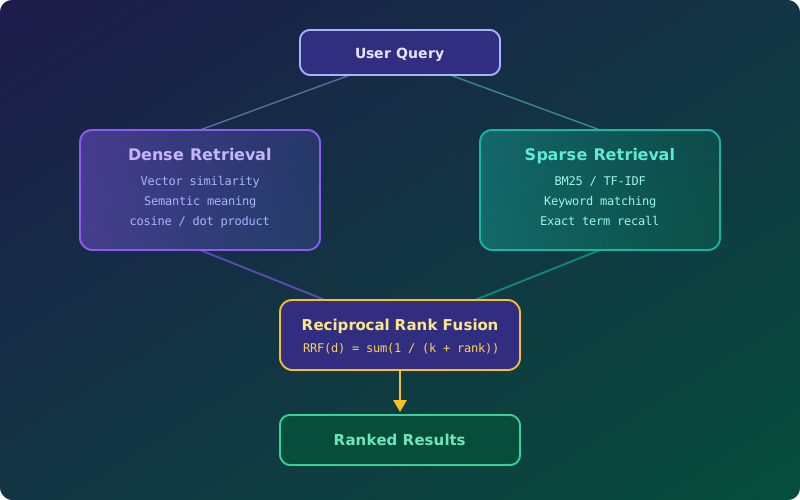
Hybrid search solves this by running two searches in parallel — dense (vector) and sparse (keyword) — and merging the results. In practice, this consistently outperforms either method alone.
Dense vs. sparse retrieval
Dense retrieval encodes both the query and documents as vectors, then finds documents whose vectors are closest (by cosine similarity or dot product). It excels at semantic understanding — “automobile” matches “car” even though they share no characters.
Sparse retrieval represents documents as high-dimensional sparse vectors where each dimension corresponds to a word in the vocabulary. BM25, the industry-standard sparse algorithm, scores documents based on term frequency, inverse document frequency, and document length normalization. It excels at exact term matching — perfect for names, codes, acronyms, and technical terms.
| Capability | Dense | Sparse (BM25) |
|---|---|---|
| Semantic similarity | Strong | Weak |
| Exact keyword match | Weak | Strong |
| Handling typos | Moderate | Weak |
| Rare/technical terms | Weak | Strong |
| Zero-shot (no training data) | Strong | Strong |
Neither method dominates across all query types. That is why hybrid search works.
BM25 in Python
The rank_bm25 library gives you a simple BM25 implementation:
from rank_bm25 import BM25Okapi
import numpy as np

# Your document chunks
documents = [
    "RAG combines retrieval with generation for grounded answers",
    "Error code E-4021 indicates a timeout in the auth service",
    "Vector databases store embeddings for similarity search",
    "The authentication service returns E-4021 when tokens expire",
]

# Tokenize (simple whitespace split; use a real tokenizer in production)
tokenized_docs = [doc.lower().split() for doc in documents]
bm25 = BM25Okapi(tokenized_docs)

# Search
query = "E-4021 auth timeout"
tokenized_query = query.lower().split()
scores = bm25.get_scores(tokenized_query)

# Rank by score
ranked_indices = np.argsort(scores)[::-1]
for i in ranked_indices[:3]:
    print(f"Score: {scores[i]:.2f} | {documents[i][:60]}...")
BM25 will rank the documents containing “E-4021” at the top because it matches the exact term. A dense model might rank the more general “RAG combines retrieval” passage higher because its embedding is semantically closer to the concept of “timeout.”
Reciprocal rank fusion (RRF)
Once you have two ranked lists — one from dense search, one from sparse search — you need to merge them. Reciprocal rank fusion is the standard method. It is simple, effective, and requires no tuning.
The formula: for each document d, sum the reciprocal of its rank in each list, with a constant k (typically 60) to prevent top-ranked documents from dominating:
RRF(d) = sum(1 / (k + rank_i(d))) for each ranking iHere is the Python implementation:
from collections import defaultdict

def reciprocal_rank_fusion(
    ranked_lists: list[list[str]],
    k: int = 60,
) -> list[tuple[str, float]]:
    """Merge multiple ranked lists using RRF.

    Args:
        ranked_lists: List of ranked document ID lists (best first).
        k: Smoothing constant (default 60).

    Returns:
        List of (doc_id, score) tuples sorted by fused score.
    """
    scores = defaultdict(float)
    for ranked_list in ranked_lists:
        for rank, doc_id in enumerate(ranked_list, start=1):
            scores[doc_id] += 1.0 / (k + rank)

    return sorted(scores.items(), key=lambda x: x[1], reverse=True)

# Example: merge dense and sparse results
dense_results = ["doc_3", "doc_1", "doc_7", "doc_2", "doc_5"]
sparse_results = ["doc_2", "doc_5", "doc_3", "doc_8", "doc_1"]

fused = reciprocal_rank_fusion([dense_results, sparse_results])
for doc_id, score in fused[:5]:
    print(f"{doc_id}: {score:.4f}")
Documents that rank well in both lists get the highest fused scores. A document ranked #1 in dense and #3 in sparse gets 1/(60+1) + 1/(60+3) = 0.0164 + 0.0159 = 0.0323. A document ranked #1 in only one list gets just 0.0164.
Full hybrid search implementation
Here is a complete hybrid search function combining BM25 and vector search:
from rank_bm25 import BM25Okapi
from sentence_transformers import SentenceTransformer
import numpy as np
from collections import defaultdict

class HybridSearcher:
    def __init__(self, documents: list[str]):
        self.documents = documents
        self.doc_ids = [f"doc_{i}" for i in range(len(documents))]

        # Initialize sparse search (BM25)
        tokenized = [doc.lower().split() for doc in documents]
        self.bm25 = BM25Okapi(tokenized)

        # Initialize dense search
        self.model = SentenceTransformer("all-MiniLM-L6-v2")
        self.doc_embeddings = self.model.encode(documents, normalize_embeddings=True)

    def search(self, query: str, top_k: int = 5, k: int = 60) -> list[dict]:
        """Run hybrid search with RRF fusion."""
        # Sparse retrieval
        bm25_scores = self.bm25.get_scores(query.lower().split())
        sparse_ranking = np.argsort(bm25_scores)[::-1][:top_k * 2]
        sparse_ranked = [self.doc_ids[i] for i in sparse_ranking]

        # Dense retrieval
        query_embedding = self.model.encode([query], normalize_embeddings=True)
        similarities = np.dot(self.doc_embeddings, query_embedding.T).flatten()
        dense_ranking = np.argsort(similarities)[::-1][:top_k * 2]
        dense_ranked = [self.doc_ids[i] for i in dense_ranking]

        # Fuse with RRF
        scores = defaultdict(float)
        for rank, doc_id in enumerate(dense_ranked, start=1):
            scores[doc_id] += 1.0 / (k + rank)
        for rank, doc_id in enumerate(sparse_ranked, start=1):
            scores[doc_id] += 1.0 / (k + rank)

        fused = sorted(scores.items(), key=lambda x: x[1], reverse=True)[:top_k]

        return [
            {"doc_id": doc_id, "score": score, "text": self.documents[int(doc_id.split("_")[1])]}
            for doc_id, score in fused
        ]

# Usage
searcher = HybridSearcher(documents)
results = searcher.search("E-4021 authentication timeout")
for r in results:
    print(f"{r['score']:.4f} | {r['text'][:70]}...")
Hybrid search in vector databases
Most production vector databases now support hybrid search natively:
Weaviate has built-in BM25 and hybrid search:
results = collection.query.hybrid(
    query="E-4021 auth timeout",
    alpha=0.5,  # 0 = pure BM25, 1 = pure vector
    limit=5,
)
Qdrant supports sparse vectors alongside dense vectors:
from qdrant_client.models import SparseVector

results = client.query_points(
    collection_name="docs",
    prefetch=[
        {"query": dense_vector, "using": "dense", "limit": 20},
        {"query": SparseVector(indices=indices, values=values), "using": "sparse", "limit": 20},
    ],
    query={"fusion": "rrf"},
    limit=5,
)
Pinecone supports hybrid with sparse-dense vectors in a single query.
Using the database’s built-in hybrid search is almost always better than implementing your own — it is faster, handles edge cases, and scales.
ColBERT: late interaction as an alternative
ColBERT takes a different approach. Instead of producing a single vector per passage, it produces one vector per token. At query time, each query token finds its best-matching passage token (MaxSim), and scores are summed. This gives ColBERT both semantic understanding (from the embeddings) and term-level precision (from the per-token matching).
ColBERT consistently outperforms both pure dense and BM25 on retrieval benchmarks. The trade-off is storage — you need to store one vector per token rather than one per passage, which increases index size by 50-100x.
Use ColBERT when: Retrieval quality is critical, you have the storage budget, and latency requirements allow the more expensive scoring.
When to use hybrid vs. pure vector
| Scenario | Recommendation |
|---|---|
| Documents contain codes, IDs, or acronyms | Hybrid (BM25 catches exact matches) |
| Queries are natural language only | Pure vector is often sufficient |
| Domain has specialized terminology | Hybrid (BM25 handles rare terms) |
| Latency budget is very tight | Pure vector (single index lookup) |
| You are unsure | Start with hybrid — it rarely hurts |
In benchmarks on datasets like Natural Questions and MS MARCO, hybrid search with RRF improves recall@10 by 3-8% over pure dense retrieval. The improvement is especially large for queries containing proper nouns, numbers, and technical terms.
Tuning the alpha parameter
When your vector database supports a blending parameter (like Weaviate’s alpha), tune it on your eval set:
# Simple alpha sweep
for alpha in [0.0, 0.25, 0.5, 0.75, 1.0]:
    results = collection.query.hybrid(query=test_query, alpha=alpha, limit=10)
    recall = compute_recall(results, ground_truth)
    print(f"alpha={alpha:.2f} -> recall@10={recall:.3f}")
Most datasets land between alpha=0.4 and alpha=0.6. If your queries are very keyword-heavy, push alpha toward 0 (more BM25 weight). If queries are conversational, push toward 1 (more vector weight).
What’s next
You now have a retrieval pipeline that combines the best of semantic and keyword search. But how do you know if it is actually working well? The next article, RAG Evaluation Metrics, covers how to measure both retrieval and generation quality.
Related articles
- RAG RAG Hybrid Search: BM25 + Vectors
Combine lexical BM25 with dense vector search to recover the queries each method misses on its own and boost RAG retrieval quality.
- Embeddings & RAG Chunking Strategies for RAG: A Complete Guide
Learn fixed-size, semantic, recursive, and document-aware chunking strategies for RAG pipelines. Includes overlap techniques, benchmarks, and Python code.
- Embeddings & RAG Embedding Models Compared: OpenAI, Cohere, and Open-Source
Compare text-embedding-3-small/large, Cohere embed-v3, and sentence-transformers on dimensions, cost, MTEB scores, and practical RAG performance.
- Embeddings & RAG RAG Evaluation Metrics: Measuring Retrieval and Generation Quality
Learn to evaluate RAG pipelines with Recall@k, MRR, NDCG for retrieval and faithfulness, relevance, hallucination rate for generation. Includes RAGAS setup.