Building Custom Operators in Apache Airflow
Learn to build custom Airflow operators from scratch with BaseOperator, hooks, templated fields, testing strategies, and packaging for reuse.
What you'll learn
- ✓When to build a custom operator vs using existing ones
- ✓Anatomy of a custom operator: BaseOperator, execute, and hooks
- ✓Templated fields for runtime parameter injection
- ✓Building a reusable hook for API integrations
- ✓Testing operators in isolation without a running Airflow instance
- ✓Packaging operators as installable Python packages
Prerequisites
- •Experience writing Airflow DAGs with built-in operators
- •Solid Python OOP fundamentals (classes, inheritance)
- •Understanding of Airflow connections and the UI
When to Build a Custom Operator
Airflow ships with hundreds of operators covering common services: PostgresOperator, S3ToGCSOperator, BigQueryInsertJobOperator, and many more. Before building a custom operator, check whether a provider package already covers your use case. The Airflow provider ecosystem is extensive, and using a maintained operator saves you from debugging edge cases someone else already solved.
Build a custom operator when:
- No existing operator fits your integration. You use an internal API, a niche SaaS product, or a proprietary system that no provider covers.
- You need to encapsulate complex logic. If your PythonOperator callable is 200 lines with extensive error handling, retry logic, and connection management, it belongs in a proper operator class.
- Multiple DAGs repeat the same pattern. If three teams are all writing the same PythonOperator boilerplate to interact with your company’s data lake, a custom operator eliminates that duplication.
- You want type safety and validation. A custom operator with explicit parameters is harder to misconfigure than a PythonOperator with a generic
op_kwargsdictionary.
Anatomy of a Custom Operator
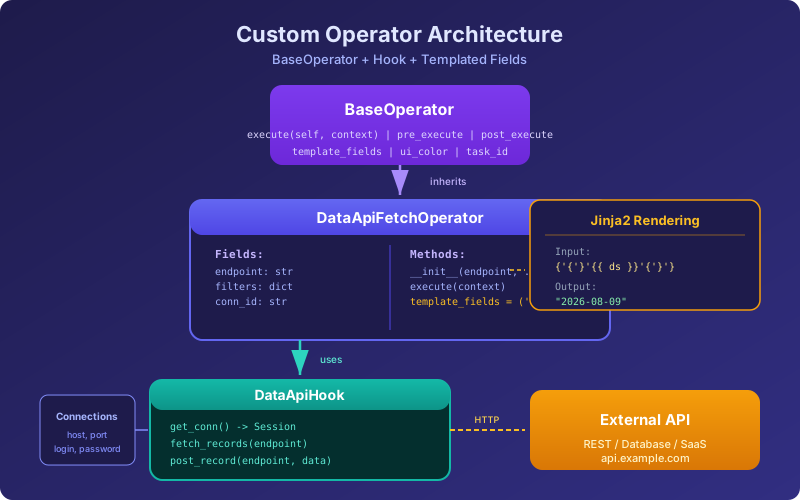
Every Airflow operator inherits from BaseOperator and implements the execute method. That is the only contract. Here is the simplest possible custom operator:
from airflow.models import BaseOperator

class PrintOperator(BaseOperator):
    """An operator that prints a message. Not useful, but instructive."""

    def __init__(self, message: str, **kwargs):
        super().__init__(**kwargs)
        self.message = message

    def execute(self, context):
        self.log.info(f"Message: {self.message}")
        return self.message
The execute method receives a context dictionary containing runtime information: the execution date, the DAG run, task instance, and more. Whatever execute returns is pushed to XCom automatically, making it available to downstream tasks.
A Real-World Example: API Integration Operator
Let us build something useful: an operator that calls a REST API, handles pagination, and pushes the results to XCom. This is a pattern you will use for any SaaS integration.
Step 1: Build the Hook
In Airflow, hooks handle connections to external systems. Operators use hooks to interact with those systems. This separation matters: if three different operators need to talk to the same API, they share the same hook rather than each implementing their own connection logic.
# plugins/hooks/data_api_hook.py
from airflow.hooks.base import BaseHook
import requests
from typing import Any

class DataApiHook(BaseHook):
    """Hook for interacting with our internal Data API."""

    conn_name_attr = 'data_api_conn_id'
    default_conn_name = 'data_api_default'
    conn_type = 'http'
    hook_name = 'Data API'

    def __init__(self, data_api_conn_id: str = default_conn_name, **kwargs):
        super().__init__(**kwargs)
        self.data_api_conn_id = data_api_conn_id
        self._session = None

    def get_conn(self) -> requests.Session:
        """Create an authenticated session using Airflow connection details."""
        if self._session is None:
            conn = self.get_connection(self.data_api_conn_id)
            self._session = requests.Session()
            self._session.base_url = f"https://{conn.host}"
            self._session.headers.update({
                'Authorization': f'Bearer {conn.password}',
                'Content-Type': 'application/json',
            })
        return self._session

    def fetch_records(self, endpoint: str, params: dict = None) -> list[dict]:
        """Fetch all records from a paginated API endpoint."""
        session = self.get_conn()
        all_records = []
        params = params or {}
        params['page'] = 1
        params['per_page'] = 100

        while True:
            conn = self.get_connection(self.data_api_conn_id)
            url = f"https://{conn.host}/{endpoint}"
            response = session.get(url, params=params)
            response.raise_for_status()

            data = response.json()
            records = data.get('results', [])
            all_records.extend(records)

            if len(records) < params['per_page']:
                break
            params['page'] += 1

        self.log.info(f"Fetched {len(all_records)} records from {endpoint}")
        return all_records

    def post_record(self, endpoint: str, payload: dict) -> dict:
        """Create a single record via POST."""
        conn = self.get_connection(self.data_api_conn_id)
        url = f"https://{conn.host}/{endpoint}"
        session = self.get_conn()
        response = session.post(url, json=payload)
        response.raise_for_status()
        return response.json()
The hook reads connection details (host, password/API key) from Airflow’s connection store. This means credentials are managed through the Airflow UI or environment variables, never hardcoded.
Step 2: Build the Operator
Now the operator uses the hook and adds task-level concerns: parameter validation, templating, and XCom integration.
# plugins/operators/data_api_operator.py
from airflow.models import BaseOperator
from hooks.data_api_hook import DataApiHook
from typing import Sequence

class DataApiFetchOperator(BaseOperator):
    """
    Fetch records from the Data API and push to XCom.

    :param endpoint: API endpoint to fetch from (e.g., 'users', 'orders')
    :param data_api_conn_id: Airflow connection ID for the Data API
    :param filters: Optional query parameters for filtering results
    :param result_key: XCom key to store results under
    """

    # Fields that support Jinja templating
    template_fields: Sequence[str] = ('endpoint', 'filters')

    # Color the operator in the Airflow UI
    ui_color = '#6366f1'
    ui_fgcolor = '#ffffff'

    def __init__(
        self,
        endpoint: str,
        data_api_conn_id: str = 'data_api_default',
        filters: dict = None,
        result_key: str = 'records',
        **kwargs,
    ):
        super().__init__(**kwargs)
        self.endpoint = endpoint
        self.data_api_conn_id = data_api_conn_id
        self.filters = filters
        self.result_key = result_key

    def execute(self, context):
        hook = DataApiHook(data_api_conn_id=self.data_api_conn_id)

        self.log.info(f"Fetching from endpoint: {self.endpoint}")
        records = hook.fetch_records(
            endpoint=self.endpoint,
            params=self.filters,
        )

        self.log.info(f"Retrieved {len(records)} records")

        # Push to XCom for downstream tasks
        context['ti'].xcom_push(key=self.result_key, value=records)

        return len(records)
Using the Operator in a DAG
from airflow.decorators import dag
from operators.data_api_operator import DataApiFetchOperator
from airflow.operators.python import PythonOperator
from datetime import datetime

@dag(
    schedule='@daily',
    start_date=datetime(2026, 1, 1),
    catchup=False,
)
def sync_users_pipeline():

    fetch_users = DataApiFetchOperator(
        task_id='fetch_users',
        endpoint='users',
        filters={'updated_after': '{{ ds }}'},  # Templated!
        data_api_conn_id='data_api_prod',
    )

    def load_users(ti=None):
        records = ti.xcom_pull(task_ids='fetch_users', key='records')
        print(f"Loading {len(records)} users to warehouse")
        # ... warehouse loading logic ...

    load = PythonOperator(
        task_id='load_users',
        python_callable=load_users,
    )

    fetch_users >> load

sync_users_pipeline()
Notice '{{ ds }}' in the filters parameter. Because filters is listed in template_fields, Airflow renders it as a Jinja template at runtime, replacing {{ ds }} with the execution date. This is one of the key advantages of a custom operator over a PythonOperator — template fields are explicit and documented.
Templated Fields in Depth
Template fields allow DAG authors to inject runtime values into operator parameters using Jinja2 syntax. Any field listed in template_fields is automatically rendered before execute is called.
class SqlRunnerOperator(BaseOperator):
    template_fields: Sequence[str] = ('sql', 'parameters')
    template_ext: Sequence[str] = ('.sql',)  # Also render .sql file contents

    def __init__(self, sql: str, parameters: dict = None, **kwargs):
        super().__init__(**kwargs)
        self.sql = sql
        self.parameters = parameters

    def execute(self, context):
        # By the time execute runs, self.sql has been rendered
        # '{{ ds }}' is already replaced with '2026-08-09'
        self.log.info(f"Running SQL: {self.sql}")
        # ... execute the SQL ...
The template_ext attribute is powerful: if you set sql='path/to/query.sql', Airflow will read the file, render its Jinja content, and assign the rendered string to self.sql. This lets you keep SQL in separate files while still using Airflow’s templating.
Testing Custom Operators
Custom operators should be tested in isolation, without a running Airflow scheduler or database. This keeps tests fast and reduces flakiness.
# tests/test_data_api_operator.py
import pytest
from unittest.mock import patch, MagicMock
from operators.data_api_operator import DataApiFetchOperator
from airflow.utils.dates import days_ago

class TestDataApiFetchOperator:

    def setup_method(self):
        self.operator = DataApiFetchOperator(
            task_id='test_fetch',
            endpoint='users',
            data_api_conn_id='test_conn',
        )

    @patch('operators.data_api_operator.DataApiHook')
    def test_execute_fetches_records(self, mock_hook_class):
        # Arrange
        mock_hook = MagicMock()
        mock_hook.fetch_records.return_value = [
            {'id': 1, 'name': 'Alice'},
            {'id': 2, 'name': 'Bob'},
        ]
        mock_hook_class.return_value = mock_hook

        mock_ti = MagicMock()
        context = {'ti': mock_ti}

        # Act
        result = self.operator.execute(context)

        # Assert
        assert result == 2
        mock_hook.fetch_records.assert_called_once_with(
            endpoint='users',
            params=None,
        )
        mock_ti.xcom_push.assert_called_once_with(
            key='records',
            value=[{'id': 1, 'name': 'Alice'}, {'id': 2, 'name': 'Bob'}],
        )

    @patch('operators.data_api_operator.DataApiHook')
    def test_execute_with_filters(self, mock_hook_class):
        self.operator.filters = {'status': 'active'}
        mock_hook = MagicMock()
        mock_hook.fetch_records.return_value = []
        mock_hook_class.return_value = mock_hook

        result = self.operator.execute({'ti': MagicMock()})

        mock_hook.fetch_records.assert_called_once_with(
            endpoint='users',
            params={'status': 'active'},
        )

    def test_template_fields_are_declared(self):
        assert 'endpoint' in DataApiFetchOperator.template_fields
        assert 'filters' in DataApiFetchOperator.template_fields
Testing the Hook Separately
# tests/test_data_api_hook.py
from unittest.mock import patch, MagicMock
from hooks.data_api_hook import DataApiHook

@patch('hooks.data_api_hook.DataApiHook.get_connection')
def test_fetch_records_handles_pagination(mock_get_conn):
    mock_get_conn.return_value = MagicMock(
        host='api.example.com', password='test-token'
    )

    hook = DataApiHook()

    with patch('requests.Session') as mock_session_class:
        mock_session = MagicMock()
        # First page: full, second page: partial (end of data)
        mock_session.get.side_effect = [
            MagicMock(json=lambda: {'results': [{'id': i} for i in range(100)]}),
            MagicMock(json=lambda: {'results': [{'id': 100}]}),
        ]
        mock_session_class.return_value = mock_session

        hook._session = mock_session
        records = hook.fetch_records('users')

        assert len(records) == 101
        assert mock_session.get.call_count == 2
Packaging Operators for Reuse
When your custom operators mature, package them as a proper Python package so multiple teams can install them:
my-airflow-operators/
    setup.py
    my_operators/
        __init__.py
        hooks/
            __init__.py
            data_api_hook.py
        operators/
            __init__.py
            data_api_operator.py
    tests/
        test_data_api_hook.py
        test_data_api_operator.py
# setup.py
from setuptools import setup, find_packages
setup(
name='my-airflow-operators',
version='1.0.0',
packages=find_packages(),
install_requires=[
'apache-airflow>=2.5.0',
'requests>=2.28.0',
],
python_requires='>=3.8',
)Install it into your Airflow environment with pip install -e . for development or publish it to your internal PyPI registry for production. Teams then import your operator like any other provider:
from my_operators.operators.data_api_operator import DataApiFetchOperatorProvider Package Format
For tighter integration with Airflow (connection types showing up in the UI, operators appearing in the provider list), follow the official Airflow provider package structure. Add an apache_airflow_provider entry point in your setup.py:
entry_points={
    'apache_airflow_provider': [
        'provider_info = my_operators:get_provider_info',
    ],
},
This is optional for internal tools but essential if you plan to contribute your operator to the Airflow community.
Summary
Custom operators follow a clear progression: start with a hook for connection management, build an operator on top with explicit parameters and template fields, test both in isolation, and package for reuse when the operator matures. The investment pays off every time a new DAG needs the same integration — instead of copying 50 lines of PythonOperator boilerplate, the DAG author writes one clean operator call with validated, documented parameters.
Related articles
- Airflow Dynamic DAGs in Airflow: Patterns and Best Practices
Master dynamic DAG generation in Airflow using DAG factories, dynamic task mapping, YAML configs, expand/reduce, and avoid common pitfalls.
- Airflow Airflow Executors Deep Dive: From Local to Kubernetes
How Airflow executors work under the hood. SequentialExecutor, LocalExecutor, CeleryExecutor, and KubernetesExecutor compared with migration paths.
- Airflow Data-Aware Scheduling in Airflow with Datasets
Replace sensor-based waiting with Airflow Datasets. Build producer-consumer DAGs, combine time and data triggers, and design dataset URIs for production.
- Airflow Real-World Airflow Patterns for Production Pipelines
Idempotent pipelines, backfilling, late data handling, error patterns, multi-environment setups, and common anti-patterns to avoid in Airflow.