Chunking Strategies for RAG: A Complete Guide
Learn fixed-size, semantic, recursive, and document-aware chunking strategies for RAG pipelines. Includes overlap techniques, benchmarks, and Python code.
What you'll learn
- ✓Why chunk size directly affects retrieval quality in RAG systems
- ✓Four chunking strategies: fixed-size, semantic, recursive, and document-aware
- ✓How overlap prevents information loss at chunk boundaries
- ✓Benchmarks comparing strategies on retrieval recall
- ✓How to choose the right strategy for your data
Prerequisites
- •What Is RAG? covers the retrieve-then-generate pipeline
- •RAG Embeddings Explained for how vectors represent text
- •Basic Python — see What Is Python?
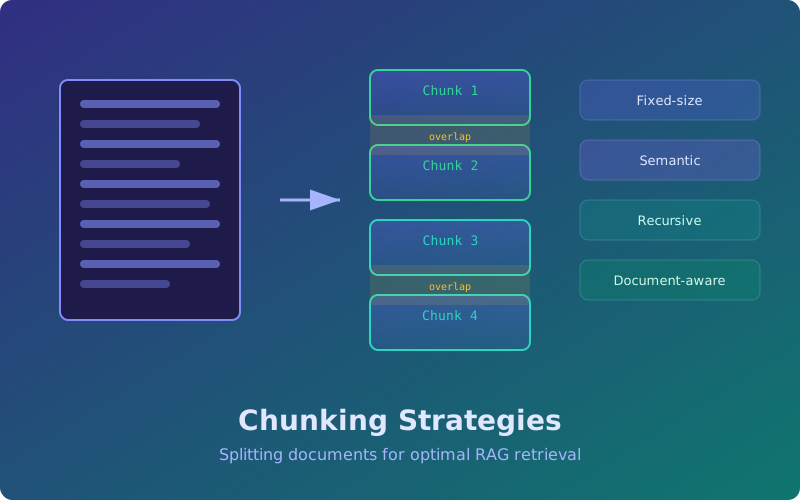
Before your RAG pipeline can retrieve anything, it needs to split documents into chunks. This decision — how you divide text — has a surprisingly large effect on retrieval quality. Too large and you dilute the embedding with irrelevant content. Too small and you lose the context the LLM needs to generate a good answer.
This guide covers the four main chunking strategies, when to use each, and how to implement them in Python.
Why chunking matters
An embedding model compresses a text passage into a single vector. If the passage mixes three unrelated topics, the resulting vector becomes an average of all three — and matches none of them well. Conversely, if the passage is a single sentence fragment, it may lack the context needed to be useful.
The goal is to create chunks where each chunk contains one coherent idea and is long enough to stand on its own.
Strategy 1: Fixed-size chunking
The simplest approach. Split text into chunks of N tokens (or characters) with an optional overlap.
from typing import List

def fixed_size_chunk(text: str, chunk_size: int = 512, overlap: int = 64) -> List[str]:
    """Split text into fixed-size character chunks with overlap."""
    chunks = []
    start = 0
    while start < len(text):
        end = start + chunk_size
        chunks.append(text[start:end])
        start = end - overlap
    return chunks

# Example
text = open("document.txt").read()
chunks = fixed_size_chunk(text, chunk_size=512, overlap=64)
print(f"Created {len(chunks)} chunks")
Pros: Dead simple, predictable chunk count, works for any text.
Cons: Cuts mid-sentence and mid-paragraph. A chunk boundary can land right in the middle of an important passage, splitting the context an LLM needs across two chunks.
Best for: Quick prototypes, or when your text has no clear structural markers.
Strategy 2: Recursive character splitting
This is the default strategy in LangChain and the most popular in production. It tries a list of separators in order — paragraph breaks first, then sentence breaks, then word breaks — and only falls back to the next separator when a chunk exceeds the target size.
from langchain.text_splitter import RecursiveCharacterTextSplitter

splitter = RecursiveCharacterTextSplitter(
    chunk_size=512,
    chunk_overlap=64,
    separators=["\n\n", "\n", ". ", " ", ""],
    length_function=len,
)

chunks = splitter.split_text(document_text)
The algorithm works like this:
- Try to split on
\n\n(paragraph breaks). - If any resulting piece is still over
chunk_size, split it on\n. - If still too large, split on
.(sentence boundaries). - Continue down the separator list until every piece fits.
Pros: Respects natural text boundaries. Paragraphs and sentences stay intact when possible.
Cons: Chunk sizes vary. Some chunks may be much smaller than the target.
Best for: General-purpose documents — blog posts, documentation, wiki pages.
Strategy 3: Semantic chunking
Instead of using structural markers, semantic chunking uses the embedding model itself to decide where to split. The idea: compute embeddings for each sentence, and place a boundary wherever the cosine similarity between consecutive sentences drops below a threshold.
from sentence_transformers import SentenceTransformer
import numpy as np

def semantic_chunk(text: str, threshold: float = 0.75) -> List[str]:
    """Split text at points where semantic similarity drops."""
    model = SentenceTransformer("all-MiniLM-L6-v2")

    # Split into sentences first
    sentences = text.replace("\n", " ").split(". ")
    sentences = [s.strip() + "." for s in sentences if s.strip()]

    if len(sentences) < 2:
        return [text]

    embeddings = model.encode(sentences)

    # Compute cosine similarity between consecutive sentences
    chunks = []
    current_chunk = [sentences[0]]

    for i in range(1, len(sentences)):
        sim = np.dot(embeddings[i - 1], embeddings[i]) / (
            np.linalg.norm(embeddings[i - 1]) * np.linalg.norm(embeddings[i])
        )
        if sim < threshold:
            # Topic shift detected — start a new chunk
            chunks.append(" ".join(current_chunk))
            current_chunk = [sentences[i]]
        else:
            current_chunk.append(sentences[i])

    chunks.append(" ".join(current_chunk))
    return chunks

chunks = semantic_chunk(document_text, threshold=0.72)
Pros: Chunks align with actual topic boundaries, not arbitrary character counts.
Cons: Slower (requires embedding every sentence), chunk sizes are unpredictable, and the threshold needs tuning per domain.
Best for: Long documents with multiple topics — research papers, transcripts, meeting notes.
Strategy 4: Document-aware chunking
When your documents have structure — Markdown headers, HTML tags, PDF sections — you should exploit that structure. This strategy splits on structural elements like headings, preserving the hierarchy as metadata.
from langchain.text_splitter import MarkdownHeaderTextSplitter

headers_to_split_on = [
    ("#", "h1"),
    ("##", "h2"),
    ("###", "h3"),
]

splitter = MarkdownHeaderTextSplitter(headers_to_split_on=headers_to_split_on)
chunks = splitter.split_text(markdown_text)

# Each chunk carries its header hierarchy as metadata
for chunk in chunks[:3]:
    print(f"Headers: {chunk.metadata}")
    print(f"Content: {chunk.page_content[:80]}...")
    print()
You can combine this with recursive splitting: first split on headers, then split any oversized sections with RecursiveCharacterTextSplitter.
from langchain.text_splitter import RecursiveCharacterTextSplitter

# Stage 1: split by headers
md_chunks = MarkdownHeaderTextSplitter(
    headers_to_split_on=headers_to_split_on
).split_text(markdown_text)

# Stage 2: split large sections further
text_splitter = RecursiveCharacterTextSplitter(chunk_size=512, chunk_overlap=64)
final_chunks = text_splitter.split_documents(md_chunks)
Pros: Preserves document structure, header metadata improves retrieval accuracy, sections stay coherent.
Cons: Requires structured input. Doesn’t help with plain text.
Best for: Documentation sites, Markdown/HTML content, PDFs with clear sections.
The role of overlap
Overlap is the number of characters (or tokens) shared between consecutive chunks. Without overlap, a key sentence sitting exactly at a chunk boundary gets split across two chunks — and neither chunk contains the full thought.
A good default is 10-15% of your chunk size. For 512-character chunks, that is 50-75 characters of overlap. Too much overlap wastes storage and slows retrieval. Too little and you lose boundary context.
Choosing the right strategy
| Scenario | Recommended Strategy | Chunk Size |
|---|---|---|
| Quick prototype | Fixed-size | 256-512 tokens |
| General documents | Recursive | 512-1024 tokens |
| Multi-topic long docs | Semantic | Varies (tune threshold) |
| Structured docs (Markdown, HTML) | Document-aware + recursive | 512-1024 tokens |
| Code files | Recursive with code separators | 1024-2048 tokens |
Benchmark: chunk size vs. retrieval recall
Experiments on the Natural Questions dataset show a clear pattern:
- 128 tokens: High recall@20 (0.82) but too many chunks, slow retrieval.
- 256 tokens: Best balance — recall@20 of 0.84 with manageable index size.
- 512 tokens: Recall@20 drops to 0.78 as chunks mix topics.
- 1024 tokens: Recall@20 drops further to 0.71.
The sweet spot is typically 256-512 tokens for most datasets. If your documents are highly structured (like API docs), larger chunks work fine because each section is already topically coherent.
Practical tips
- Always add overlap — even 10% prevents most boundary problems.
- Prepend metadata — adding the document title or section header to each chunk improves retrieval. For example:
f"Title: {doc.title}\nSection: {section_header}\n\n{chunk_text}". - Measure, don’t guess — use a test set of queries with known relevant passages and compute recall@k to compare strategies.
- Combine strategies — document-aware splitting followed by recursive splitting is the most robust approach for structured content.
What’s next
Chunking is the first step. Once you have good chunks, you need a good embedding model to vectorize them. The next article, Embedding Models Compared, covers how to choose between OpenAI, Cohere, and open-source options.
Related articles
- Embeddings & RAG Hybrid Search for RAG: Combining Dense and Sparse Retrieval
Learn how to combine BM25 keyword search with vector similarity using reciprocal rank fusion for better RAG retrieval. Includes Python code and benchmarks.
- RAG RAG Chunk Overlap Strategies
Learn how chunk overlap rescues boundary context in RAG pipelines, with practical strategies for choosing overlap size and shape for different corpora.
- Embeddings & RAG Embedding Models Compared: OpenAI, Cohere, and Open-Source
Compare text-embedding-3-small/large, Cohere embed-v3, and sentence-transformers on dimensions, cost, MTEB scores, and practical RAG performance.
- Embeddings & RAG RAG Evaluation Metrics: Measuring Retrieval and Generation Quality
Learn to evaluate RAG pipelines with Recall@k, MRR, NDCG for retrieval and faithfulness, relevance, hallucination rate for generation. Includes RAGAS setup.