What Is Apache Kafka? A Complete Introduction
A practical introduction to Apache Kafka — what it is, why it exists, its core concepts, and how it differs from traditional message queues. Includes your first producer and consumer code.
What you'll learn
- ✓What Apache Kafka is and the problem it solves
- ✓The three roles Kafka plays: messaging, storage, and stream processing
- ✓Core vocabulary: topics, partitions, producers, consumers, brokers
- ✓Key properties that make Kafka unique
- ✓How Kafka differs from traditional message queues
- ✓What a minimal producer and consumer look like in code
Prerequisites
- •Basic understanding of distributed systems concepts
- •Familiarity with any programming language (examples use Java)
- •No prior Kafka experience required

Apache Kafka is a distributed event streaming platform capable of handling trillions of events per day. Originally created at LinkedIn in 2011, it was open-sourced through the Apache Software Foundation and has since become the backbone of real-time data infrastructure at thousands of companies worldwide.
But what does that actually mean in plain terms? This article breaks down the problem Kafka was built to solve, the roles it plays in modern systems, and the vocabulary you need before going deeper.
The problem Kafka solves: the spaghetti integration nightmare
Imagine you are running an e-commerce company. You have a web application, a mobile app, a payment service, an inventory system, an analytics dashboard, a recommendation engine, and a notification service. Each of these systems needs data from the others.
Your payment service needs to tell the inventory system that an order was paid. The web app needs to send click data to the analytics dashboard. The recommendation engine needs purchase history from the order database. The notification service needs events from practically everything.
Without a central data backbone, the natural approach is point-to-point integration. You write a direct connection from every system that produces data to every system that needs it. If you have 5 source systems and 5 target systems, you could end up with as many as 25 separate integration pipelines. Each one has its own protocol, its own data format, its own error handling, and its own on-call rotation when it breaks at 2 AM.
This is the “spaghetti integration” problem, and it gets worse exponentially. When your company grows from 5 systems to 15, the potential connections jump from 25 to 225. Engineers spend more time maintaining plumbing than building features. A single schema change in one system can cascade failures across a dozen pipelines. It becomes a fragile, unmaintainable web that everyone is afraid to touch.
Kafka solves this by acting as a central nervous system for your data. Think of it like a post office for your entire organization. Instead of every person in town hand-delivering letters to every other person (point-to-point), everyone drops their mail at the post office, and everyone picks up their mail from the post office. The senders do not need to know who the recipients are, and the recipients do not need to know who sent the mail. The post office handles the routing.
In Kafka terms, every system publishes events to Kafka. Every system that needs those events subscribes to them. The complexity drops from O(n squared) to O(n). Adding a new consumer is as simple as subscribing to the relevant topic — no changes to the producer, no new pipeline to build, no coordination meeting required.
Companies like Netflix, Uber, Airbnb, and LinkedIn all adopted Kafka for exactly this reason. LinkedIn, where Kafka was born, was processing over 7 trillion messages per day through Kafka by 2019. The platform was not built as a theoretical exercise — it was born from the urgent, practical need to untangle a growing mess of system integrations.
Three roles Kafka plays
Kafka is sometimes called a “message queue,” but that dramatically undersells what it does. It simultaneously serves three distinct roles, and understanding all three is key to seeing why it has become so widely adopted.
1. Messaging system: the newspaper subscription model
At its most basic, Kafka lets applications send messages to each other. Producers write messages, consumers read them. If you have used RabbitMQ or ActiveMQ, this part will feel familiar.
But here is where the analogy shifts. Traditional message queues work like a physical mailbox: once you pick up the letter, it is gone. Nobody else can read it. Kafka works more like a newspaper subscription service. The newspaper (Kafka) prints a copy of every edition and keeps it on file. When you subscribe, you get access to all the editions — including back issues if you want them. If your neighbor also subscribes, they get their own independent access to the same editions. Neither of you “uses up” the newspaper by reading it.
This is a fundamental difference. In Kafka, reading a message does not destroy it. Multiple consumer groups can independently read the same data at different speeds, and a slow analytics pipeline does not block a fast real-time alerting service.
Business example: An e-commerce company publishes every “order placed” event to Kafka. The payment service reads it to charge the customer. The inventory service reads it to update stock. The analytics service reads it to update dashboards. The recommendation engine reads it to improve suggestions. All four services consume the same stream independently, each at their own pace.
2. Storage system: your data’s safety net
Unlike traditional message brokers that hold messages only in memory and discard them once consumed, Kafka durably stores streams of records. Data is written to disk and replicated across multiple servers. You can configure how long to keep data: 7 days, 30 days, or even forever.
This matters because it means Kafka is not just a fleeting pipe between systems — it is a reliable storage layer. If your analytics service goes down for maintenance over the weekend, no data is lost. When it comes back up on Monday, it simply picks up where it left off and processes everything it missed. Some organizations even use Kafka as their system of record, keeping infinite retention enabled so that the complete history of every event is always available.
Business example: A fintech company keeps 90 days of transaction events in Kafka for compliance. If regulators need to audit transactions from last month, the data is right there in Kafka, ready to be replayed through an auditing service without touching the production database.
3. Stream processing platform: real-time computation
With tools like Kafka Streams and ksqlDB, you can process data as it arrives — transforming, filtering, aggregating, and joining streams in real time. This turns Kafka from a passive pipe into an active computation engine.
Instead of collecting data into a database and running batch queries every hour, you can compute results continuously. The moment an event arrives, it flows through your processing pipeline and produces an output.
Business example: A ride-sharing company uses Kafka Streams to calculate surge pricing. As ride requests pour in from a particular neighborhood, a stream processor counts requests per zone per minute, compares that to available drivers, and publishes updated pricing multipliers to a “surge-pricing” topic — all in real time, with sub-second latency.
Core vocabulary: the building blocks
Before looking at any code, you need a mental model of how Kafka’s pieces fit together. Here are the five terms you will encounter constantly.
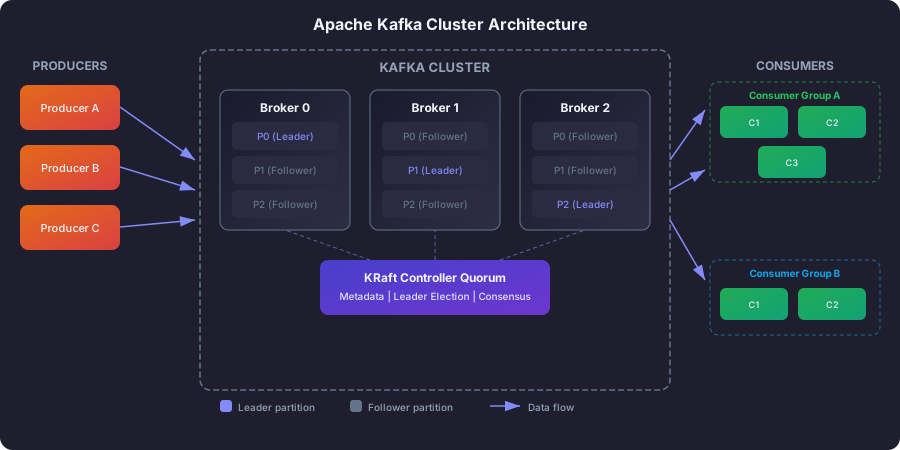
Brokers: the servers that store your data
A Kafka broker is a single server in the Kafka cluster. Think of it as one building in a warehouse complex. It receives messages from producers, stores them on disk, and serves them to consumers when they ask. A production cluster typically runs 3 or more brokers so that if one server dies, the others can pick up the slack.
Topics: named channels for categories of data
A topic is the logical name for a stream of related events. It is how you organize data in Kafka. For example, you might have topics named user-signups, order-events, and page-views. Producers write to a specific topic. Consumers subscribe to the topics they care about. Think of topics like TV channels — each one carries a specific type of content, and viewers tune in to the channels that interest them.
Partitions: the secret to Kafka’s speed
Each topic is split into one or more partitions. A partition is an ordered, append-only sequence of messages. Partitions are the unit of parallelism in Kafka — like lanes on a highway. A single-lane road (one partition) can only handle one car at a time. But if you add more lanes (more partitions), you can handle more traffic simultaneously. Each message within a partition gets a sequential ID called an offset, which is essentially a bookmark marking that message’s position.
Producers: applications that send data
A producer is any application that publishes messages to a Kafka topic. The producer decides which partition to send each message to, either by providing a key (all messages with the same key go to the same partition) or by letting Kafka distribute messages evenly across partitions.
Consumers and consumer groups: applications that read data
A consumer is any application that reads messages from one or more topics. Consumers belong to a consumer group. Kafka distributes partitions across the consumers in a group so that each partition is read by exactly one consumer. This is how you scale up consumption: add more consumers to the group, and each one handles a share of the partitions.
Key properties: what makes Kafka special
Kafka’s design was built around specific engineering goals that set it apart from other messaging systems.
| Property | What it means in practice |
|---|---|
| High throughput | A single broker handles hundreds of thousands of messages per second. Clusters can reach millions per second. |
| Low latency | Messages travel from producer to consumer in single-digit milliseconds. |
| Durability | Messages are written to disk and copied across multiple servers. Data survives server failures. |
| Scalability | Add more brokers without downtime. Split topics into more partitions for parallel processing. |
| Fault tolerance | If a server crashes, another one automatically takes over its work. |
| Ordering guarantees | Messages within a single partition are strictly ordered — first in, first out. |
Common use cases: where Kafka shines
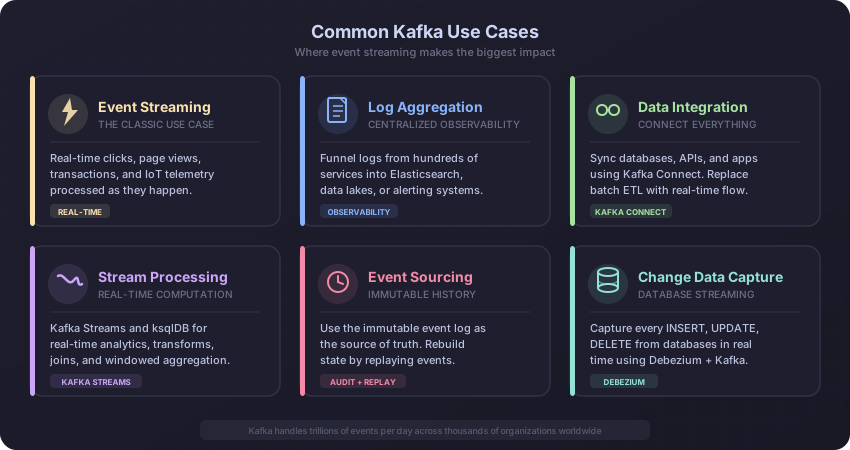
Understanding where Kafka fits in real systems helps solidify why these properties matter.
Real-time event streaming. Capture user activity — clicks, page views, searches — and process it in real time for recommendations, fraud detection, or live dashboards. This is the classic Kafka use case and the one it was originally built for at LinkedIn.
Log aggregation. Instead of SSHing into hundreds of servers to read log files, you funnel all logs into Kafka. From there, they flow into Elasticsearch for search, into a data lake for long-term analysis, or into an alerting system that pages you when error rates spike.
Event-driven microservices. Decouple services by communicating through events rather than synchronous HTTP calls. When the order service publishes an “order placed” event, the inventory, payment, and notification services each consume it independently. If the notification service is temporarily down, no problem — it catches up when it recovers.
Change data capture (CDC). Stream database changes (inserts, updates, deletes) from a source database into Kafka using tools like Debezium. Downstream systems get a real-time feed of database changes without polling the database directly.
Metrics and monitoring. Collect operational metrics from distributed systems into Kafka, then process them with stream processing for alerting and visualization.
How Kafka differs from traditional message queues
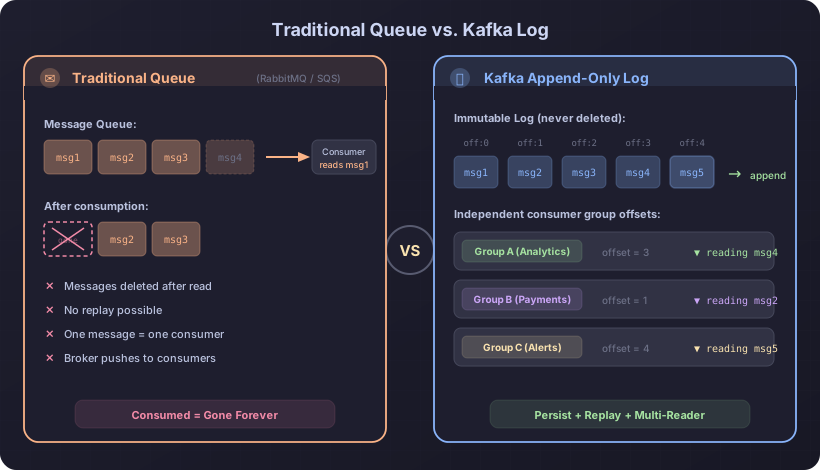
If you have used RabbitMQ, ActiveMQ, or Amazon SQS, you might wonder why Kafka is not just another message queue. The differences are not superficial — they reflect fundamentally different design philosophies.
The most important distinction is Kafka’s append-only log model. In a traditional queue, consuming a message removes it. It is like tearing a page out of a notebook — once read, it is gone. Kafka works like a shared journal that everyone can read. The journal keeps growing, readers put their own bookmarks in it, and nobody’s reading affects anyone else’s experience.
This single design choice unlocks several powerful capabilities. Replay becomes possible: if your analytics service had a bug in its processing logic, you can fix the bug, reset the consumer’s bookmark (offset) back to last Tuesday, and reprocess everything. With a traditional queue, that data would be gone forever.
Consumer independence becomes natural. Five different teams can each read the same stream of order events without any coordination. A slow team does not block a fast team because there is no shared cursor — each consumer group has its own offset. This is impossible with competing-consumer queues, where one message goes to exactly one consumer.
| Feature | Traditional queue | Apache Kafka |
|---|---|---|
| After consumption | Message deleted | Message retained for configured period |
| Replay | Not possible | Reset offset and re-read anytime |
| Multiple readers | Competing consumers (one message, one reader) | Independent consumer groups, each reads everything |
| Ordering | Per-queue FIFO (hard to scale) | Per-partition ordering with horizontal scaling |
| Throughput | Thousands per second | Millions per second at cluster level |
| Storage model | In-memory or short-lived | Durable, disk-based, append-only log |
| Backpressure | Broker pushes to consumers | Consumer pulls at its own pace |
Your first Kafka code
Below is a minimal Java example using the official Kafka client library. This is not production code — it is meant to show you the shape of the API so you know what interacting with Kafka looks like at a code level.
The producer example connects to a Kafka cluster running on your local machine, creates 10 simple messages, and sends them to a topic. Each message has a key (like a label) and a value (the actual content). The Properties object configures how the producer behaves — where to connect, and how to convert your Java strings into bytes that Kafka can store. The callback on each send call lets you confirm that the message arrived safely by printing which partition and offset it was assigned to.
import org.apache.kafka.clients.producer.*;
import java.util.Properties;

public class SimpleProducer {
    public static void main(String[] args) {
        Properties props = new Properties();
        props.put("bootstrap.servers", "localhost:9092");
        props.put("key.serializer",
            "org.apache.kafka.common.serialization.StringSerializer");
        props.put("value.serializer",
            "org.apache.kafka.common.serialization.StringSerializer");

        try (KafkaProducer<String, String> producer = new KafkaProducer<>(props)) {
            for (int i = 0; i < 10; i++) {
                ProducerRecord<String, String> record =
                    new ProducerRecord<>("my-topic", "key-" + i, "hello-" + i);

                producer.send(record, (metadata, exception) -> {
                    if (exception == null) {
                        System.out.printf("Sent to partition %d offset %d%n",
                            metadata.partition(), metadata.offset());
                    }
                });
            }
        }
    }
}
The consumer example joins a consumer group, subscribes to the same topic, and enters a loop where it continuously asks Kafka for new messages. The group.id property is what makes consumer groups work — all consumers with the same group ID coordinate with each other so that each partition is handled by exactly one consumer in the group. The auto.offset.reset=earliest setting tells a brand-new consumer group to start reading from the very beginning of the topic, rather than only seeing messages that arrive after it starts.
import org.apache.kafka.clients.consumer.*;
import java.time.Duration;
import java.util.List;
import java.util.Properties;

public class SimpleConsumer {
    public static void main(String[] args) {
        Properties props = new Properties();
        props.put("bootstrap.servers", "localhost:9092");
        props.put("group.id", "my-consumer-group");
        props.put("key.deserializer",
            "org.apache.kafka.common.serialization.StringDeserializer");
        props.put("value.deserializer",
            "org.apache.kafka.common.serialization.StringDeserializer");
        props.put("auto.offset.reset", "earliest");

        try (KafkaConsumer<String, String> consumer = new KafkaConsumer<>(props)) {
            consumer.subscribe(List.of("my-topic"));

            while (true) {
                ConsumerRecords<String, String> records =
                    consumer.poll(Duration.ofMillis(1000));

                for (ConsumerRecord<String, String> record : records) {
                    System.out.printf("partition=%d offset=%d key=%s value=%s%n",
                        record.partition(), record.offset(),
                        record.key(), record.value());
                }
            }
        }
    }
}
Notice how the producer and consumer are completely independent. The producer does not know or care who is reading the messages. The consumer does not know or care who wrote them. Kafka is the intermediary that decouples them, and that is the entire point.
Next steps
You now have a solid understanding of what Kafka is, why it exists, and the vocabulary you need to go deeper. Here is where to go from here:
- Kafka Architecture Explained — learn how brokers, replication, and KRaft mode work together to make Kafka reliable and fault-tolerant.
- Topics, Partitions, and Offsets — dive deep into the data model that underpins everything in Kafka.
- Installation and Setup — get Kafka running on your machine and start producing and consuming messages yourself.
Related articles
- Data Engineering Real-Time Data Streaming: Architectures and Patterns
Learn real-time streaming architectures like Lambda, Kappa, CDC, and event sourcing. Understand when to choose streaming over batch processing.
- Kafka Kafka Installation and Setup: Local, Docker, and CLI
Step-by-step guide to running Apache Kafka locally using KRaft mode binaries and Docker Compose — includes Schema Registry, Kafka UI, topic creation, and CLI producer/consumer testing.
- Kafka Kafka Topics, Partitions, and Offsets Explained
A deep dive into Kafka's core data model — how topics organize data, how partitions enable parallelism and ordering, how offsets track consumer progress, and how retention and compaction manage storage.
- Airflow What Is Apache Airflow? A Complete Introduction
Learn what Apache Airflow is, why Airbnb created it, how DAGs work, and when to use Airflow for orchestrating data pipelines, ETL workflows, and ML operations.