Dynamic DAGs in Airflow: Patterns and Best Practices
Master dynamic DAG generation in Airflow using DAG factories, dynamic task mapping, YAML configs, expand/reduce, and avoid common pitfalls.
What you'll learn
- ✓Why you need dynamic DAGs and when static DAGs are not enough
- ✓DAG factory pattern for generating DAGs from configuration
- ✓Dynamic task mapping with expand() and reduce()
- ✓Generating DAGs from YAML or JSON config files
- ✓Common pitfalls that will break your scheduler
- ✓Testing strategies for dynamically generated DAGs
Prerequisites
- •Comfortable writing basic Airflow DAGs
- •Understanding of Airflow scheduling and the DAG bag
- •Python functions, decorators, and basic file I/O
When Static DAGs Are Not Enough
You start with one pipeline. Then three. Then twenty. Each one looks almost identical — same structure, same operators, different parameters. You are copying and pasting DAG files, changing the table name, the schedule, the connection ID. When you need to change the retry logic, you update twenty files. You miss one. That one fails in production at 3 AM.
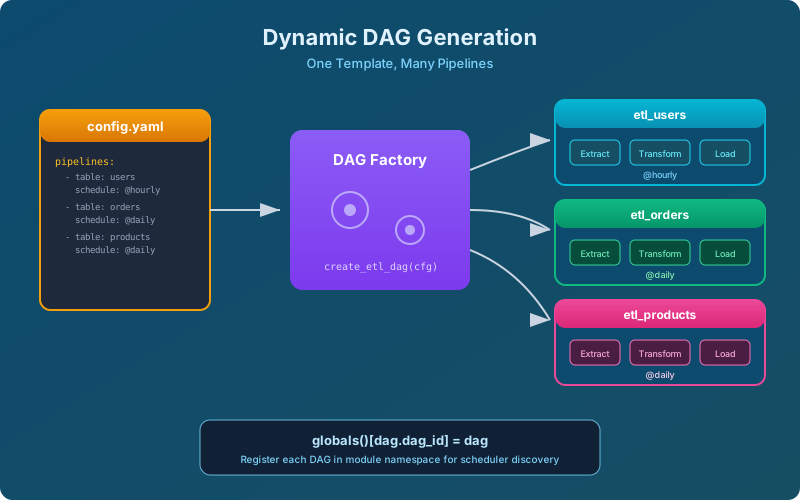
This is the problem dynamic DAGs solve. Instead of maintaining dozens of near-identical DAG files, you define the pattern once and generate DAGs programmatically from configuration. One template, many instances.
There are two fundamentally different approaches to dynamic DAGs in Airflow, and they solve different problems:
Dynamic DAG generation: creating multiple DAG objects at parse time from a template. This is for when you have many pipelines with the same structure but different parameters (different tables, different sources, different schedules).
Dynamic task mapping: creating a variable number of tasks within a single DAG at runtime. This is for when you do not know ahead of time how many items you need to process — like processing every file that landed in S3 today, where the count varies daily.
Pattern 1: The DAG Factory
A DAG factory is a function that takes a configuration dictionary and returns a DAG object. You call it once for each pipeline you need, and each call creates a fully independent DAG that shows up separately in the Airflow UI.
# dags/dag_factory.py
from airflow import DAG
from airflow.operators.python import PythonOperator
from airflow.providers.postgres.operators.postgres import PostgresOperator
from datetime import datetime

def create_etl_dag(config):
    """Factory function that creates an ETL DAG from a config dict."""

    dag_id = f"etl_{config['table_name']}"

    dag = DAG(
        dag_id=dag_id,
        schedule=config.get('schedule', '@daily'),
        start_date=datetime(2026, 1, 1),
        catchup=False,
        tags=['etl', 'generated'],
        default_args={
            'owner': config.get('owner', 'data-team'),
            'retries': config.get('retries', 2),
        }
    )

    extract = PythonOperator(
        task_id='extract',
        python_callable=extract_data,
        op_kwargs={
            'source_conn': config['source_connection'],
            'table': config['table_name'],
        },
        dag=dag,
    )

    transform = PythonOperator(
        task_id='transform',
        python_callable=transform_data,
        op_kwargs={'table': config['table_name']},
        dag=dag,
    )

    load = PostgresOperator(
        task_id='load',
        postgres_conn_id=config['target_connection'],
        sql=f"CALL load_{config['table_name']}()",
        dag=dag,
    )

    extract >> transform >> load

    return dag
Now you define your pipelines as data, not code:
# dags/generate_etl_dags.py
from dag_factory import create_etl_dag

ETL_CONFIGS = [
    {
        'table_name': 'users',
        'source_connection': 'prod_mysql',
        'target_connection': 'warehouse_postgres',
        'schedule': '@hourly',
        'owner': 'user-team',
    },
    {
        'table_name': 'orders',
        'source_connection': 'prod_mysql',
        'target_connection': 'warehouse_postgres',
        'schedule': '0 */4 * * *',
        'owner': 'commerce-team',
    },
    {
        'table_name': 'products',
        'source_connection': 'catalog_api',
        'target_connection': 'warehouse_postgres',
        'schedule': '@daily',
        'owner': 'catalog-team',
    },
]

# This loop runs at parse time and creates DAG objects
# that Airflow's scheduler discovers
for config in ETL_CONFIGS:
    dag = create_etl_dag(config)
    # Register in the module's global namespace so Airflow finds it
    globals()[dag.dag_id] = dag
The globals() line is critical. Airflow discovers DAGs by scanning Python files for DAG objects in the module’s global namespace. If you create a DAG inside a function but do not expose it at the module level, Airflow will never see it.
Pattern 2: Generating DAGs from YAML
Hardcoding configs in Python works, but it means non-engineers need to edit Python files to add a new pipeline. A better approach for larger teams is to define configs in YAML and have your DAG generator read them:
# dags/config/etl_pipelines.yaml
pipelines:
  - table_name: users
    source_connection: prod_mysql
    target_connection: warehouse_postgres
    schedule: "@hourly"
    owner: user-team

  - table_name: orders
    source_connection: prod_mysql
    target_connection: warehouse_postgres
    schedule: "0 */4 * * *"
    owner: commerce-team

  - table_name: products
    source_connection: catalog_api
    target_connection: warehouse_postgres
    schedule: "@daily"
    owner: catalog-team
# dags/generate_from_yaml.py
import yaml
from pathlib import Path
from dag_factory import create_etl_dag
config_path = Path(__file__).parent / 'config' / 'etl_pipelines.yaml'
with open(config_path, 'r') as f:
config = yaml.safe_load(f)
for pipeline in config['pipelines']:
dag = create_etl_dag(pipeline)
globals()[dag.dag_id] = dagNow adding a new pipeline is a YAML change, not a Python change. This is easier to review, harder to break, and accessible to analysts who know their data but not Python.
Important: Cache File Reads
The scheduler parses DAG files frequently — every min_file_process_interval seconds (default 30). If your YAML file is large or lives on a network filesystem, reading it on every parse cycle adds up. Cache the parsed result:
import functools

@functools.lru_cache(maxsize=1)
def load_config():
    config_path = Path(__file__).parent / 'config' / 'etl_pipelines.yaml'
    with open(config_path, 'r') as f:
        return yaml.safe_load(f)

config = load_config()
Note that lru_cache caches per-process. If you change the YAML, you need to restart the scheduler (or wait for the process to be recycled) for changes to take effect. This is an acceptable tradeoff for most teams.
Pattern 3: Dynamic Task Mapping (expand/reduce)
Dynamic task mapping, introduced in Airflow 2.3, solves a different problem: you need a variable number of task instances within a single DAG run, and you do not know the count until runtime.
Classic example: process every CSV file that landed in a cloud storage bucket today. Some days there are 3 files, some days 300. With dynamic task mapping, you write the processing logic once and Airflow fans it out at runtime.
from airflow.decorators import dag, task
from datetime import datetime

@dag(
    schedule='@daily',
    start_date=datetime(2026, 1, 1),
    catchup=False,
)
def process_daily_files():

    @task
    def list_files(ds=None):
        """Discover files to process. Runs once."""
        from airflow.providers.amazon.aws.hooks.s3 import S3Hook
        hook = S3Hook(aws_conn_id='aws_default')
        keys = hook.list_keys(
            bucket_name='data-landing',
            prefix=f'incoming/{ds}/'
        )
        return keys or []

    @task
    def process_file(file_key: str):
        """Process a single file. Runs once per file."""
        from airflow.providers.amazon.aws.hooks.s3 import S3Hook
        hook = S3Hook(aws_conn_id='aws_default')
        content = hook.read_key(key=file_key, bucket_name='data-landing')
        # ... transform and load the file ...
        return {'file': file_key, 'rows': len(content.splitlines())}

    @task
    def summarize(results):
        """Aggregate results from all processed files."""
        total_rows = sum(r['rows'] for r in results)
        print(f"Processed {len(results)} files, {total_rows} total rows")

    files = list_files()
    processed = process_file.expand(file_key=files)
    summarize(processed)

process_daily_files()
The .expand() call is where the magic happens. At runtime, Airflow takes the list returned by list_files() and creates one process_file task instance for each element. If list_files() returns 5 file paths, you get 5 mapped task instances running in parallel (subject to pool and concurrency limits).
Expanding Over Multiple Parameters
You can map over multiple parameters using expand_kwargs:
@task
def load_to_table(file_key: str, target_table: str, mode: str):
    # ... loading logic ...
    pass

configs = [
    {'file_key': 'users.csv', 'target_table': 'dim_users', 'mode': 'upsert'},
    {'file_key': 'orders.csv', 'target_table': 'fact_orders', 'mode': 'append'},
]

load_to_table.expand_kwargs(configs)
Map Index and Filtering
Each mapped task instance gets a map_index starting from 0. You can use this in downstream tasks to identify which instance produced which result. If a mapped task fails, only that instance is retried — the others are unaffected.
Common Pitfalls
Pitfall 1: Slow Parse Times
Every variable lookup, database query, or API call in your DAG file’s top-level code runs on every parse cycle. This is the number one performance killer for dynamic DAGs.
# BAD: This queries the database every 30 seconds
from airflow.models import Variable
tables = Variable.get('etl_tables', deserialize_json=True)  # DB call!

# GOOD: Read from a local file (fast) or use environment variables
import os, json
tables = json.loads(os.environ.get('ETL_TABLES', '[]'))
Pitfall 2: Non-Deterministic DAG IDs
If your DAG generation creates different DAG IDs across parse cycles, Airflow gets confused. The scheduler sees DAGs appearing and disappearing, which triggers warnings and can cause runs to be orphaned.
# BAD: If the config file changes, DAGs vanish and reappear
# with different IDs. Historical runs are orphaned.
dag_id = f"etl_{hash(config)}"

# GOOD: Use a stable, human-readable identifier
dag_id = f"etl_{config['table_name']}"
Pitfall 3: Too Many DAGs
Airflow’s scheduler has limits. Generating 10,000 DAGs from a config file will make your scheduler crawl. If you need that scale, consider grouping related pipelines into fewer DAGs with more tasks each, or using dynamic task mapping instead of dynamic DAG generation.
A reasonable upper bound depends on your infrastructure, but most Airflow deployments start struggling past 500-1,000 DAGs without careful tuning of min_file_process_interval, dag_dir_list_interval, and scheduler concurrency.
Pitfall 4: Forgetting globals()
This trips up everyone at least once:
# BAD: DAG is created but Airflow never discovers it
def generate():
    dag = DAG('my_dag', ...)
    return dag

generate()  # DAG object is created and immediately garbage collected

# GOOD: Assign to module namespace
dag = generate()
# Or: globals()['my_dag'] = generate()
Testing Dynamic DAGs
Dynamic DAGs need testing because a broken factory function can silently produce invalid DAGs that fail only at runtime.
# tests/test_dag_factory.py
import pytest
from dag_factory import create_etl_dag

def test_factory_creates_valid_dag():
    config = {
        'table_name': 'test_table',
        'source_connection': 'test_source',
        'target_connection': 'test_target',
    }
    dag = create_etl_dag(config)

    assert dag.dag_id == 'etl_test_table'
    assert len(dag.tasks) == 3
    assert dag.task_ids == ['extract', 'transform', 'load']

def test_factory_sets_correct_schedule():
    config = {
        'table_name': 'hourly_table',
        'source_connection': 'src',
        'target_connection': 'tgt',
        'schedule': '@hourly',
    }
    dag = create_etl_dag(config)
    assert dag.schedule_interval == '@hourly'

def test_all_configs_produce_unique_dag_ids():
    """Ensure no two configs accidentally create the same DAG ID."""
    from generate_etl_dags import ETL_CONFIGS
    dag_ids = [f"etl_{c['table_name']}" for c in ETL_CONFIGS]
    assert len(dag_ids) == len(set(dag_ids)), "Duplicate DAG IDs found!"
Run these tests in CI before deploying DAG changes. A test that catches a duplicate DAG ID in a pull request is worth a hundred times more than discovering it in production.
Dynamic DAGs are one of Airflow’s most powerful features, but they require discipline. Keep your parse-time code fast, your DAG IDs stable, and your configs validated. Get those right, and you can manage hundreds of pipelines with the same effort it takes to manage one.
Related articles
- Airflow Building Custom Operators in Apache Airflow
Learn to build custom Airflow operators from scratch with BaseOperator, hooks, templated fields, testing strategies, and packaging for reuse.
- Airflow Airflow Executors Deep Dive: From Local to Kubernetes
How Airflow executors work under the hood. SequentialExecutor, LocalExecutor, CeleryExecutor, and KubernetesExecutor compared with migration paths.
- Airflow Data-Aware Scheduling in Airflow with Datasets
Replace sensor-based waiting with Airflow Datasets. Build producer-consumer DAGs, combine time and data triggers, and design dataset URIs for production.
- Airflow Real-World Airflow Patterns for Production Pipelines
Idempotent pipelines, backfilling, late data handling, error patterns, multi-environment setups, and common anti-patterns to avoid in Airflow.