SQL JOINs: INNER, LEFT, RIGHT, and FULL Explained
A practical tour of INNER, LEFT, RIGHT, FULL OUTER, and CROSS joins — when to reach for each, how ON differs from USING, and the Cartesian-product mistake that catches everyone once.
What you'll learn
- ✓How INNER, LEFT, RIGHT, and FULL OUTER joins differ
- ✓When CROSS JOIN is useful — and when it bites you
- ✓The difference between ON and USING
- ✓How foreign keys make joins sensible
- ✓Table aliases and the habits that make join queries readable
Prerequisites
- •Comfort with SELECT and WHERE — see SQL SELECT Basics
- •A schema with two related tables — see CREATE TABLE and INSERT
A single table answers a single kind of question. Real applications live across many tables, and the moment you want a “users with their orders” report, you need JOIN. This post covers the four joins you reach for every day, the syntax variations, and the mistakes worth avoiding.
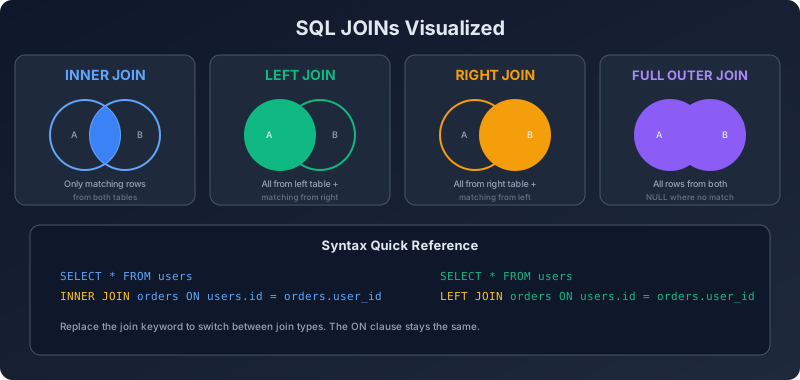
If SELECT is the foundation, JOIN is the first floor.
The running dataset
We’ll keep using the users, orders, products schema.
-- users(id, name, country, age)
-- products(id, name, price)
-- orders(id, user_id, product_id, quantity, total, status)
There’s one important detail for this post: not every user has an order, and we’ll add a user with no orders to make outer joins meaningful.
INSERT INTO users (id, name, email, country, age) VALUES
  (6, 'Edsger', 'ed@example.com', 'NL', 75);
Edsger has no orders — remember this name.
What a JOIN actually does
A join combines rows from two tables based on a condition. The output is a single result set where columns from both tables sit side by side.
The four joins you need:
| Join | Keeps rows from |
|---|---|
INNER JOIN | Only matching rows in both tables |
LEFT JOIN | All rows from the left table, matched where possible |
RIGHT JOIN | All rows from the right table, matched where possible |
FULL OUTER JOIN | All rows from both tables, matched where possible |
The other one — CROSS JOIN — pairs every row on the left with every row on the right.
INNER JOIN
The default. INNER JOIN returns only rows where the join condition is true in both tables.
SELECT u.name, o.id AS order_id, o.total
FROM users u
INNER JOIN orders o ON o.user_id = u.id;
Result:
name     | order_id | total
---------+----------+-------
Ada      | 101      |  25.00
Ada      | 102      |  10.00
Linus    | 103      |  49.00
Grace    | 104      |  89.00
Margaret | 105      |  12.50
Margaret | 106      |   6.00
Dennis   | 107      |  98.00
Edsger does not appear — he has no orders, so there’s nothing to match.
The word INNER is optional. JOIN on its own means INNER JOIN. Be explicit anyway; future readers thank you.
Table aliases
Notice users u and orders o. Those are aliases — short nicknames you can use elsewhere in the query. They are essential once a query references the same column name in both tables (id exists in both users and orders).
SELECT users.name, orders.total
FROM users
JOIN orders ON orders.user_id = users.id;
Works, but reads heavy. Aliases keep things tight:
SELECT u.name, o.total
FROM users u
JOIN orders o ON o.user_id = u.id;
Pick aliases that are obviously the table — u for users, o for orders, p for products. Avoid one-letter aliases that share the first letter (u for users and u2 for usage works; u for users and o for orders is the usual sweet spot).
ON vs USING
ON lets you write any boolean condition:
JOIN orders o ON o.user_id = u.id AND o.status = 'paid'USING is shorthand when both tables share an identically-named column:
SELECT name, total
FROM users
JOIN orders USING (id);   -- only works if both have a column called id
In practice USING is rare because the foreign-key column is usually named differently in each table (users.id vs orders.user_id). ON is the workhorse.
LEFT JOIN
LEFT JOIN keeps every row from the left table, even when there’s no match on the right. The right-hand columns come back as NULL for unmatched rows.
SELECT u.name, o.id AS order_id, o.total
FROM users u
LEFT JOIN orders o ON o.user_id = u.id
ORDER BY u.id;
Result (note Edsger):
name     | order_id | total
---------+----------+-------
Ada      | 101      |  25.00
Ada      | 102      |  10.00
Linus    | 103      |  49.00
Grace    | 104      |  89.00
Margaret | 105      |  12.50
Margaret | 106      |   6.00
Dennis   | 107      |  98.00
Edsger   | NULL     |  NULL
This is the classic “users and their orders, including users with none” report.
Finding things that don’t exist
LEFT JOIN combined with WHERE … IS NULL is the standard way to find rows in the left table with no matching row on the right.
-- Users who have never placed an order
SELECT u.name
FROM users u
LEFT JOIN orders o ON o.user_id = u.id
WHERE o.id IS NULL;
Returns: Edsger. We’ll see an EXISTS-based alternative in Subqueries and CTEs.
RIGHT JOIN
RIGHT JOIN is the mirror image of LEFT JOIN — every row from the right table, matched where possible. In practice almost nobody writes RIGHT JOIN; you swap the table order and use LEFT JOIN instead.
-- These two queries return the same rows
SELECT u.name, o.total FROM users u RIGHT JOIN orders o ON o.user_id = u.id;
SELECT u.name, o.total FROM orders o LEFT JOIN users u ON o.user_id = u.id;
LEFT JOIN reads more naturally because the “anchor” table (the one you want all rows from) appears first. Recognise RIGHT JOIN, but lean on LEFT JOIN.
FULL OUTER JOIN
FULL OUTER JOIN keeps unmatched rows from both sides. It’s the union of LEFT and RIGHT.
SELECT u.name, o.id
FROM users u
FULL OUTER JOIN orders o ON o.user_id = u.id;
Useful when you have two datasets that should match and you want to see both sets of orphans. Example: reconciling two ledgers.
Note: MySQL doesn’t support FULL OUTER JOIN natively. You simulate it with UNION of a LEFT JOIN and a RIGHT JOIN. Postgres and SQLite (3.39+) support it directly.
CROSS JOIN
CROSS JOIN produces every combination of rows from the two tables — the Cartesian product.
SELECT u.name, p.name AS product
FROM users CROSS JOIN products;
Six users times four products is twenty-four rows. Genuinely useful when you want to enumerate all pairs — for example, generating a row per (user, day) for a reporting table.
-- Every user paired with every day in June 2026
SELECT u.id, d.day
FROM users u
CROSS JOIN generate_series('2026-06-01'::date, '2026-06-30'::date, '1 day') AS d(day);
generate_series is Postgres-specific; the principle is universal.
The Cartesian-product mistake
Forget the ON clause and an inner join silently becomes a cross join.
-- BUG: no join condition
SELECT u.name, o.total
FROM users u, orders o;
This returns 6 × 7 = 42 rows — every user paired with every order, regardless of who placed it. With larger tables this kind of mistake quickly produces millions of rows and a very confused query plan.
The fix is to either join explicitly with JOIN ... ON, or include the condition in the WHERE clause if you use the comma syntax:
SELECT u.name, o.total
FROM users u, orders o
WHERE o.user_id = u.id;
Both styles work. The explicit JOIN ... ON form is preferred because the join condition lives next to the join — easier to read, easier to keep in sync when the query grows.
Try it yourself. Using the seed data from CREATE TABLE and INSERT, write:
- An
INNER JOINlisting the name of each user and the name of the product they bought. - A
LEFT JOINlisting every user and the total amount they’ve spent (sum ofo.total). Users with no orders should showNULLor 0. - A query that lists users who have never bought a product priced over $50.
The third question is harder than it looks — there are at least two ways to write it.
Joining more than two tables
You chain joins. Each new JOIN adds another table.
SELECT u.name, p.name AS product, o.quantity, o.total
FROM users u
JOIN orders o ON o.user_id = u.id
JOIN products p ON p.id = o.product_id
WHERE o.status = 'paid'
ORDER BY u.name, p.name;
Read it top to bottom. Start with users, attach their orders, attach the product for each order, keep paid ones, sort. Big queries are just small queries with more joins glued on.
When you mix inner and outer joins, the order matters. A LEFT JOIN followed by an INNER JOIN on the right-side table can quietly drop the rows you were trying to preserve. If you find yourself in that situation, parenthesise the join or move the inner join into a subquery.
Foreign keys make joins trustworthy
Joins make most sense when the join columns are connected by a foreign key:
CREATE TABLE orders (
  ...
  user_id INTEGER NOT NULL REFERENCES users(id),
  ...
);
The foreign key gives you three things:
- Validation — the database refuses to insert an order for a user that doesn’t exist.
- Documentation — readers see the relationship in the schema, not just in the queries.
- Performance — many databases automatically index foreign-key columns.
We cover indexes properly in SQL Indexes and Performance.
Self joins
A table can join to itself. Useful for hierarchical data — employees with managers, categories with parent categories.
SELECT e.name AS employee, m.name AS manager
FROM employees e
LEFT JOIN employees m ON m.id = e.manager_id;
Aliases become non-optional in self joins — you need two different names for the same table.
Common beginner mistakes
- Forgetting the
ONclause and producing a Cartesian product. - Mixing inner and outer joins so an
INNER JOINlater in the chain throws away yourNULLrows. - Filtering an outer-joined table in the
WHEREclause instead of in theONclause —WHERE o.status = 'paid'quietly turns aLEFT JOINinto an inner join becauseNULL = 'paid'is false. - Selecting
*from a multi-table join — you get duplicated columns and no idea which is which. - Forgetting aliases when both tables have a column called
id.
The WHERE-vs-ON distinction is worth a closer look:
-- All users, with their paid orders (if any). Users with no paid orders still appear.
SELECT u.name, o.total
FROM users u
LEFT JOIN orders o ON o.user_id = u.id AND o.status = 'paid';

-- Only users who have at least one paid order. Edsger disappears.
SELECT u.name, o.total
FROM users u
LEFT JOIN orders o ON o.user_id = u.id
WHERE o.status = 'paid';
Same tables, very different result. Put filters on the outer table in WHERE, filters on the outer-joined table in ON.
Try it yourself. Write a single query that returns every user with two extra columns: total_orders (count) and total_spent (sum of o.total). Users with no orders should show 0, not NULL. Hint: COALESCE(SUM(o.total), 0). We unpack SUM and COUNT in the next post.
Recap
You now know:
INNER JOINkeeps only matching rows;LEFT/RIGHT/FULLkeep unmatched rows from one or both sidesCROSS JOINis the Cartesian product — useful occasionally, disastrous accidentallyONtakes any boolean condition;USINGis shorthand for identically-named columns- Aliases (
u,o,p) are essential once tables share column names - Foreign keys are what make join columns trustworthy
- Filter outer-joined tables in
ON, notWHERE
That’s enough to combine almost any two tables that share a relationship.
Next steps
Joins are the combine operator. The next big tool is the summarise operator: GROUP BY and the aggregate functions.
Next: SQL Aggregations — COUNT, SUM, AVG, GROUP BY, HAVING
Related reading: SQL SELECT Basics, CREATE TABLE and INSERT.
Questions or feedback? Email codeloomdevv@gmail.com.
Related articles
- SQL Common Table Expressions (CTEs) in SQL
A practical guide to SQL Common Table Expressions: the WITH clause, recursive CTEs, readability improvements, materialization hints, and when CTEs outperform subqueries.
- SQL SQL Joins Deep Dive: Inner, Outer, Cross, and Self
A thorough tour of SQL joins with diagrams, sample queries, and the gotchas that bite real systems: NULLs, duplicates, and join order.
- SQL Database Normalization: 1NF, 2NF, 3NF Made Practical
A practical guide to database normalization with real customer and order examples. Covers 1NF, 2NF, 3NF, when to denormalize, and tradeoffs.
- SQL SQL Window Functions: ROW_NUMBER, RANK, and LAG
Learn SQL window functions with practical examples. Covers ROW_NUMBER, RANK, DENSE_RANK, LAG, LEAD, running totals, and the OVER clause in depth.