Batch vs Stream Processing Explained
Understand the difference between batch and stream processing, when to use each pattern, and how Lambda and Kappa architectures combine them.
What you'll learn
- ✓What batch and stream processing are in concrete terms
- ✓The trade-offs between latency, throughput, and complexity
- ✓When to use batch, when to use streaming, and when to use both
- ✓Lambda and Kappa architectures for combining the two
- ✓Real-world examples of each pattern
Prerequisites
- •Basic understanding of data pipelines
- •Familiarity with SQL and Python
Data pipelines process data in one of two modes: batch (scheduled chunks) or streaming (continuous flow). The choice affects your latency, complexity, cost, and architecture. Most production systems use both.
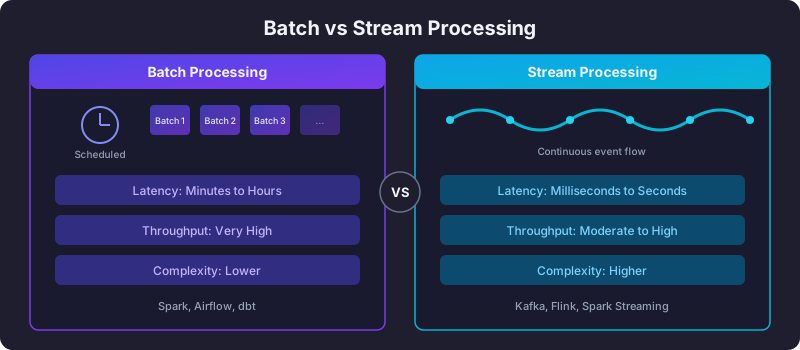
Batch processing
Batch processing runs on a schedule — hourly, daily, weekly. It collects data over a period, processes it all at once, and writes the results.
Data accumulates → Scheduled trigger → Process entire batch → Write resultsExample: daily revenue pipeline
from airflow import DAG
from airflow.operators.python import PythonOperator
from datetime import datetime

def compute_daily_revenue(ds):
    """Process all of yesterday's orders in one pass."""
    query = f"""
        INSERT INTO analytics.daily_revenue
        SELECT
            DATE(order_time) AS order_date,
            region,
            SUM(amount) AS total_revenue,
            COUNT(*) AS num_orders
        FROM raw.orders
        WHERE DATE(order_time) = '{ds}'
        GROUP BY 1, 2
    """
    warehouse.execute(query)

with DAG('daily_revenue', schedule='@daily',
         start_date=datetime(2026, 1, 1), catchup=False) as dag:
    PythonOperator(task_id='compute', python_callable=compute_daily_revenue)
Strengths
- High throughput — processing data in bulk is more efficient than one record at a time.
- Simpler to build — clear boundaries, easy to test, straightforward error handling.
- Easier exactly-once semantics — reprocess the entire batch on failure.
- Lower cost — compute spins up, processes, and shuts down.
Weaknesses
- High latency — data is stale until the next batch runs. A daily pipeline means up to 24 hours of delay.
- All-or-nothing — a failure near the end means reprocessing the entire batch.
- Bursty resource usage — nothing for hours, then a spike when the batch runs.
Stream processing
Stream processing handles data continuously as it arrives, record by record or in micro-batches (seconds-long windows).
Event produced → Stream processor → Result available immediatelyExample: real-time fraud detection
from pyspark.sql import SparkSession
from pyspark.sql.functions import col, window, count, sum as spark_sum

spark = SparkSession.builder.appName("FraudDetection").getOrCreate()

transactions = (
    spark.readStream
    .format("kafka")
    .option("kafka.bootstrap.servers", "broker:9092")
    .option("subscribe", "transactions")
    .load()
    .selectExpr("CAST(value AS STRING)", "timestamp")
)

suspicious = (
    transactions
    .withWatermark("timestamp", "5 minutes")
    .groupBy(
        window("timestamp", "10 minutes"),
        col("card_id")
    )
    .agg(
        count("*").alias("tx_count"),
        spark_sum("amount").alias("total_amount")
    )
    .filter((col("tx_count") > 10) | (col("total_amount") > 5000))
)

query = (
    suspicious.writeStream
    .outputMode("update")
    .format("kafka")
    .option("kafka.bootstrap.servers", "broker:9092")
    .option("topic", "fraud_alerts")
    .option("checkpointLocation", "/tmp/fraud_checkpoint")
    .start()
)
Strengths
- Low latency — results in milliseconds to seconds.
- Continuous — no waiting for the next scheduled run.
- Natural for event-driven systems — clicks, transactions, sensor readings.
Weaknesses
- Higher complexity — state management, ordering guarantees, late-arriving data.
- Harder exactly-once — requires careful checkpointing and idempotent writes.
- Higher cost — compute runs continuously, even during low-traffic periods.
- Debugging is harder — distributed, stateful, time-dependent systems are tough to reproduce locally.
Side-by-side comparison
| Dimension | Batch | Stream |
|---|---|---|
| Latency | Minutes to hours | Milliseconds to seconds |
| Throughput | Very high | Moderate to high |
| Complexity | Lower | Higher |
| Cost | Lower (scheduled compute) | Higher (always-on) |
| Error handling | Reprocess entire batch | Checkpoints, dead-letter queues |
| State | Stateless or simple | Complex stateful processing |
| Tools |  Spark, Spark,  Airflow, dbt Airflow, dbt |  Kafka, Kafka,  Flink, Spark Streaming Flink, Spark Streaming |
| Best for | Reports, ML training, backfills | Fraud detection, real-time dashboards, alerts |
Lambda architecture
Lambda architecture runs both batch and stream processing in parallel, merging the results at query time.
                    ┌─── Batch Layer (Spark) ──── Batch View ───┐
                    │                                            │
Raw Data ───────────┤                                            ├─── Serving Layer
                    │                                            │
└─── Speed Layer (Flink) ──── Real-time View ┘- Batch layer — processes all historical data periodically. Produces accurate, complete views.
- Speed layer — processes only recent data in real-time. Produces approximate, low-latency views.
- Serving layer — merges both views. Recent data comes from the speed layer; older data comes from the batch layer.
Advantage: you get both accuracy (batch) and freshness (stream).
Disadvantage: you maintain two separate codepaths for the same logic. When the business rule for “revenue” changes, you update it in both the Spark job and the Flink job. This duplication is the primary criticism of Lambda.
Kappa architecture
Kappa architecture simplifies Lambda by using only the streaming layer. Historical reprocessing is done by replaying the event log (Kafka) through the same stream processor.
Event Log (Kafka) → Stream Processor (Flink) → Serving Layer
                          ↑
Replay for reprocessing- One codebase for both real-time and historical processing.
- Requires a durable, replayable event log (Kafka with long retention).
- Reprocessing is slower than a dedicated batch engine — you replay the entire log.
Advantage: single codebase, no dual maintenance.
Disadvantage: reprocessing petabytes by replaying a stream is slower and more expensive than a batch engine designed for it.
When to use each
Use batch when
- Data freshness of hours is acceptable (daily reports, monthly summaries).
- You are training ML models on historical data.
- You need to backfill or reprocess large volumes.
- The transformation logic is complex and benefits from simple debugging.
- Cost is a concern — batch compute is cheaper.
Use streaming when
- Latency matters — fraud detection, live dashboards, real-time recommendations.
- The data source is naturally event-driven — clickstreams, IoT sensors, transactions.
- You need to trigger actions immediately — alerts, notifications, automated responses.
Use both when
- Most businesses end up here. Real-time events flow through Kafka for immediate use cases, and the same events land in a data lake for batch processing, ML, and historical analysis.
Next steps
- What Is Apache Kafka? — the event streaming backbone for stream processing.
- What Is Apache Airflow? — the scheduler for batch pipelines.
- ETL vs ELT Pipelines — the transformation patterns that sit on top of batch processing.
Related articles
- Data Engineering Real-Time Data Streaming: Architectures and Patterns
Learn real-time streaming architectures like Lambda, Kappa, CDC, and event sourcing. Understand when to choose streaming over batch processing.
- Data Engineering Apache Spark Fundamentals — Big Data Processing at Scale
Learn Apache Spark: RDDs, DataFrames, SparkSQL, the execution model, PySpark basics, platform comparisons, and essential performance optimization tips.
- Data Engineering Data Observability — Monitoring Your Data, Not Just Pipes
Learn the five pillars of data observability, anomaly detection, lineage tracking, incident response, and tools like Elementary, Monte Carlo, and Soda.
- Data Engineering CI/CD for Data Pipelines — Ship Data with Confidence
Build CI/CD workflows for data pipelines: lint SQL, validate DAGs, run tests, deploy dbt models, and manage dev/staging/prod environments.