Kafka Consumers and Consumer Groups: Complete Guide
Master Kafka consumers and consumer groups including poll loops, offset management, rebalancing strategies, and partition assignment with Python and Java examples.
What you'll learn
- ✓Consumer architecture and the poll loop
- ✓Consumer groups and partition assignment
- ✓Manual vs auto offset commit strategies
- ✓Rebalancing triggers and cooperative assignors
- ✓Batch processing patterns for high throughput
Prerequisites
- •Basic Kafka concepts (topics, partitions, brokers)
- •Understanding of Kafka producers
- •Python 3.8+ installed
What is a Kafka Consumer?
Think of a Kafka topic as a newspaper with a very unusual property: it never throws away old editions. Every article ever published is still there, sitting on the shelf. A Kafka consumer is like a subscriber who reads this newspaper at their own pace. They keep a bookmark (called an offset) that tracks exactly where they left off, so they can pick up right where they stopped — even after a vacation or an unexpected interruption.
This is fundamentally different from traditional message queues, where the broker pushes messages to consumers and deletes them after delivery. In Kafka, the consumer pulls messages at its own pace, and the data stays in the topic for as long as the retention policy allows (days, weeks, or even indefinitely). This means multiple consumers can read the same data independently, and a consumer can even rewind to re-read old messages if needed.
The consumer’s workflow is a simple loop that repeats continuously:
- Subscribe — Tell Kafka which topics you want to read from.
- Poll — Ask the broker for new messages. This is a pull model: the consumer asks for data rather than having data pushed to it.
- Deserialize — Convert the raw bytes back into usable objects (the reverse of what the producer did).
- Process — Run your business logic on the messages.
- Commit — Tell Kafka how far you have read so that, if you restart, you resume from the right place.
The offset is the critical concept here. Each partition in a topic has its own sequence of offsets starting from 0. When a consumer commits offset 47 for partition 3, it is saying “I have successfully processed everything up to and including message 47 in partition 3.” On restart, the consumer asks for messages starting at offset 48.
Consumer Groups: Team Reading
Now imagine that the newspaper publishes so many articles that one person cannot read them all in time. You form a team. Each team member takes responsibility for reading a different section — one person handles sports, another handles business, another handles technology. Together, the team covers everything, but no article is read by two people on the same team.
This is exactly how Kafka consumer groups work. A consumer group is a set of consumers that share the same group.id. Kafka divides the partitions of a topic among the consumers in the group, so each partition is read by exactly one consumer. This provides parallel processing: more consumers in the group means faster consumption, up to the number of partitions.
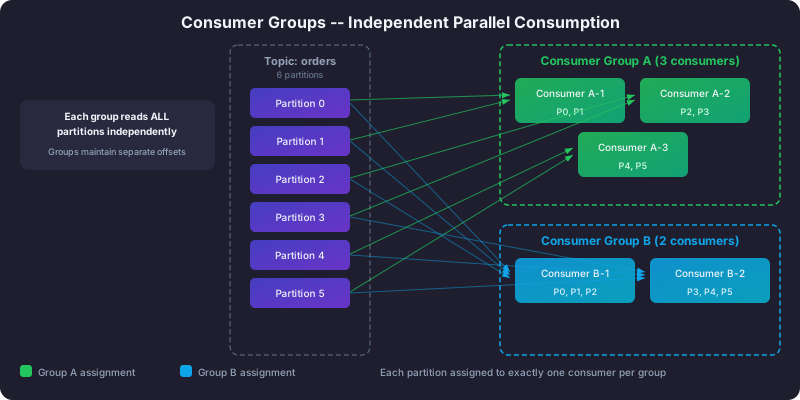
Here are the key rules that govern consumer groups:
Each partition goes to exactly one consumer within a group. This is the fundamental guarantee. Partition 0 might be assigned to Consumer A, while Partition 1 goes to Consumer B. But Partition 0 will never be read by both A and B simultaneously within the same group.
A single consumer can handle multiple partitions. If you have 6 partitions and only 2 consumers, each consumer gets 3 partitions. The work is divided as evenly as possible.
Extra consumers sit idle. If you have 6 partitions and 8 consumers, only 6 consumers are active. The remaining 2 do nothing, waiting as standby in case an active consumer fails.
Different groups are completely independent. If two groups — say “analytics-team” and “billing-team” — both subscribe to the same topic, each group gets its own complete copy of all the data. They track their own offsets independently and do not interfere with each other. This is how Kafka supports multiple downstream systems reading from the same data stream.
Here is a concrete example. A topic called orders has 6 partitions, and a consumer group called order-processors has 3 consumers:
Topic: orders (6 partitions)

Consumer Group: order-processors
  Consumer-1: partitions [0, 1]
  Consumer-2: partitions [2, 3]
  Consumer-3: partitions [4, 5]
Each consumer reads from 2 partitions. The total workload is evenly split, and each order is processed exactly once within this group.
Rebalancing: When a Team Member Leaves
What happens when Consumer-2 crashes? Its partitions (2 and 3) have no one reading them. Kafka detects the failure and triggers a rebalance, redistributing the orphaned partitions among the surviving consumers:
Consumer Group: order-processors (after rebalance)
  Consumer-1: partitions [0, 1, 2]
  Consumer-3: partitions [3, 4, 5]
Think of it like a team project at work. If one team member calls in sick, their tasks get redistributed among the remaining team members. The project continues, but everyone has a bit more work.
Rebalancing is triggered by several events:
- A consumer joins the group — a new team member arrives and should take on some work.
- A consumer leaves the group — either a graceful shutdown or a crash. Kafka detects crashes when a consumer stops sending heartbeats within the
session.timeout.mswindow. - New partitions are added — the topic grows, and the new partitions need owners.
- A consumer takes too long between polls — if a consumer exceeds
max.poll.interval.mswithout callingpoll(), Kafka assumes it is stuck and removes it from the group.
There are two approaches to rebalancing, and the difference matters for your application’s availability:
Eager rebalancing (the older approach) is like stopping the entire team, taking all tasks away from everyone, and then redistributing from scratch. During this period, no consumer in the group processes any messages. It is simple but disruptive.
Cooperative sticky rebalancing (the recommended approach) is smarter. Only the partitions that need to move are reassigned. Consumers that keep their partitions continue processing without interruption. It is like reassigning only the sick team member’s tasks while everyone else keeps working. Always use cooperative-sticky in production.
Manual vs Auto Commit: Speed vs Reliability
Offset committing is how your consumer tells Kafka “I have processed up to this point.” This seemingly simple act has significant implications for your data guarantees, and it is one of the most important decisions you will make when configuring a consumer.
Auto Commit: The Easy Path
With auto commit enabled, the consumer periodically commits offsets in the background at a fixed interval (every 5 seconds by default). You do not write any commit code. Simple, right? But there is a catch — actually, two catches.
Risk of data loss: Suppose your consumer polls 100 messages and auto-commit fires immediately after the poll. The offsets are now committed, telling Kafka “I processed all 100.” But your application has only processed 30 of them so far. If the consumer crashes right now, Kafka thinks messages 31 through 100 have been handled. On restart, the consumer picks up at message 101. Messages 31 through 100 are silently lost.
Risk of duplicates: Now consider the opposite scenario. Your consumer processes all 100 messages, but auto-commit has not fired yet when the consumer crashes. On restart, the consumer re-reads those 100 messages and processes them again. If your processing involves charging a credit card or sending an email, that is a problem.
Manual Commit: Full Control
Manual commit puts you in the driver’s seat. You decide exactly when to tell Kafka “I am done with these messages.” The recommended pattern is: poll messages, process them, then commit. This gives you at-least-once semantics: you will never lose messages, though in rare failure scenarios (crash after processing but before commit) you might process a message twice. For most applications, this is the right trade-off, especially if you make your processing idempotent.
The choice between synchronous and asynchronous commit is also worth understanding. Synchronous commit blocks your consumer until the broker confirms the offset was saved. This is slower but guarantees the commit succeeded. Asynchronous commit returns immediately, which is faster but means a failed commit goes unnoticed unless you check a callback.
For production systems, use manual commit with synchronous commits. The small performance cost is worth the reliability guarantee.
A Complete Python Consumer Example
Let us put all of these concepts together in a single, well-explained consumer example. This code shows the recommended production pattern: manual offset commits, proper error handling, and graceful shutdown.
from confluent_kafka import Consumer, KafkaError, KafkaException
import json


# --- Configuration ---
config = {
    # Connect to the Kafka cluster.
    'bootstrap.servers': 'localhost:9092',

    # Consumer group ID. All consumers with this same ID form a group,
    # and Kafka distributes partitions among them.
    'group.id': 'user-events-processor',

    # When this consumer group reads a topic for the first time and
    # has no committed offsets, start from the very beginning.
    # Use 'latest' if you only care about new messages going forward.
    'auto.offset.reset': 'earliest',

    # Disable auto commit so we control exactly when offsets are saved.
    # This is the key setting for at-least-once processing.
    'enable.auto.commit': False,

    # If our processing takes longer than 5 minutes for a single
    # poll batch, Kafka considers us dead and triggers a rebalance.
    'max.poll.interval.ms': 300000,

    # How long Kafka waits for a heartbeat before declaring us dead.
    'session.timeout.ms': 45000,

    # Use cooperative-sticky rebalancing so that partition reassignment
    # does not pause ALL consumers -- only the affected ones.
    'partition.assignment.strategy': 'cooperative-sticky',
}

consumer = Consumer(config)


def process_message(msg):
    """
    Process a single Kafka message.
    Returns True if processing succeeded, False otherwise.
    """
    try:
        # Deserialize the key and value from bytes back to strings/dicts.
        key = msg.key().decode('utf-8') if msg.key() else None
        value = json.loads(msg.value().decode('utf-8'))

        print(f'Processing: partition={msg.partition()} '
              f'offset={msg.offset()} key={key}')

        # --- Your business logic goes here ---
        action = value.get('action')
        if action == 'purchase':
            print(f"  Purchase: user={value['user_id']} "
                  f"amount={value.get('amount')}")
        elif action == 'page_view':
            print(f"  Page view: user={value['user_id']} "
                  f"page={value.get('page')}")

        return True

    except json.JSONDecodeError as e:
        # The message value was not valid JSON. Log and skip it.
        print(f'Bad JSON at offset {msg.offset()}: {e}')
        return False
    except Exception as e:
        print(f'Processing error at offset {msg.offset()}: {e}')
        return False


def on_revoke(consumer, partitions):
    """
    Called when partitions are about to be taken away from this consumer
    (during a rebalance). Commit offsets now so the next consumer that
    receives these partitions starts from the right place.
    """
    print(f'Partitions revoked: {[p.partition for p in partitions]}')
    consumer.commit(asynchronous=False)


def consume_loop():
    """Main consumption loop with manual offset commit."""
    # Subscribe to the topic. The on_revoke callback ensures we
    # commit offsets before partitions move to another consumer.
    consumer.subscribe(['user-events'], on_revoke=on_revoke)

    try:
        while True:
            # poll() asks the broker for new messages. It blocks for
            # up to 1 second. If no messages are available, it
            # returns None.
            msg = consumer.poll(timeout=1.0)

            if msg is None:
                # No messages available right now. Loop and try again.
                continue

            if msg.error():
                if msg.error().code() == KafkaError._PARTITION_EOF:
                    # We have read everything currently in this partition.
                    # Not an error -- just means we are caught up.
                    continue
                else:
                    raise KafkaException(msg.error())

            # Process the message, then commit its offset.
            success = process_message(msg)

            if success:
                # Synchronous commit: blocks until Kafka confirms
                # the offset was saved. Slower but reliable.
                consumer.commit(message=msg, asynchronous=False)
            else:
                # Even on failure, commit the offset so we do not get
                # stuck retrying a permanently bad message forever.
                # In production, send failed messages to a dead letter
                # topic for investigation.
                consumer.commit(message=msg, asynchronous=False)

    except KeyboardInterrupt:
        print('Shutting down consumer...')
    finally:
        # close() triggers a graceful leave from the consumer group,
        # which causes an immediate rebalance rather than waiting
        # for the session timeout to expire.
        consumer.close()


if __name__ == '__main__':
    consume_loop()
A few things to notice about this code. The on_revoke callback is often overlooked but critical: it ensures that when partitions move to another consumer during a rebalance, all processed offsets are committed first. Without it, the next consumer might reprocess messages that were already handled. The cooperative-sticky assignment strategy minimizes disruption during rebalances. And the synchronous commit after each message ensures we never lose track of our progress.
Key Consumer Configurations Explained
Understanding what each configuration does helps you tune your consumer for your specific use case, whether that is low-latency real-time processing or high-throughput batch analytics.
| Configuration | Default | What It Controls |
|---|---|---|
group.id | (required) | Which consumer group this consumer belongs to |
auto.offset.reset | latest | Where to start reading if no committed offset exists: earliest (beginning), latest (new messages only) |
enable.auto.commit | true | Whether offsets are committed automatically on a timer |
max.poll.interval.ms | 300000 | Maximum time between poll() calls before Kafka considers the consumer dead |
session.timeout.ms | 45000 | How long Kafka waits for heartbeats before removing the consumer |
fetch.min.bytes | 1 | Minimum amount of data the broker should accumulate before responding to a fetch |
fetch.max.wait.ms | 500 | Maximum time the broker waits to fill fetch.min.bytes |
The relationship between fetch.min.bytes and fetch.max.wait.ms is worth understanding. Together, they control the trade-off between latency and efficiency. Setting fetch.min.bytes to 1 (the default) means the broker responds immediately with whatever data is available, giving you low latency. Setting it to a larger value like 64KB means the broker waits until it has accumulated that much data (or until fetch.max.wait.ms expires, whichever comes first). This reduces the number of fetch requests, improving throughput at the cost of higher latency.
For real-time processing (dashboards, alerts), keep fetch.min.bytes low and fetch.max.wait.ms short. For batch analytics or ETL workloads, increase both values to process larger chunks at a time.
Common Pitfalls and How to Avoid Them
Slow processing causing rebalances. If your message processing takes longer than max.poll.interval.ms (5 minutes by default), Kafka assumes your consumer is dead and triggers a rebalance. The consumer loses its partitions, processes them partially, and then gets them back after the rebalance — creating chaos. The fix is either to increase the interval or to reduce the amount of work done between poll() calls by processing messages in a separate thread.
Forgetting to close the consumer. If your consumer process exits without calling consumer.close(), Kafka does not know the consumer left until the session timeout expires (45 seconds by default). During that time, the consumer’s partitions are unread. Always use a try/finally block to ensure close() is called.
More consumers than partitions. If your topic has 6 partitions and you run 8 consumer instances, 2 of them will sit completely idle, consuming resources but doing no work. Match your consumer count to your partition count, or have fewer consumers than partitions.
Not handling the rebalance callback. When a rebalance occurs without an on_revoke callback, uncommitted offsets for the revoked partitions are lost. The new consumer that receives those partitions will re-read from the last committed offset, potentially duplicating work.
Summary
Kafka consumers and consumer groups provide a flexible, scalable model for reading data. The consumer pulls data at its own pace, tracks its position with offsets, and can rewind to re-read old data. Consumer groups enable horizontal scaling by distributing partitions across multiple consumers. The key decisions you need to make are:
- Use manual offset commits for at-least-once processing guarantees.
- Choose cooperative-sticky rebalancing to minimize disruption during partition reassignment.
- Match your consumer count to your partition count for optimal parallelism.
- Tune
fetch.min.bytesandfetch.max.wait.msfor your latency vs throughput requirements.
Next Steps
- Learn how to produce messages in Kafka Producers Explained
- Explore real-time transformations with Kafka Streams Processing
Related articles
- Kafka Kafka Connect: Streaming Data Integration Framework
Master Kafka Connect for integrating external systems with Kafka using source and sink connectors, Debezium CDC, JDBC, Elasticsearch, REST API management, and SMTs.
- Kafka Kafka Architecture Explained: Brokers, Replication, and KRaft
A detailed look at Kafka's internal architecture — broker clusters, KRaft consensus, replication protocols, partition leadership, log segments, and how they combine to deliver fault tolerance at scale.
- Kafka Kafka Producers Explained: Architecture, Configuration & Code
Learn how Kafka producers work including batching, partitioning, serialization, delivery guarantees, and idempotent production with Python and Java examples.
- Kafka Schema Registry and Avro Serialization in Apache Kafka
Learn how Confluent Schema Registry manages Avro schemas for Kafka producers and consumers, enabling safe schema evolution and decoupled services.