Simplify Unix Path Using a Stack — LeetCode 71 Solution
Solve Simplify Path LeetCode 71 with a stack. Handle ., .., multiple slashes, and edge cases. Python solution with step-by-step trace.
What you'll learn
- ✓How Unix path resolution works with . and ..
- ✓Stack-based approach for directory navigation
- ✓Handling edge cases: trailing slashes, root directory, multiple slashes
- ✓Why this is a natural stack problem
Prerequisites
- •Stack basics — see Stacks & Queues Intro
Given an absolute Unix-style file path, simplify it to its canonical form. This means:
- No trailing slashes (except root
/) - No double slashes
// - No
.(current directory) - No
..beyond root - Resolve
..to go up one directory
This is LeetCode 71.
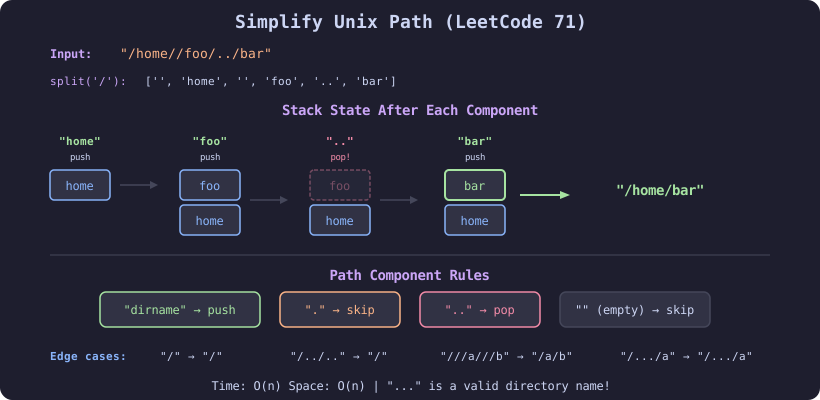
Unix Path Rules
| Component | Meaning | Action |
|---|---|---|
. | Current directory | Ignore |
.. | Parent directory | Pop from stack |
name | Directory name | Push to stack |
/ | Separator | Split on it |
// | Same as / | Handled by split |
Solution
def simplify_path(path: str) -> str:
    """
    Simplify Unix path to canonical form.
    LeetCode 71.
    Time: O(n), Space: O(n)
    """
    stack = []

    # Split by '/' — handles multiple slashes automatically
    for component in path.split('/'):
        if component == '..':
            if stack:
                stack.pop()  # go up one directory
        elif component and component != '.':
            stack.append(component)  # valid directory name

    return '/' + '/'.join(stack)
That is the entire solution. The split('/') call handles multiple consecutive slashes by producing empty strings, which we skip with the component truthiness check.
Step-by-Step Trace
Example 1: "/home//foo/../bar"
Split by '/': ['', 'home', '', 'foo', '..', 'bar']

Component    Action           Stack
─────────    ──────           ─────
''           skip (empty)     []
'home'       push             ['home']
''           skip (empty)     ['home']
'foo'        push             ['home', 'foo']
'..'         pop              ['home']
'bar'        push             ['home', 'bar']

Result: '/home/bar' ✓
Example 2: "/../a/b/../../c/"
Split by '/': ['', '..', 'a', 'b', '..', '..', 'c', '']

Component    Action           Stack
─────────    ──────           ─────
''           skip             []
'..'         pop? empty!      []          ← can't go above root
'a'          push             ['a']
'b'          push             ['a', 'b']
'..'         pop              ['a']
'..'         pop              []
'c'          push             ['c']
''           skip             ['c']

Result: '/c' ✓
Example 3: "/a/./b/../../c/"
Split by '/': ['', 'a', '.', 'b', '..', '..', 'c', '']

Component    Action           Stack
─────────    ──────           ─────
''           skip             []
'a'          push             ['a']
'.'          skip (current)   ['a']
'b'          push             ['a', 'b']
'..'         pop              ['a']
'..'         pop              []
'c'          push             ['c']
''           skip             ['c']

Result: '/c' ✓
Why a Stack?
Directory navigation is inherently stack-like:
- Entering a directory = push onto stack
- Going back (..) = pop from stack
- Current directory (.) = no operation
The stack maintains the path from root to current position. At the end, joining the stack gives the canonical path.
Edge Cases
# Root directory
assert simplify_path("/") == "/"

# Multiple dots (valid directory name!)
assert simplify_path("/...") == "/..."

# Just go up
assert simplify_path("/../../../") == "/"

# Current directory
assert simplify_path("/./././.") == "/"

# Trailing slash
assert simplify_path("/home/user/") == "/home/user"

# Multiple slashes
assert simplify_path("///a///b///") == "/a/b"

# Hidden files (start with .)
assert simplify_path("/.hidden") == "/.hidden"

# Complex mix
assert simplify_path("/a/b/c/../d/./e/../..") == "/a/b"
Common Gotcha: ... Is a Valid Name
Three or more dots is a valid directory name, not a special symbol:
simplify_path("/a/.../b")  # → "/a/.../b"  (... is a real name)
simplify_path("/a/..b/c")  # → "/a/..b/c"  (..b is a real name)
Only exactly . and exactly .. have special meaning.
Alternative: Without Split
If the interviewer asks you to avoid split():
def simplify_path_manual(path: str) -> str:
    """
    Parse path character by character.
    Time: O(n), Space: O(n)
    """
    stack = []
    i = 0
    n = len(path)

    while i < n:
        # Skip slashes
        while i < n and path[i] == '/':
            i += 1

        # Build component
        start = i
        while i < n and path[i] != '/':
            i += 1
        component = path[start:i]

        if component == '..':
            if stack:
                stack.pop()
        elif component and component != '.':
            stack.append(component)

    return '/' + '/'.join(stack)
Complexity
| Metric | Value | Why |
|---|---|---|
| Time | O(n) | Single pass through the string |
| Space | O(n) | Stack stores directory names |
When to Use This Pattern
- File system operations: Path normalization in real file systems
- URL normalization: Canonicalizing URLs follows similar rules
- Breadcrumb navigation: Building navigation trails in UIs
- Undo mechanisms: Stack-based history with “go back” support
Related Problems
- Decode String — nested bracket processing with stack
- Valid Parentheses — matching brackets
- Basic Calculator — nested evaluation with stack
Related articles
- DSA Minimum Remove to Make Valid Parentheses — Stack Solution
Solve LeetCode 1249 Minimum Remove to Make Valid Parentheses using a stack. Two-pass and one-pass approaches with Python code and traces.
- DSA Implement Stack Using Two Queues — Two Approaches Explained
Implement a stack using two queues with costly push and costly pop approaches. Complete Python solutions with complexity analysis.
- DSA Asteroid Collision Problem Using Stacks
Solve the asteroid collision problem (LeetCode 735) using a stack. Covers collision rules, Python implementation, and all edge cases.
- DSA Car Fleet Problem — Stack-Based Arrival Time Solution
Solve LeetCode 853 Car Fleet using a stack. Sort by position, compare arrival times, and count fleets. Python solution with visual trace.