Dead Letter Queues in Kafka: Handling Failed Messages
Learn how to implement Dead Letter Queues in Kafka to gracefully handle failed messages with retry strategies, monitoring, and production patterns.
What you'll learn
- ✓Why messages fail and the types of failures you will encounter
- ✓The Dead Letter Queue pattern and when to use it
- ✓Implementing DLQs with Spring Kafka in Java
- ✓Implementing DLQs with confluent-kafka-python
- ✓Retry strategies: fixed, exponential backoff, and retry topics
- ✓Monitoring and reprocessing DLQ messages in production
Prerequisites
- •Kafka producers and consumers fundamentals
- •Basic understanding of consumer groups
- •Familiarity with either Java/Spring or Python
Why Messages Fail
In any Kafka-based system, messages will eventually fail to process. This is not a question of if, but when. Understanding the types of failures helps you design the right handling strategy.
Deserialization errors happen when a consumer receives a message it cannot parse. Maybe a producer sent malformed JSON, or the schema evolved in a way the consumer does not understand. The message bytes are valid from Kafka’s perspective, but your application cannot make sense of them.
Business logic errors occur when a message is structurally valid but contains data your application cannot handle. An order with a negative quantity, a user ID that does not exist in your database, a timestamp from the year 3000. The message parsed fine, but your code rejects it.
Transient infrastructure errors are temporary: a database connection timeout, a third-party API returning 503, a network blip. These are the only failures where retrying the same message later has a reasonable chance of succeeding.
The critical distinction is between retriable and non-retriable errors. Retrying a deserialization error will fail every single time — the message bytes will not magically change. Retrying a database timeout might succeed in a few seconds when the database recovers.
The Dead Letter Queue Pattern
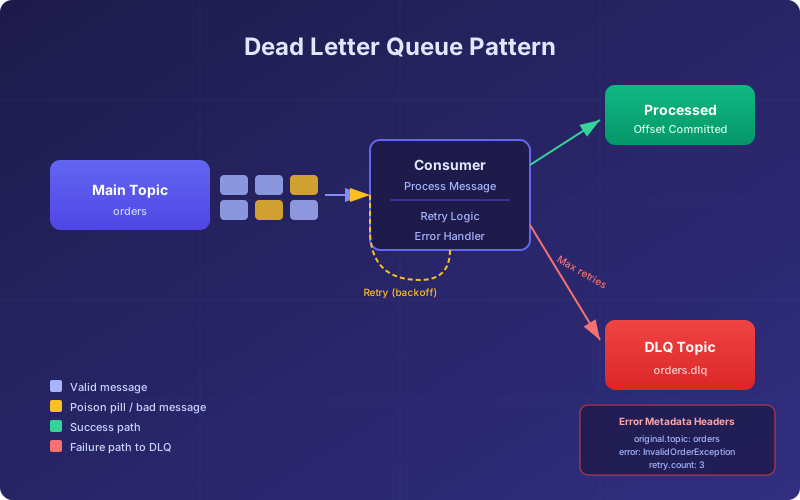
A Dead Letter Queue (DLQ) is a separate Kafka topic where you send messages that your consumer cannot process. Instead of blocking the entire consumer, crashing, or silently dropping the message, you move it aside for later investigation.
The pattern works like this: your consumer reads from the main topic, attempts to process each message, and if processing fails after exhausting retries, it produces the failed message to a designated DLQ topic. The consumer then commits the offset and moves on to the next message.
This keeps your pipeline flowing. Failed messages are preserved with their original content, headers, and metadata so you can inspect them later, fix the underlying issue, and reprocess them.
When Not to Use DLQs
DLQs are not appropriate for every situation. If message ordering is critical and you cannot tolerate gaps, a DLQ will break your ordering guarantees because it skips the failed message. In that case, you may need to pause consumption on the affected partition until the issue is resolved. Also, if every message is failing, a DLQ will just shift the problem — you need to fix the root cause, not shovel everything into a side topic.
Implementing DLQs with Spring Kafka
Spring Kafka has built-in support for error handling and dead letter publishing. The DefaultErrorHandler combined with DeadLetterPublishingRecoverer gives you a production-ready DLQ with minimal configuration.
@Configuration
public class KafkaConsumerConfig {

    @Bean
    public DefaultErrorHandler errorHandler(KafkaTemplate<String, String> kafkaTemplate) {
        // Send failed messages to a DLQ topic after 3 retries
        DeadLetterPublishingRecoverer recoverer =
            new DeadLetterPublishingRecoverer(kafkaTemplate,
                (record, ex) -> new TopicPartition(
                    record.topic() + ".dlq", record.partition()));

        // Retry 3 times with 1-second backoff, then send to DLQ
        FixedBackOff backOff = new FixedBackOff(1000L, 3L);
        DefaultErrorHandler handler = new DefaultErrorHandler(recoverer, backOff);

        // Do not retry deserialization errors -- they will never succeed
        handler.addNotRetryableExceptions(DeserializationException.class);

        return handler;
    }
}
The DeadLetterPublishingRecoverer automatically adds headers to the DLQ message containing the original topic, partition, offset, exception class, and exception message. This metadata is invaluable when you are debugging failures at 2 AM.
Your consumer stays clean and focused on business logic:
@KafkaListener(topics = "orders", groupId = "order-processor")
public void processOrder(ConsumerRecord<String, String> record) {
    Order order = objectMapper.readValue(record.value(), Order.class);

    if (order.getQuantity() < 0) {
        throw new InvalidOrderException("Negative quantity: " + order.getQuantity());
    }

    orderService.fulfill(order);
}
When processOrder throws an exception, Spring Kafka’s error handler catches it, retries according to your backoff policy, and if all retries fail, sends the message to orders.dlq.
Exponential Backoff
For transient errors, exponential backoff is more effective than fixed intervals. It gives the failing dependency more time to recover on each successive attempt:
@Bean
public DefaultErrorHandler errorHandler(KafkaTemplate<String, String> kafkaTemplate) {
    DeadLetterPublishingRecoverer recoverer =
        new DeadLetterPublishingRecoverer(kafkaTemplate);

    // Start at 1s, multiply by 2 each retry, max 5 retries
    ExponentialBackOff backOff = new ExponentialBackOff(1000L, 2.0);
    backOff.setMaxElapsedTime(30000L); // Give up after 30 seconds total

    return new DefaultErrorHandler(recoverer, backOff);
}
Implementing DLQs with confluent-kafka-python
Python does not have Spring’s built-in DLQ support, so you build it yourself. The pattern is straightforward: wrap your processing logic in a try/except and produce to the DLQ on failure.
from confluent_kafka import Consumer, Producer
import json
import traceback

producer = Producer({'bootstrap.servers': 'localhost:9092'})
consumer = Consumer({
    'bootstrap.servers': 'localhost:9092',
    'group.id': 'order-processor',
    'enable.auto.commit': False,
    'auto.offset.reset': 'earliest'
})
consumer.subscribe(['orders'])

DLQ_TOPIC = 'orders.dlq'
MAX_RETRIES = 3

def process_message(msg):
    """Process a single message. Raises on failure."""
    order = json.loads(msg.value().decode('utf-8'))
    if order.get('quantity', 0) < 0:
        raise ValueError(f"Invalid quantity: {order['quantity']}")
    # ... business logic here ...

def send_to_dlq(msg, error, attempt_count):
    """Produce the failed message to the DLQ with error metadata."""
    headers = [
        ('dlq.original.topic', msg.topic().encode('utf-8')),
        ('dlq.original.partition', str(msg.partition()).encode('utf-8')),
        ('dlq.original.offset', str(msg.offset()).encode('utf-8')),
        ('dlq.error.message', str(error).encode('utf-8')),
        ('dlq.retry.count', str(attempt_count).encode('utf-8')),
    ]
    producer.produce(
        topic=DLQ_TOPIC,
        key=msg.key(),
        value=msg.value(),
        headers=headers
    )
    producer.flush()

def consume_with_dlq():
    while True:
        msg = consumer.poll(timeout=1.0)
        if msg is None:
            continue
        if msg.error():
            print(f"Consumer error: {msg.error()}")
            continue

        retries = 0
        success = False
        last_error = None

        while retries < MAX_RETRIES and not success:
            try:
                process_message(msg)
                success = True
            except (json.JSONDecodeError, KeyError) as e:
                # Non-retriable: bad data will never parse correctly
                last_error = e
                break
            except Exception as e:
                retries += 1
                last_error = e
                if retries < MAX_RETRIES:
                    import time
                    time.sleep(2 ** retries)  # Exponential backoff

        if not success:
            send_to_dlq(msg, last_error, retries)
            print(f"Sent to DLQ: offset={msg.offset()} error={last_error}")

        consumer.commit(message=msg)

if __name__ == '__main__':
    consume_with_dlq()
Notice how deserialization errors (json.JSONDecodeError) break out of the retry loop immediately. There is no point waiting and retrying a message that will never parse.
Retry Topics: A More Sophisticated Pattern
For high-throughput systems, the simple retry loop has a problem: it blocks the consumer while waiting for backoff timers. A more sophisticated approach uses retry topics — separate Kafka topics with increasing delays.
orders --> orders.retry.1 (1 min delay) --> orders.retry.2 (10 min delay) --> orders.dlqThe consumer reads from orders, and on failure, produces to orders.retry.1. A separate consumer reads from orders.retry.1 with a delay (using a timestamp header and sleeping until the retry time), and on failure produces to orders.retry.2. If the second retry also fails, the message goes to the DLQ.
This pattern keeps your main consumer unblocked and gives transient errors much more time to resolve. Spring Kafka supports this out of the box with RetryTopicConfiguration:
@Configuration
@EnableKafka
public class RetryTopicConfig {

    @Bean
    public RetryTopicConfiguration retryTopicConfig(KafkaTemplate<String, String> template) {
        return RetryTopicConfigurationBuilder
            .newInstance()
            .fixedBackOff(60000)       // 1 minute between retries
            .maxRetryAttempts(3)
            .autoCreateTopics(true, 3, (short) 3)  // 3 partitions, replication 3
            .build();
    }
}
Monitoring Your DLQs
A DLQ that nobody monitors is worse than no DLQ at all — it gives you a false sense of safety while messages silently pile up. You need alerts when messages land in the DLQ.
Key Metrics to Track
DLQ message rate: how many messages per minute are being sent to the DLQ. A sudden spike means something changed — a bad deployment, a schema change, or an infrastructure issue.
DLQ consumer lag: if you have a reprocessing consumer on the DLQ, track its lag. Growing lag means you are not keeping up with failures.
Error category breakdown: group DLQ messages by the error type header. If 90% of failures are ConnectionTimeout, you have an infrastructure problem, not a data quality problem.
# Simple DLQ monitoring with Prometheus metrics
from prometheus_client import Counter, Gauge

dlq_messages_total = Counter(
    'kafka_dlq_messages_total',
    'Total messages sent to DLQ',
    ['topic', 'error_type']
)

dlq_pending = Gauge(
    'kafka_dlq_pending_messages',
    'Messages in DLQ awaiting reprocessing',
    ['topic']
)

def send_to_dlq_with_metrics(msg, error, attempt_count):
    error_type = type(error).__name__
    dlq_messages_total.labels(
        topic=msg.topic(),
        error_type=error_type
    ).inc()
    send_to_dlq(msg, error, attempt_count)
Reprocessing DLQ Messages
Once you fix the root cause of failures, you need to reprocess the DLQ messages. The simplest approach is a dedicated consumer that reads from the DLQ and produces back to the original topic:
def reprocess_dlq(dlq_topic, batch_size=100):
    """Read messages from DLQ and replay them to the original topic."""
    dlq_consumer = Consumer({
        'bootstrap.servers': 'localhost:9092',
        'group.id': 'dlq-reprocessor',
        'auto.offset.reset': 'earliest'
    })
    dlq_consumer.subscribe([dlq_topic])
    count = 0

    while count < batch_size:
        msg = dlq_consumer.poll(timeout=5.0)
        if msg is None:
            break

        original_topic = None
        for key, value in msg.headers():
            if key == 'dlq.original.topic':
                original_topic = value.decode('utf-8')

        if original_topic:
            producer.produce(topic=original_topic, key=msg.key(), value=msg.value())
            count += 1

    producer.flush()
    dlq_consumer.close()
    return count
Run reprocessing in controlled batches rather than replaying the entire DLQ at once. This prevents overwhelming your main consumer if there are thousands of accumulated failures.
Production Checklist
Before deploying DLQs to production, verify these items:
- DLQ topic exists with appropriate retention and replication settings. DLQ topics should have longer retention than your main topics since you need time to investigate.
- Error metadata headers are attached to every DLQ message so you can diagnose failures without guessing.
- Alerts are configured for DLQ message rate exceeding your baseline threshold.
- Non-retriable exceptions are classified correctly so you do not waste time retrying messages that will never succeed.
- A reprocessing runbook exists so your team knows how to replay DLQ messages after fixing an issue.
- DLQ topic permissions are restricted so only your error handling code writes to it and only authorized operators can trigger reprocessing.
Dead Letter Queues are not glamorous, but they are the difference between a Kafka pipeline that handles failures gracefully and one that loses messages or grinds to a halt. Get them right, and your on-call rotation gets a lot quieter.
Related articles
- Kafka Kafka Producers Explained: Architecture, Configuration & Code
Learn how Kafka producers work including batching, partitioning, serialization, delivery guarantees, and idempotent production with Python and Java examples.
- Python Python Error Handling with try and except
A practical guide to error handling in Python — catching specific exceptions, the else and finally clauses, raising and re-raising, custom exception types, and habits that lead to robust code.
- Kafka Kafka Multi-Cluster Replication with MirrorMaker 2
Master Kafka multi-cluster replication using MirrorMaker 2 with active-passive and active-active topologies, offset sync, and disaster recovery.
- Kafka Building Data Pipelines with Apache Kafka
Build production-grade data pipelines using Kafka Connect, Debezium CDC, sink connectors, schema evolution, and dead letter queues for robust error handling.