What Is Apache Airflow? A Complete Introduction
Learn what Apache Airflow is, why Airbnb created it, how DAGs work, and when to use Airflow for orchestrating data pipelines, ETL workflows, and ML operations.
What you'll learn
- ✓What Apache Airflow is and the problem it solves
- ✓How DAGs define workflow dependencies
- ✓How Airflow differs from cron jobs and streaming tools
- ✓Common use cases in data engineering and ML
Prerequisites
- •Basic Python knowledge
- •Familiarity with command-line interfaces

The Problem Airflow Solves
Imagine you are running a restaurant kitchen. Every morning, a delivery truck drops off ingredients, the prep cooks chop vegetables, the sauces get started, and by lunchtime everything comes together on the plate. Now imagine trying to coordinate all of that by writing sticky notes on a whiteboard and hoping everyone checks the board at the right time. That is essentially what happens when data teams try to manage complex workflows with basic tools.
Every data team eventually hits this wall. You start with a simple script that pulls data from an API. Then you add another script that cleans that data. Then a third script loads it into your database. At first, you schedule them with cron jobs — one runs at 2:00 AM, the next at 2:30 AM, and the third at 3:00 AM. You leave 30-minute gaps and hope each script finishes in time.
But what happens when the API is slow one night and the extraction takes 45 minutes? The cleaning script starts before the data is ready. It either crashes or processes yesterday’s stale data. You do not find out until someone complains about the dashboard the next morning.
So you start adding workarounds. You write a bash script that checks for a “done” file before starting the next step. You add retry logic. You build a monitoring script that sends you an email if something fails. Within a few months, you have spent more time maintaining your scheduling infrastructure than building actual data pipelines.
This is the exact problem that led to the creation of Apache Airflow.
What Is Apache Airflow?
Apache Airflow is an open-source platform for programmatically authoring, scheduling, and monitoring workflows. Think of it as the kitchen manager for your data operations — it knows which tasks depend on which other tasks, it makes sure things run in the right order, it retries when something goes wrong, and it gives you a clear dashboard showing the status of everything.
The word “programmatically” is important here. Unlike some workflow tools where you drag and drop boxes in a visual editor, Airflow workflows are written in Python code. This might sound like more work at first, but it is actually a superpower. Because your workflows are code, you can use loops to generate tasks dynamically, use if-statements to create conditional logic, version-control your pipelines with git, and test them like you would test any Python application.
In practice, Airflow does not actually process your data itself. It does not crunch numbers or run SQL queries directly. Instead, it tells other systems to do the work and keeps track of whether they succeeded or failed. Think of it as a conductor leading an orchestra — the conductor does not play any instruments, but without the conductor, the musicians would not know when to come in, how fast to play, or when to stop.
Here is a quick summary of what makes Airflow distinctive:
| Feature | Description |
|---|---|
| Programmatic | Workflows are defined as Python code, not XML or YAML |
| Schedulable | Built-in scheduler handles time-based and dependency-based execution |
| Monitorable | Rich web UI shows task status, logs, and execution history |
| Extensible | Plugin architecture with 70+ provider packages for external services |
| Scalable | Supports single-machine to distributed multi-worker deployments |
A Brief History
Understanding where Airflow came from helps explain why it works the way it does. Airflow was created at Airbnb in October 2014 by Maxime Beauchemin. At the time, Airbnb’s data engineering team was drowning in complexity. They had hundreds of data pipelines powering everything from search rankings to pricing algorithms to host analytics dashboards. Managing all of these with cron jobs and custom scripts was unsustainable.
Beauchemin designed Airflow around a few key principles: workflows should be defined as code (not configuration files), dependencies between tasks should be explicit and enforceable, and operators should be able to see exactly what is running, what has failed, and why. These principles remain at the core of Airflow today.
The timeline tells a story of rapid community adoption:
- 2014 — Created internally at Airbnb
- 2015 — Open-sourced on GitHub
- 2016 — Joined the Apache Software Foundation as an incubator project
- 2019 — Graduated to a top-level Apache project
- 2020 — Airflow 2.0 released with major architectural improvements
- 2023 — Airflow 2.7+ with the TaskFlow API matured
- 2024 — Airflow 2.9+ and early Airflow 3.0 development
Today, Airflow is used by thousands of companies including Google, Amazon, Microsoft, Spotify, Twitter, and Shopify. It has become the de facto standard for batch workflow orchestration in the data engineering world.
The Core Concept: DAGs
The fundamental abstraction in Airflow is the DAG, which stands for Directed Acyclic Graph. If that sounds like a term from a math textbook, do not worry — the concept is simpler than the name suggests.
Think of a DAG like a recipe. When you bake a cake, you cannot frost it before you bake it, and you cannot bake it before you mix the batter. The steps have a natural order, and some steps depend on others being completed first. That ordered collection of steps, with their dependencies, is essentially what a DAG represents.
Let us break down the three words:
Directed means that relationships between tasks have a direction. Task A runs before Task B, not the other way around. It is like a one-way street — traffic only flows in one direction.
Acyclic means there are no loops or circles. If Task A depends on Task B, then Task B cannot also depend on Task A. This is crucial because a circular dependency would create an infinite loop — Task A waits for B, which waits for A, which waits for B, forever. By forbidding cycles, Airflow guarantees that every workflow has a clear beginning and a clear end.
Graph is just a technical term for a structure made of nodes (the tasks) and edges (the connections between them). If you have ever seen a flowchart, you have seen a graph.
In practical terms, a DAG defines what tasks to run and in what order. It does not define how to execute the task logic — that is the job of operators (which we cover in a later article).
Here is what a simple DAG looks like visually:
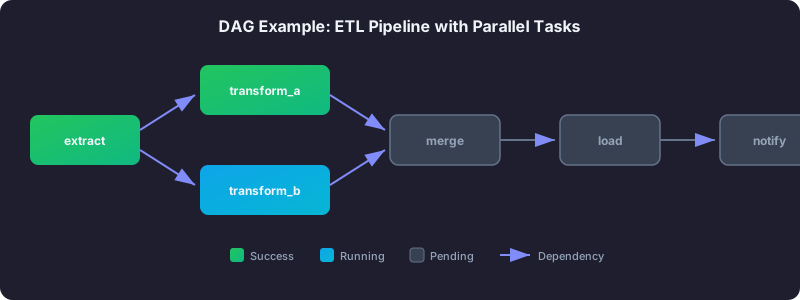
  extract_data
       |
       v
  transform_data
       |
       v
   load_data
This is the classic Extract-Transform-Load (ETL) pattern. First you pull data from a source system, then you clean and reshape it, then you load it into its destination. Each step depends on the previous one completing successfully.
Here is how you would express that same workflow in Python. Before you look at the code, understand what it is doing at a high level: it creates three tasks (extract, transform, load), wraps them in a DAG that runs daily, and then chains them together so they execute in sequence.
from datetime import datetime
from airflow import DAG
from airflow.operators.python import PythonOperator

def extract():
    print("Extracting data from source system")

def transform():
    print("Transforming raw data")

def load():
    print("Loading data into warehouse")

with DAG(
    dag_id="simple_etl_pipeline",
    start_date=datetime(2026, 1, 1),
    schedule="@daily",
    catchup=False,
) as dag:

    extract_task = PythonOperator(task_id="extract_data", python_callable=extract)
    transform_task = PythonOperator(task_id="transform_data", python_callable=transform)
    load_task = PythonOperator(task_id="load_data", python_callable=load)

    extract_task >> transform_task >> load_task
The >> operator at the bottom is how Airflow defines dependencies. Reading it left to right: extract runs first, then transform, then load. If extract fails, transform and load will not run at all. Airflow handles this automatically — you do not need to write any “check if the previous step succeeded” logic.
How Airflow Differs From Cron Jobs
If you have used cron before, you might be wondering: “Why not just use cron? It schedules things too.” That is a fair question, and the answer comes down to what happens when things go wrong — which, in data engineering, happens constantly.
Dependencies are the biggest difference. With cron, every job is an island. You schedule Job A at 2:00 AM and Job B at 2:30 AM, and you cross your fingers that A finishes in 30 minutes. With Airflow, you say “B depends on A,” and Airflow will not start B until A has actually succeeded. If A takes 5 minutes or 5 hours, B will wait.
Retry logic comes built-in. When a cron job fails, it just fails. You have to build your own retry mechanism, which usually means another cron job that checks the output of the first one. In Airflow, you specify retries=3 and retry_delay=timedelta(minutes=5), and Airflow handles the rest. It will try again three times, waiting five minutes between each attempt.
Visibility is night and day. With cron, figuring out what ran, when it ran, and whether it succeeded means digging through log files scattered across servers. Airflow gives you a web dashboard where you can see the status of every task in every pipeline, click into detailed logs, and view historical trends. You can see at a glance that your pipeline has been failing every Tuesday for the past month, which might lead you to discover that a source system runs maintenance on Tuesday nights.
Backfilling is a superpower. Suppose you deploy a new pipeline on January 10th, but you need to process data going back to January 1st. With cron, you write a bash script to loop through dates and run your job for each one. With Airflow, you set start_date=datetime(2026, 1, 1) and catchup=True, and Airflow automatically creates and runs a DAG run for each missed day.
Here is the comparison at a glance:
| Aspect | Cron | Airflow |
|---|---|---|
| Dependencies | None — each job is independent | Full dependency graph between tasks |
| Retry logic | Manual implementation required | Built-in with configurable retries and delays |
| Monitoring | Check logs manually | Web UI with real-time status and history |
| Backfilling | Manual scripting | Native support — run historical dates automatically |
| Scalability | Single machine | Distributed execution across multiple workers |
That said, cron still has its place. If you have a simple, standalone script that runs once a day and does not depend on anything else, cron is perfectly fine. Airflow shines when you have multiple interdependent tasks that need coordination, monitoring, and resilience.
The Airflow UI
One of Airflow’s most practical features is its web interface. When you first open it, you see a list of all your DAGs with their schedule, last run status, and a toggle to pause or unpause each one.
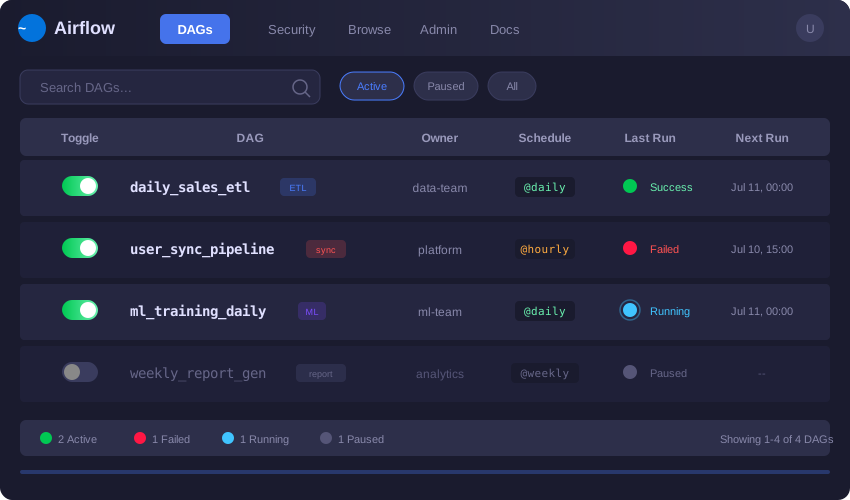
The Graph View is where most people spend their time. It shows your tasks as nodes connected by arrows representing dependencies. Each node is color-coded by status: dark green for success, red for failure, yellow for currently running, and pink for “upstream failed” (meaning this task was skipped because something it depends on failed). At a glance, you can see exactly where a pipeline broke.
The Grid View (called Tree View in older versions) shows a historical matrix. Each column is a DAG run, and each row is a task. This view is invaluable for spotting patterns — for example, you might notice that your “load” task consistently fails on the first of each month, which could point to a resource contention issue during month-end reporting.
Task Instance Details are available by clicking any task. You get full execution logs, the exact duration, rendered template values, and buttons to re-run just that one task, mark it as successful (if you have fixed the issue manually), or mark it as failed.
What Airflow Is NOT
Understanding what Airflow is not will save you from trying to force it into roles it was never designed for.
Airflow is not a streaming tool. It is designed for batch workflows that run on a schedule — every hour, every day, every week. If you need to process events in real time as they arrive (like processing credit card transactions as they happen), you need a streaming tool like Apache Kafka or Apache Flink. Think of it this way: Airflow is like a mail carrier who delivers mail once a day on a schedule, while streaming tools are like a phone call that delivers messages instantly.
Airflow is not a data processing framework. This is a subtle but important distinction. Airflow does not crunch numbers or transform data itself. Instead, it tells other systems to do the work. It tells Spark to run a job, it tells dbt to build models, it triggers a BigQuery query. The actual heavy lifting happens in those external systems. Airflow’s job is coordination, not computation.
Airflow is not designed for sub-minute scheduling. The scheduler typically operates on a one-minute cycle. If you need something to run every 10 seconds, Airflow is the wrong tool.
Common Use Cases
ETL and ELT Pipelines
This is the bread and butter of Airflow. Extract data from source systems (APIs, databases, files), transform it (clean, aggregate, join), and load it into a data warehouse. Nearly every company with a data warehouse uses some form of this pattern, and Airflow is the most popular tool for orchestrating it.
Machine Learning Pipelines
ML workflows are a natural fit for Airflow because they have clear sequential steps: fetch training data, engineer features, train the model, evaluate performance, and deploy if the metrics look good. Each step depends on the previous one, and you often want automatic retries and notifications if training fails.
Report Generation and Distribution
Schedule daily or weekly reports that aggregate data, generate visualizations, and send them via email or Slack. Airflow can handle the entire chain from data preparation to delivery.
Infrastructure Management
Trigger infrastructure tasks like database backups, log rotation, or resource scaling based on schedules or conditions. Some teams even use Airflow to orchestrate their CI/CD deployments.
Key Terminology
Before moving on to the architecture and deeper topics, here are the terms you will encounter constantly:
| Term | Definition |
|---|---|
| DAG | A collection of tasks with defined dependencies — your workflow blueprint |
| Task | A single unit of work within a DAG |
| Operator | A template for a task (PythonOperator, BashOperator, etc.) |
| Task Instance | A specific run of a task for a given execution date |
| DAG Run | A specific execution of an entire DAG |
| Execution Date | The logical date a DAG run represents (not when it actually runs) |
| Scheduler | The component that triggers DAG runs and submits tasks |
| Executor | Determines how tasks are actually run (locally, on Celery, on Kubernetes) |
| XCom | Mechanism for tasks to share small amounts of data |
| Connection | Stored credentials for external systems |
The “Execution Date” concept trips up almost every beginner. A DAG run with an execution date of January 15th and a daily schedule actually runs on January 16th. The execution date represents the start of the data interval being processed, not when the processing happens. This design ensures that all data for January 15th exists before the pipeline tries to process it.
Next Steps
Now that you understand what Airflow is, why it exists, and what problems it solves, the next step is to understand how its internal components work together:
- Airflow Architecture Explained — Learn about the Scheduler, Web Server, Executor, and how they interact.
- DAGs Explained in Depth — Deep dive into writing DAGs, scheduling, and task dependencies.
Related articles
- Airflow Data-Aware Scheduling in Airflow with Datasets
Replace sensor-based waiting with Airflow Datasets. Build producer-consumer DAGs, combine time and data triggers, and design dataset URIs for production.
- Airflow Real-World Airflow Patterns for Production Pipelines
Idempotent pipelines, backfilling, late data handling, error patterns, multi-environment setups, and common anti-patterns to avoid in Airflow.
- Airflow Airflow DAGs Explained: Structure, Scheduling, and Dependencies
Master Airflow DAGs -- learn the anatomy of a DAG file, scheduling with cron and presets, defining task dependencies, fan-out patterns, and task lifecycle states.
- Airflow Installing Apache Airflow: pip and Docker Compose Methods
Step-by-step guide to installing Apache Airflow using pip with constraints or Docker Compose, creating an admin user, and verifying your setup works correctly.