Networking Fundamentals for System Design Interviews
Understand the networking stack from TCP/IP to HTTP/3. Learn DNS resolution, the TLS handshake, WebSockets vs SSE, and how CDNs reduce latency — all through practical analogies.
What you'll learn
- ✓Map the OSI and TCP/IP models to real-world postal system analogies
- ✓Compare TCP and UDP and know when to use each
- ✓Trace the evolution from HTTP/1.1 to HTTP/2 to HTTP/3 (QUIC)
- ✓Walk through DNS resolution step by step
- ✓Choose between WebSockets, Server-Sent Events, and Long Polling
- ✓Explain how CDNs reduce latency for global users
Prerequisites
- •Basic understanding of how the internet works at a high level
Every system design discussion eventually comes down to how machines talk to each other over a network. Understanding the networking stack — even at a conceptual level — lets you reason about latency, reliability, and the trade-offs behind protocol choices. This article covers the fundamentals you will need.
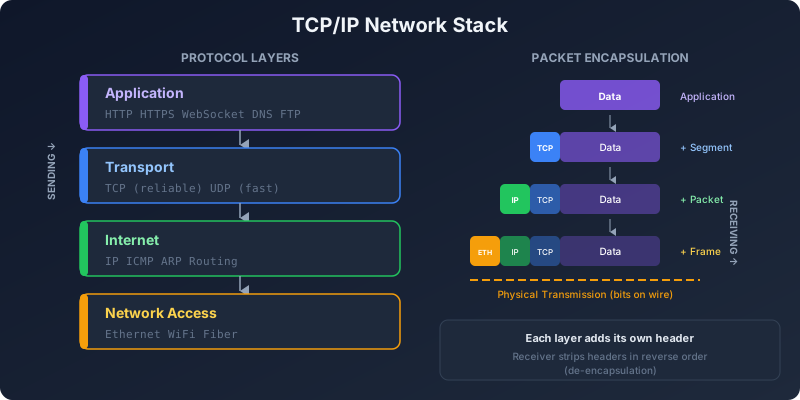
The Network Stack: A Postal System Analogy
Think of sending a letter internationally. Multiple layers of abstraction handle different concerns:
- Application layer: You write the letter content. (HTTP, DNS, SMTP)
- Transport layer: You choose between registered mail (TCP — reliable, tracked) or a postcard (UDP — fast, no tracking).
- Network layer: The postal system routes the letter through sorting facilities across countries. (IP addressing, routing)
- Data link and physical layers: The actual trucks, planes, and conveyor belts that move the physical letter. (Ethernet, WiFi, fiber optics)
The OSI model has seven layers; the TCP/IP model condenses this into four. For system design, the four-layer model is what matters:
┌─────────────────────────────────┐
│  Application    (HTTP, DNS, gRPC)│
├─────────────────────────────────┤
│  Transport      (TCP, UDP)       │
├─────────────────────────────────┤
│  Internet       (IP, ICMP)       │
├─────────────────────────────────┤
│  Network Access (Ethernet, WiFi) │
└─────────────────────────────────┘
Each layer only talks to its immediate neighbors. HTTP does not care whether the physical medium is fiber or copper. TCP does not care whether you are sending a web page or a database query. This separation of concerns is what makes the internet work.
TCP vs UDP: Reliability vs Speed
TCP (Transmission Control Protocol) guarantees that data arrives completely, in order, and without errors. It does this through a three-way handshake, sequence numbers, acknowledgments, and retransmissions.
TCP Three-Way Handshake:
Client ──SYN──────────────▶ Server    "I want to connect"
Client ◀──SYN-ACK──────── Server    "OK, I acknowledge"
Client ──ACK──────────────▶ Server    "Great, let's talk"
       ◀═══ connection established ═══▶
The cost is latency. Before sending any data, you spend one round trip on the handshake. Then every packet needs acknowledgment, and lost packets cause the sender to wait and retransmit.
UDP (User Datagram Protocol) skips all of that. It sends packets (called datagrams) without establishing a connection, without tracking order, and without retransmitting lost packets. It is “fire and forget.”
UDP:
Client ──data──────────────▶ Server    "Here's some data"
Client ──data──────────────▶ Server    "Here's more data"
Client ──data──────────────▶ Server    "And more"
        (no handshake, no acknowledgment)
When to use TCP: Web pages, API calls, file transfers, emails — anything where losing data is unacceptable. HTTP runs on TCP (until HTTP/3).
When to use UDP: Live video streaming, online gaming, VoIP, DNS queries — anywhere low latency matters more than perfect delivery. If a video frame is lost, showing the next frame is better than waiting for a retransmission.
HTTP Evolution: 1.1 to 2 to 3
HTTP/1.1: One Request at a Time (Per Connection)
HTTP/1.1, released in 1997, sends requests and responses as plain text, one at a time per connection. To load a web page with 50 resources (images, scripts, stylesheets), the browser either waits for each response before sending the next request or opens multiple TCP connections in parallel (browsers typically allow six per domain).
The main problem is head-of-line blocking: if the first request on a connection is slow, all subsequent requests on that connection wait behind it.
HTTP/2: Multiplexing Over a Single Connection
HTTP/2, standardized in 2015, solves head-of-line blocking at the HTTP level by multiplexing many requests over a single TCP connection. Requests and responses are broken into binary frames, and frames from different requests are interleaved on the same connection.
HTTP/1.1:                  HTTP/2:
Conn 1: [Req1]───[Res1]   Single Conn: [F1a][F2a][F1b][F3a][F2b]...
Conn 2: [Req2]───[Res2]   (frames from requests 1, 2, 3 interleaved)
Conn 3: [Req3]───[Res3]
Other HTTP/2 improvements:
- Header compression (HPACK): HTTP headers are surprisingly large and repetitive. HPACK compresses them, reducing bandwidth.
- Server push: The server can proactively send resources it knows the client will need (though this feature saw limited adoption and is being reconsidered).
- Binary framing: More efficient to parse than text.
But HTTP/2 still runs on TCP, and TCP has its own head-of-line blocking problem: if a single TCP packet is lost, the entire connection stalls while that packet is retransmitted — even if the lost packet belongs to a different HTTP request.
HTTP/3: QUIC and the Move to UDP
HTTP/3 solves TCP’s head-of-line blocking by abandoning TCP entirely and running on QUIC, a protocol built on UDP. QUIC provides its own reliability and ordering per stream, so a lost packet in one stream does not block other streams.
HTTP/2 over TCP:
  Stream 1: [data] [data] [LOST] ← entire connection waits
  Stream 2: [data] [blocked...]
  Stream 3: [data] [blocked...]

HTTP/3 over QUIC:
  Stream 1: [data] [data] [LOST] ← only stream 1 waits
  Stream 2: [data] [data] [data] ← continues normally
  Stream 3: [data] [data] [data] ← continues normally
QUIC also integrates the TLS handshake into the connection setup, reducing the initial connection to a single round trip (compared to TCP’s three-way handshake plus TLS handshake). For returning connections, QUIC supports zero-round-trip resumption (0-RTT).
Google, Cloudflare, and most major CDNs now support HTTP/3. For system design, the key takeaway is: HTTP/3 improves performance on unreliable networks (mobile, WiFi) because it handles packet loss more gracefully.
DNS: What Happens When You Type google.com
The Domain Name System translates human-readable domain names into IP addresses. Here is the full resolution process:
1. Browser cache     → "Do I already know this?"
2. OS cache          → "Does the operating system know?"
3. Resolver (ISP)    → "Ask the ISP's recursive resolver"
4. Root nameserver   → "Who handles .com?"
5. TLD nameserver    → "Who handles google.com?"
6. Authoritative NS  → "google.com is 142.250.80.46"
Each level caches the result. The TTL (Time To Live) on each DNS record controls how long caches keep it. A low TTL (like 60 seconds) means changes propagate quickly but increase DNS query load. A high TTL (like 86400 seconds / one day) reduces load but means changes take a long time to reach all users.
In system design, DNS is often the first layer of load balancing. Services like Route 53 (AWS) and Cloud DNS (Google) support:
- Weighted routing: Send 80% of traffic to the primary and 20% to the canary deployment.
- Latency-based routing: Send users to the nearest data center.
- Health-check-based failover: Automatically remove unhealthy endpoints from DNS responses.
TLS/SSL: How HTTPS Works
TLS (Transport Layer Security) encrypts the communication between client and server. The handshake establishes a shared secret without ever sending that secret over the network.
TLS 1.3 Handshake (simplified):
Client ──ClientHello────────────▶ Server
         (supported ciphers,
          client's public key)

Client ◀──ServerHello──────────── Server
         (chosen cipher,
          server's public key,
          certificate)

Client verifies certificate against trusted CAs
Client and server independently compute shared secret
from each other's public keys (Diffie-Hellman)

Client ──Finished──────────────▶ Server
         (encrypted with shared secret)

◀══════ encrypted communication ══════▶
Key concepts for system design:
- Certificate authority (CA): A trusted third party that vouches for the server’s identity. Let’s Encrypt provides free certificates.
- TLS termination: In production, a load balancer or reverse proxy often handles TLS, decrypting traffic before forwarding it to backend servers. This offloads CPU-intensive encryption from application servers.
- mTLS (mutual TLS): Both client and server present certificates. Common in service-to-service communication within microservices to verify identity without API keys.
Real-Time Communication Patterns
Not all communication fits the request-response model. When the server needs to push updates to the client, you have three main options.
Long Polling
The client sends a request, and the server holds the connection open until it has new data or a timeout occurs. The client immediately sends another request when it gets a response.
Client ──request───────────▶ Server
                              (holds connection open...)
                              (waits for new data...)
Client ◀──response─────────── Server  (new data available!)
Client ──request───────────▶ Server   (immediately reconnects)
Pros: Works everywhere, no special protocol support needed. Cons: High overhead from repeated HTTP connections. Each “hold” ties up a server connection.
Server-Sent Events (SSE)
The server keeps a single HTTP connection open and pushes text-based events to the client as they occur. It is unidirectional — server to client only.
// Server (Node.js)
app.get('/events', (req, res) => {
  res.setHeader('Content-Type', 'text/event-stream');
  res.setHeader('Cache-Control', 'no-cache');

  const interval = setInterval(() => {
    res.write(`data: ${JSON.stringify({ time: Date.now() })}\n\n`);
  }, 1000);

  req.on('close', () => clearInterval(interval));
});

// Client (Browser)
const source = new EventSource('/events');
source.onmessage = (event) => {
  console.log(JSON.parse(event.data));
};
Pros: Simple, automatic reconnection built into the browser API, works over HTTP. Cons: Unidirectional. Limited to text data (no binary). Some proxies buffer the response.
WebSockets
WebSockets upgrade an HTTP connection to a full-duplex, bidirectional channel. Both client and server can send messages at any time.
// Server (Node.js with ws)
const wss = new WebSocket.Server({ port: 8080 });
wss.on('connection', (ws) => {
  ws.on('message', (msg) => {
    // Echo back + broadcast to all clients
    wss.clients.forEach(client => client.send(msg));
  });
});

// Client (Browser)
const ws = new WebSocket('wss://example.com/chat');
ws.onmessage = (event) => console.log(event.data);
ws.send('Hello, server!');
Pros: True bidirectional communication. Low overhead per message after handshake. Supports binary data. Cons: Stateful connections are harder to load balance. Requires WebSocket-aware infrastructure (proxies, load balancers).
When to use which:
- Long polling: Legacy systems or when you need broad compatibility.
- SSE: Dashboard updates, notifications, live feeds — server-to-client only.
- WebSockets: Chat applications, collaborative editing, multiplayer games — bidirectional, low-latency.
CDNs: Caching at the Edge
A Content Delivery Network (CDN) is a globally distributed network of servers that cache content close to users. Instead of every request traveling to your origin server in Virginia, static assets are served from the nearest CDN edge node — which might be in Mumbai, Tokyo, or Sao Paulo.
Without CDN:
User (Tokyo) ──800ms──▶ Origin (Virginia) ──800ms──▶ User (Tokyo)
Round trip: ~1600ms

With CDN:
User (Tokyo) ──20ms──▶ CDN Edge (Tokyo) ──20ms──▶ User (Tokyo)
Round trip: ~40ms (cache hit)
CDNs handle more than static files. Modern CDNs like Cloudflare and Fastly support:
- Dynamic content caching with short TTLs and cache invalidation APIs
- Edge compute that runs application logic at the edge (Cloudflare Workers, Fastly Compute)
- DDoS mitigation by absorbing attack traffic across the distributed network
- TLS termination at the edge, reducing the latency of the TLS handshake
For system design, CDNs are often the single biggest latency improvement you can make. Serving a cached response from an edge node 20ms away is always faster than computing a response on an origin server 200ms away — no matter how fast your backend is.
Cache Invalidation at the Edge
The hardest part of CDN caching is knowing when to invalidate. Common strategies:
- TTL-based: Set a cache lifetime (e.g., 5 minutes). Simple but means users might see stale content for up to 5 minutes.
- Purge-on-deploy: Invalidate all cached content when you deploy a new version. Works well for versioned assets.
- Surrogate keys / cache tags: Tag cached responses with keys, then purge all responses with a specific tag. For example, purge everything tagged “product:123” when that product changes.
Wrapping Up
Networking is the foundation that every distributed system is built on. TCP gives you reliability at the cost of latency, UDP gives you speed at the cost of guarantees, and protocols like QUIC try to get the best of both. DNS turns names into addresses, TLS secures the channel, and CDNs bring content closer to users.
You do not need to memorize packet formats for system design interviews. But understanding these trade-offs — why HTTP/2 multiplexes, why WebSockets exist, why CDNs matter — lets you make informed architectural decisions rather than cargo-culting patterns you have seen in blog posts.
Related articles
- System Design System Design: Design a DNS System
Design a scalable Domain Name System. Covers recursive and authoritative resolution, zone file management, caching, anycast deployment, and handling billions of lookups daily.
- System Design System Design: Design a Content Delivery Network
Design a CDN that serves static and dynamic content from edge locations worldwide. Covers caching tiers, cache invalidation, origin shielding, and anycast routing.
- Python Python Socket Programming: Build a TCP Server and Client
Learn Python socket programming from scratch. Build TCP and UDP servers and clients, handle multiple connections, and implement a simple chat application.
- AWS AWS Route 53 Routing Policies Explained
Understand simple, weighted, latency, failover, geolocation, and multivalue routing policies in Amazon Route 53 with real examples.