Kafka Connect: Streaming Data Integration Framework
Master Kafka Connect for integrating external systems with Kafka using source and sink connectors, Debezium CDC, JDBC, Elasticsearch, REST API management, and SMTs.
What you'll learn
- ✓What Kafka Connect is and how it fits in the Kafka ecosystem
- ✓Source connectors vs sink connectors
- ✓Setting up JDBC, Debezium, and Elasticsearch connectors
- ✓Managing connectors via the REST API
- ✓Single Message Transforms for in-flight data manipulation
Prerequisites
- •Basic Kafka concepts (topics, partitions, brokers)
- •Familiarity with databases (MySQL, PostgreSQL)
- •Docker for running Connect in distributed mode
The Problem: Integration Code is Tedious and Error-Prone
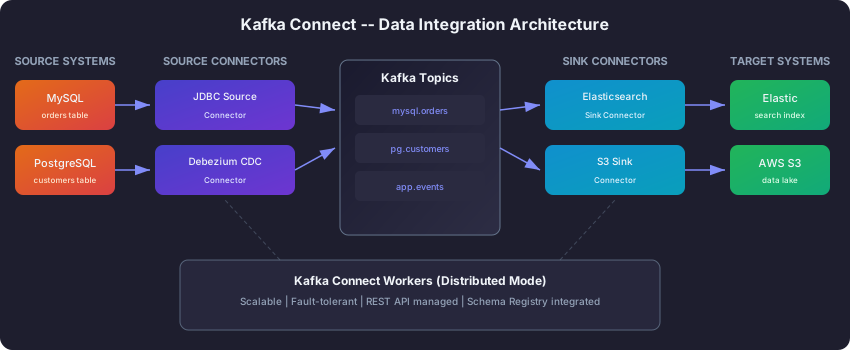
Every data platform eventually faces the same challenge: you need to get data into Kafka from a dozen different sources, and back out of Kafka to another dozen destinations. Your MySQL database needs to feed into Kafka. Your Kafka topics need to flow into Elasticsearch for search. Your event streams need to land in S3 for archival. And every one of these integrations needs to handle failures, track offsets, manage schemas, and scale horizontally.
You could write a custom Kafka producer for each source and a custom consumer for each destination. Many teams start this way. But by the time you have written your fifth custom integration, you realize the pattern is always the same: poll the source for changes, serialize the data, produce to Kafka, handle errors, track what you have already read. The business logic is different, but the plumbing is identical. You have written the same infrastructure code five times, and each copy has its own bugs.
Kafka Connect solves this by extracting the common plumbing into a reusable framework. You do not write producers or consumers at all. Instead, you configure pre-built connectors that handle all the integration mechanics. The Kafka Connect ecosystem has hundreds of connectors available for databases, message queues, cloud storage, search engines, and more. You describe what you want in a JSON configuration file, and Connect does the rest.
Source Connectors vs Sink Connectors: Intake and Output Pipes
Think of Kafka as a large water treatment plant. Water needs to flow in from various sources (rivers, reservoirs, wells), get processed, and then flow out to various destinations (homes, factories, farms). Source connectors are the intake pipes that bring data into Kafka. Sink connectors are the output pipes that deliver data from Kafka to external systems.
Source connectors read data from an external system and write it to Kafka topics. When a new row appears in your MySQL orders table, a JDBC source connector detects it and publishes it to a Kafka topic. When a change occurs in your PostgreSQL database, a Debezium CDC source connector captures it from the database’s transaction log and sends it to Kafka. The external system is the source, and Kafka is the destination.
Sink connectors do the reverse. They read data from Kafka topics and write it to an external system. An Elasticsearch sink connector reads from your product catalog topic and indexes each record in Elasticsearch for search. An S3 sink connector reads from your event stream topic and writes Parquet files to S3 for long-term storage. Kafka is the source, and the external system is the destination.
The beauty of this architecture is that source and sink connectors are completely independent. You can add a new sink connector without touching any source connector, and vice versa. Your MySQL data flows into Kafka via a source connector, and from there it can simultaneously flow to Elasticsearch, S3, and a data warehouse via three separate sink connectors — all without modifying the original source configuration.
Debezium CDC: Watching for Changes in Your Database
One of the most powerful source connectors is Debezium, which implements Change Data Capture (CDC). To understand why CDC matters, consider the two ways you can get data out of a database and into Kafka.
The first approach is polling: run a query against the database every few seconds to check for new or updated rows. This works, but it has problems. Frequent polling puts load on the database. There is always a delay between when a row changes and when the next poll picks it up. And detecting deleted rows is tricky because, well, they are gone.
The second approach is CDC: instead of asking the database “what changed?”, you watch the database’s own internal change log. Every relational database maintains a transaction log (called WAL in PostgreSQL, binlog in MySQL) that records every INSERT, UPDATE, and DELETE as it happens. Debezium reads this log and converts each change into a Kafka message in real time. No polling, no database load from queries, and deletes are captured just as easily as inserts.
Think of it like the difference between periodically checking your mailbox to see if new mail arrived versus having a security camera that notifies you the instant the mail carrier opens the mailbox door. CDC gives you the security camera.
Each change event that Debezium produces contains the complete picture: the state of the row before the change, the state after the change, which operation occurred (insert, update, or delete), and metadata about where in the transaction log this change came from. This rich structure allows consumers to react precisely to what changed.
Here is a Debezium connector configuration for capturing changes from a PostgreSQL database:
{
  "name": "postgres-cdc-source",
  "config": {
    "connector.class": "io.debezium.connector.postgresql.PostgresConnector",
    "database.hostname": "postgres-host",
    "database.port": "5432",
    "database.user": "debezium",
    "database.password": "${file:/opt/secrets/pg.properties:password}",
    "database.dbname": "ecommerce",
    "topic.prefix": "cdc.ecommerce",
    "table.include.list": "public.customers,public.orders,public.products",
    "plugin.name": "pgoutput",
    "slot.name": "debezium_slot",
    "snapshot.mode": "initial",
    "tasks.max": 1
  }
}
Let us walk through what each setting does. The connector.class tells Connect which connector plugin to use. The database.* settings tell Debezium how to connect to PostgreSQL. The topic.prefix determines how output topics are named — a change in the public.customers table would be published to a topic called cdc.ecommerce.public.customers. The table.include.list specifies which tables to watch. The plugin.name tells Debezium which PostgreSQL logical decoding plugin to use. And snapshot.mode: initial means that when the connector starts for the first time, it takes a complete snapshot of the current table data before switching to streaming mode for ongoing changes.
Notice the ${file:/opt/secrets/pg.properties:password} syntax for the password. This is Connect’s externalized secret mechanism. Never put passwords directly in connector configurations — always reference them from a secure file or a secrets manager.
Elasticsearch Sink Connector: Making Kafka Data Searchable
On the other side of the pipeline, sink connectors deliver data from Kafka to external systems. The Elasticsearch sink connector is one of the most commonly used. It reads records from Kafka topics and indexes them in Elasticsearch, making your streaming data instantly searchable.
Here is a well-explained configuration:
{
  "name": "elasticsearch-sink",
  "config": {
    "connector.class": "io.confluent.connect.elasticsearch.ElasticsearchSinkConnector",
    "connection.url": "http://elasticsearch:9200",
    "topics": "cdc.ecommerce.public.customers,cdc.ecommerce.public.products",
    "tasks.max": 3,
    "write.method": "upsert",
    "batch.size": 200,
    "max.retries": 5,
    "retry.backoff.ms": 1000,
    "behavior.on.null.values": "delete",
    "transforms": "extractAfter",
    "transforms.extractAfter.type":
      "org.apache.kafka.connect.transforms.ExtractField$Value",
    "transforms.extractAfter.field": "after"
  }
}
The write.method: upsert setting is important. It tells the connector to insert new records and update existing ones, matching by the Kafka record key. This means when a customer updates their profile, the Elasticsearch document is updated in place rather than creating a duplicate. The behavior.on.null.values: delete setting handles Kafka tombstones (records with a null value, produced by Debezium when a row is deleted) by deleting the corresponding Elasticsearch document. Together, these two settings keep Elasticsearch perfectly in sync with the source database.
The batch.size of 200 means the connector accumulates up to 200 records before flushing them to Elasticsearch in a single bulk request. This is much more efficient than writing one document at a time. The tasks.max: 3 setting runs three parallel tasks, each responsible for a subset of partitions, for higher throughput.
The transforms section applies a Single Message Transform (explained below) that extracts just the after field from Debezium’s change event structure. Without this, Elasticsearch would index the entire change event envelope (with before, after, source, and op fields) rather than just the current state of the row.
Managing Connectors via the REST API
Kafka Connect exposes a REST API on port 8083 that lets you create, monitor, update, pause, resume, and delete connectors without restarting anything. Think of it as a remote control for your data pipelines.
This is one of the biggest operational advantages of Kafka Connect over custom integration code. Instead of redeploying applications to change a configuration, you send an HTTP request. Instead of SSH-ing into servers to check if a pipeline is running, you query the status endpoint. You can even automate monitoring by scripting health checks against the API.
Here are the essential operations:
Deploy a new connector by POSTing its configuration:
curl -X POST http://localhost:8083/connectors \
  -H "Content-Type: application/json" \
  -d @postgres-cdc-source.json
Check the status of a running connector and all its tasks:
curl -s http://localhost:8083/connectors/postgres-cdc-source/status | jq .This returns the state of the connector (RUNNING, PAUSED, or FAILED) and the state of each individual task. If a task has failed, the response includes a stack trace telling you why — invaluable for debugging.
Pause and resume a connector without deleting it. Pausing stops all tasks but preserves the connector’s configuration and offset tracking. When you resume, it picks up exactly where it left off:
# Pause -- stops reading/writing but remembers its position
curl -X PUT http://localhost:8083/connectors/postgres-cdc-source/pause

# Resume -- picks up right where it left off
curl -X PUT http://localhost:8083/connectors/postgres-cdc-source/resume
Restart a failed task without restarting the entire connector:
curl -X POST http://localhost:8083/connectors/postgres-cdc-source/tasks/0/restartDelete a connector when you no longer need it:
curl -X DELETE http://localhost:8083/connectors/postgres-cdc-sourceIn production, teams typically build a simple monitoring script that polls the status endpoint for all connectors and alerts when any connector or task is in a FAILED state. Many also integrate this with their existing monitoring tools (Prometheus, Datadog, PagerDuty) for automated alerting.
Single Message Transforms (SMTs): Lightweight Data Manipulation
Sometimes the data that comes from a source connector is not quite in the shape you need for the sink. Maybe you want to add a timestamp field, mask sensitive data before it reaches the output, rename a field, or route records to different topics based on a field value. You could build a Kafka Streams application to do this, but that is overkill for simple transformations.
Single Message Transforms (SMTs) are lightweight functions that modify each record as it passes through a connector. They are configured directly in the connector’s JSON configuration — no code, no separate application. Each SMT performs one small, focused operation, and you can chain multiple SMTs together for more complex transformations.
The most commonly used built-in SMTs include:
- InsertField — Add metadata fields like the Kafka ingest timestamp or the source topic name to each record.
- MaskField — Replace sensitive fields (SSN, credit card numbers, phone numbers) with a redacted placeholder before the data reaches its destination.
- ExtractField — Pull a single field out of a nested structure. We used this in the Elasticsearch example above to extract just the
afterfield from Debezium events. - TimestampRouter — Route records to different topics based on their timestamp. Useful for creating time-partitioned topics like
orders-20260710,orders-20260711, etc.
SMTs are applied in the order they are listed, so you can chain them like a pipeline: first unwrap the Debezium envelope, then add metadata, then mask PII, then route by date.
Running Connect in Production
For production deployments, always run Kafka Connect in distributed mode. In this mode, multiple Connect worker processes form a cluster, sharing connector tasks for scalability and fault tolerance. If one worker crashes, its tasks are automatically redistributed to the surviving workers.
Connect stores its own state (connector configurations, offset tracking, task status) in internal Kafka topics. This means a crashed worker can be replaced with a new one that automatically picks up the lost state from these topics. There is nothing to back up, no external database to maintain — Connect is self-healing by design.
A few best practices for production deployments:
- Set the replication factor to 3 for internal topics (configs, offsets, status) to prevent data loss if a broker fails.
- Use externalized secrets for all passwords and API keys. Never put credentials directly in connector JSON files.
- Start with
tasks.max=1for new connectors and increase only after you have validated correctness. - Monitor connector and task status using the REST API, and set up automated alerts for FAILED states.
- Use Avro with Schema Registry for type safety and schema evolution across your data pipelines.
Summary
Kafka Connect eliminates the tedious and error-prone work of writing custom integration code for every data source and destination. Instead of building and maintaining producers and consumers for each system, you configure pre-built connectors that handle offset tracking, failure recovery, and scaling automatically. The key concepts to remember are:
- Source connectors bring data into Kafka. Sink connectors deliver data from Kafka to external systems.
- Debezium CDC captures database changes in real time by reading the database’s own transaction log, avoiding the downsides of polling.
- The REST API is your remote control for creating, monitoring, pausing, and deleting connectors without restarting anything.
- SMTs provide lightweight, code-free data transformations for tasks like masking PII, adding metadata, or extracting nested fields.
Next Steps
- Learn about schema management in Schema Registry and Avro
- Explore stream processing with Kafka Streams
Related articles
- Kafka Building Data Pipelines with Apache Kafka
Build production-grade data pipelines using Kafka Connect, Debezium CDC, sink connectors, schema evolution, and dead letter queues for robust error handling.
- Kafka Kafka Architecture Explained: Brokers, Replication, and KRaft
A detailed look at Kafka's internal architecture — broker clusters, KRaft consensus, replication protocols, partition leadership, log segments, and how they combine to deliver fault tolerance at scale.
- Kafka Kafka Consumers and Consumer Groups: Complete Guide
Master Kafka consumers and consumer groups including poll loops, offset management, rebalancing strategies, and partition assignment with Python and Java examples.
- Kafka Kafka Producers Explained: Architecture, Configuration & Code
Learn how Kafka producers work including batching, partitioning, serialization, delivery guarantees, and idempotent production with Python and Java examples.