Real-World Applications of Stacks and Queues — From Undo/Redo to BFS Crawlers
Real-world applications of stacks and queues: undo/redo systems, browser history, call stacks, task scheduling, message queues, and BFS web crawlers with Python examples.
What you'll learn
- ✓How undo/redo systems use two stacks
- ✓Browser back/forward navigation with stacks
- ✓How programming language call stacks work
- ✓Task scheduling and message queues in production systems
- ✓BFS-based web crawlers and social network features
- ✓When to choose a stack vs a queue in system design
Prerequisites
- •Stack basics — see Stacks Intro
- •Queue basics — see Queues Intro
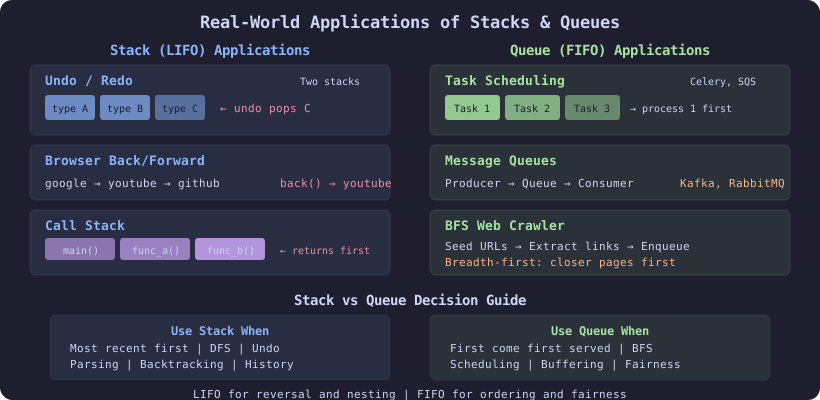
Stacks and queues are not just interview topics — they power systems you use every day. This article explores six real-world applications with working Python implementations that show how these data structures solve actual engineering problems.
1. Undo/Redo — Two-Stack Pattern
Every text editor, design tool, and IDE implements undo/redo. The pattern is elegant: two stacks.
- Undo stack: each action is pushed here when performed
- Redo stack: when you undo, the action moves here; when you redo, it moves back
class UndoRedoEditor:
    """Text editor with undo/redo using two stacks."""

    def __init__(self):
        self.text = ""
        self.undo_stack = []
        self.redo_stack = []

    def type_text(self, chars):
        self.undo_stack.append(self.text)
        self.redo_stack.clear()  # new action clears redo
        self.text += chars

    def delete_last(self, n):
        self.undo_stack.append(self.text)
        self.redo_stack.clear()
        self.text = self.text[:-n] if n <= len(self.text) else ""

    def undo(self):
        if self.undo_stack:
            self.redo_stack.append(self.text)
            self.text = self.undo_stack.pop()

    def redo(self):
        if self.redo_stack:
            self.undo_stack.append(self.text)
            self.text = self.redo_stack.pop()
editor = UndoRedoEditor()
editor.type_text("Hello") # text = "Hello"
editor.type_text(" World") # text = "Hello World"
editor.undo() # text = "Hello"
editor.undo() # text = ""
editor.redo() # text = "Hello"Why stacks? Undo naturally follows LIFO — you undo the most recent action first. Two stacks handle the back-and-forth without losing history.
2. Browser History — Stack Navigation
Your browser’s back and forward buttons work exactly like the undo/redo pattern:
class BrowserHistory:
    """Browser back/forward navigation."""

    def __init__(self, homepage):
        self.back_stack = [homepage]
        self.forward_stack = []

    def visit(self, url):
        """Navigate to a new page."""
        self.back_stack.append(url)
        self.forward_stack.clear()

    def back(self, steps=1):
        """Go back up to `steps` pages."""
        for _ in range(steps):
            if len(self.back_stack) > 1:
                self.forward_stack.append(self.back_stack.pop())
        return self.back_stack[-1]

    def forward(self, steps=1):
        """Go forward up to `steps` pages."""
        for _ in range(steps):
            if self.forward_stack:
                self.back_stack.append(self.forward_stack.pop())
        return self.back_stack[-1]
browser = BrowserHistory("google.com")
browser.visit("youtube.com")
browser.visit("github.com")
browser.back(1) # → "youtube.com"
browser.back(1) # → "google.com"
browser.forward(1) # → "youtube.com"
browser.visit("reddit.com") # forward_stack cleared
browser.forward(1) # → "reddit.com" (no forward)3. The Call Stack — How Functions Execute
Every programming language uses a call stack to manage function execution. When a function is called, a stack frame (containing local variables, return address, and parameters) is pushed. When it returns, the frame is popped.
import traceback

def function_a():
    function_b()

def function_b():
    function_c()

def function_c():
    # Print the current call stack
    for line in traceback.format_stack():
        print(line.strip())

function_a()
# Output shows the call stack:
#   function_a() → function_b() → function_c()
Stack overflow happens when recursion goes too deep, exceeding the call stack limit:
import sys
print(f"Default recursion limit: {sys.getrecursionlimit()}")
# Typically 1000

def infinite_recursion(n):
    return infinite_recursion(n + 1)

# infinite_recursion(0)  # RecursionError: maximum recursion depth exceeded
This is why converting deep recursion to iterative solutions (using an explicit stack) is sometimes necessary:
# Recursive DFS (uses call stack)
def dfs_recursive(node, visited):
    visited.add(node)
    for neighbor in graph[node]:
        if neighbor not in visited:
            dfs_recursive(neighbor, visited)

# Iterative DFS (uses explicit stack)
def dfs_iterative(start, graph):
    visited = set()
    stack = [start]
    while stack:
        node = stack.pop()
        if node not in visited:
            visited.add(node)
            for neighbor in graph[node]:
                stack.append(neighbor)
4. Task Scheduling — Queue-Based Processing
Production systems use queues to decouple work submission from processing. Think of a print queue, a CI/CD pipeline, or a kitchen order system.
from collections import deque
from dataclasses import dataclass
from datetime import datetime

@dataclass
class Task:
    id: int
    name: str
    priority: str  # "high", "normal", "low"
    created_at: str

class TaskScheduler:
    """Simple task scheduler with priority queues."""

    def __init__(self):
        self.high = deque()
        self.normal = deque()
        self.low = deque()

    def submit(self, task):
        if task.priority == "high":
            self.high.append(task)
        elif task.priority == "normal":
            self.normal.append(task)
        else:
            self.low.append(task)

    def next_task(self):
        """Process highest priority task first (FIFO within priority)."""
        if self.high:
            return self.high.popleft()
        if self.normal:
            return self.normal.popleft()
        if self.low:
            return self.low.popleft()
        return None

    def pending_count(self):
        return len(self.high) + len(self.normal) + len(self.low)
Real-world examples:
- Celery (Python): distributed task queue backed by Redis/RabbitMQ
- AWS SQS: managed message queue service
- Kafka: distributed event streaming (queue semantics per partition)
5. Message Queues — Producer/Consumer Pattern
Message queues are the backbone of microservices architectures. Producers enqueue messages; consumers dequeue them. This decouples services and handles load spikes.
import threading
from collections import deque

class SimpleMessageQueue:
    """Thread-safe message queue with producer/consumer pattern."""

    def __init__(self, max_size=100):
        self.queue = deque(maxlen=max_size)
        self.lock = threading.Lock()

    def publish(self, message):
        with self.lock:
            self.queue.append(message)
            return True

    def consume(self):
        with self.lock:
            if self.queue:
                return self.queue.popleft()
            return None

    def peek(self):
        with self.lock:
            return self.queue[0] if self.queue else None
Why queues?
- Decoupling: producers and consumers run independently
- Buffering: absorb traffic spikes without dropping requests
- Ordering: FIFO ensures messages are processed in order
- Reliability: messages persist until acknowledged
| System | Type | Use Case |
|---|---|---|
| RabbitMQ | Message broker | Task distribution |
| Apache Kafka | Event streaming | Log aggregation, real-time |
| AWS SQS | Managed queue | Serverless workflows |
| Redis Lists | In-memory queue | Fast job queues |
6. BFS Web Crawler
Search engines like Google use BFS (queue-based) to crawl the web. Start from seed URLs, visit each page, extract links, and enqueue them.
from collections import deque

def bfs_crawler(seed_urls, max_pages=100):
    """
    BFS web crawler skeleton.
    In production, this would use async HTTP and respect robots.txt.
    """
    visited = set()
    queue = deque(seed_urls)
    pages_crawled = []

    while queue and len(pages_crawled) < max_pages:
        url = queue.popleft()

        if url in visited:
            continue
        visited.add(url)

        # In production: fetch page, parse HTML
        page_content = fetch_page(url)  # placeholder
        pages_crawled.append(url)

        # Extract and enqueue new links
        for link in extract_links(page_content):
            if link not in visited:
                queue.append(link)

    return pages_crawled

def fetch_page(url):
    """Placeholder for HTTP fetch."""
    return f"<html>content of {url}</html>"

def extract_links(html):
    """Placeholder for link extraction."""
    return []
Why BFS (queue) instead of DFS (stack)?
- BFS explores pages level by level — closer pages first
- This gives better coverage breadth before going deep into one site
- DFS would follow a single chain of links indefinitely
BFS is also used in social networks for “people you may know” (friends-of-friends) and shortest connection paths.
Stack vs Queue: When to Use Which
| Criterion | Stack (LIFO) | Queue (FIFO) |
|---|---|---|
| Processing order | Most recent first | Oldest first |
| Traversal | DFS (depth-first) | BFS (breadth-first) |
| History | Undo/redo, back/forward | Not applicable |
| Parsing | Expressions, brackets, XML | Not applicable |
| Scheduling | Not typical | Task queues, message queues |
| Fairness | No (recent items prioritized) | Yes (first come, first served) |
| Recursion | Call stack, iterative DFS | Level-order processing |
System Design Interview Applications
When designing systems, stacks and queues appear in specific roles:
| System Component | Data Structure | Purpose |
|---|---|---|
| Rate limiter | Queue (sliding window) | Track request timestamps |
| Task queue | Queue | Decouple and buffer work |
| Undo system | Two stacks | Reversible operations |
| Expression engine | Stack | Parse and evaluate formulas |
| Web crawler | Queue (BFS) | Breadth-first page discovery |
| Notification system | Queue | Ordered delivery |
| Function execution | Stack | Call frames |
| Backtracking solver | Stack | State management |
Key Takeaways
- Undo/redo uses two stacks — the most elegant application of LIFO
- Browser history is the same two-stack pattern applied to navigation
- Call stacks are why recursion works (and why stack overflow happens)
- Task schedulers use queues for fairness and decoupling
- Message queues power microservices architecture (RabbitMQ, Kafka, SQS)
- BFS crawlers use queues for breadth-first web exploration
- Choosing stack vs queue depends on whether you need LIFO or FIFO semantics
- These patterns appear constantly in system design interviews
Related articles
- DSA Implement Stack Using Two Queues — Two Approaches Explained
Implement a stack using two queues with costly push and costly pop approaches. Complete Python solutions with complexity analysis.
- DSA Implement Queue Using Two Stacks — Amortized O(1) Solution
Implement a queue using two stacks with amortized O(1) operations. Covers costly enqueue vs costly dequeue approaches with Python code.
- DSA Stacks & Queues: 8 Practice Problems with Solutions
Eight classic stack and queue interview problems with worked Python solutions — Valid Parentheses, Min Stack, Daily Temperatures, Sliding Window Maximum, and more.
- DSA BFS Pattern with Queues: Level-Order and Shortest Path
Master BFS using queues for tree level-order traversal and shortest path in unweighted graphs. Python implementations with detailed traces.